
















A Factorio server runs one world at a time. To run another save, open the World page, choose Run this from the next start on its row, and restart the server. The world you leave stays on the server as a save, so you can go back.
In the panel
- Open World.
- In the card Saves, find the save you want. Open the menu on its row, the one named More for and the save’s name.
- Choose Run this from the next start.
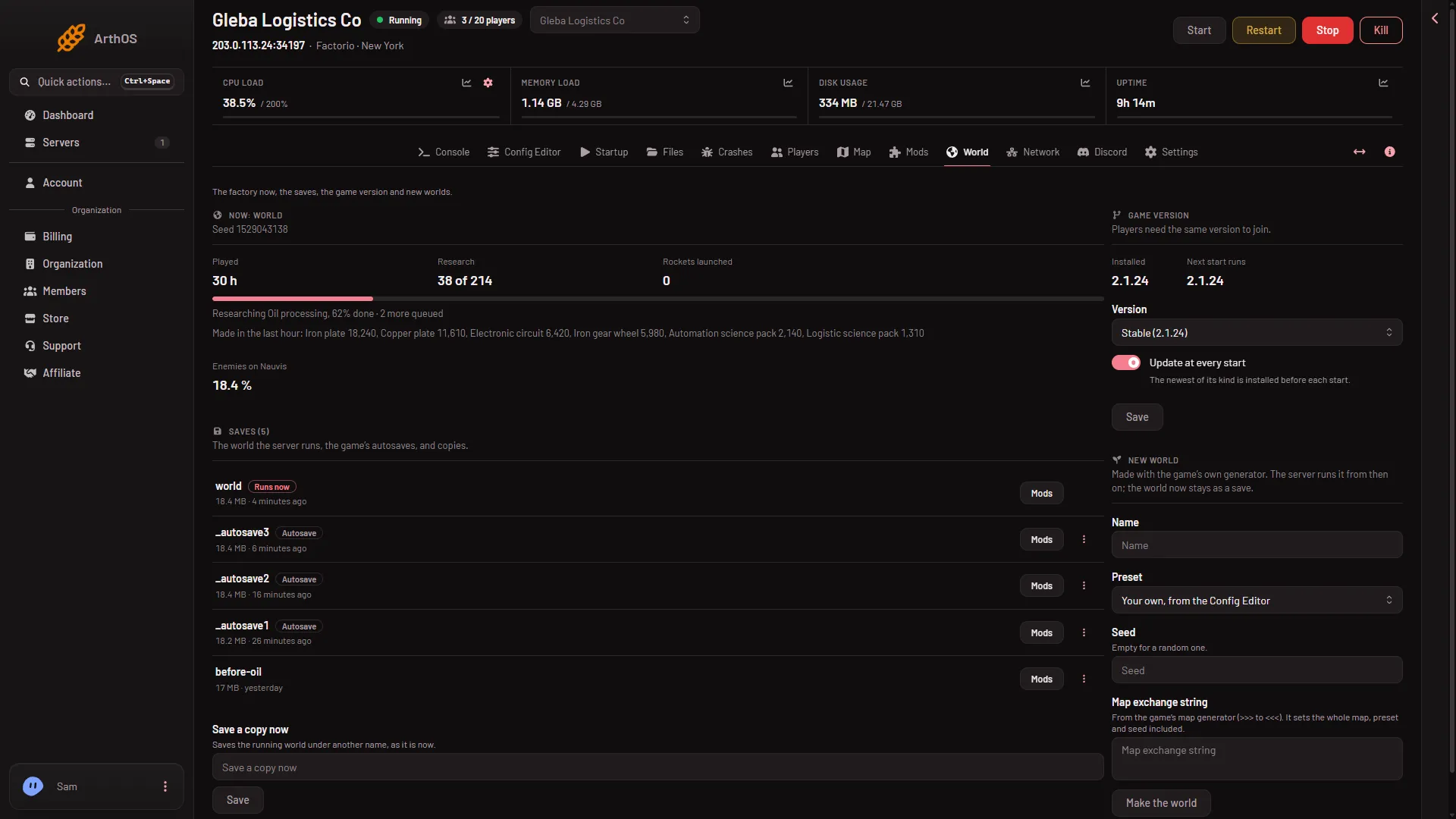
- Saves list
- The save that runs
- An autosave row
The save that runs (2) has the tag Runs now. Every other row, such as the autosave row (3), has the same menu at its right end, with Run this from the next start.
The page answers in one of two ways:
- With the server stopped: “(name) runs from the next start.”
- With the server running: “(name) runs from the next start: restart the server to load it now.”
The choice is saved at once, but the game does not change worlds while it runs. It loads the new save when the server starts.
- Restart the server, or start it if it is stopped. A restart drops everyone who is on, so warn them first with Message everyone on the Players page, then use Restart at the top of the server page. A restart stops the server first, and a stop asks the game to save, so the world you leave is saved.
When it is up, the row of your save shows Runs now.
What changes with the switch
- The Startup value. Choosing a save sets the World value on the Startup page. You can read it there, but the World page is where to change it.
- Live game details. If you turned them on for the old world, they are off for the new one. They are turned on one world at a time. Turning them on ends Steam achievements for that world, so the page asks first.
- Players. They need the same game version and the same mods as the save was made with.
Check the save first
- Mods. Every row has a Mods button. It opens the box Mods of (name), which says whether the server has every mod the save was made with. If some differ, choose Install these mods before you switch. The server downloads mods with its own factorio.com account: the username on Startup and the token under Passwords in the Config Editor.
- Version. A save made by a newer game does not load in an older one. The Game version card warns that worlds saved by the installed version do not load in an older one. See game version if you need to change it.
A name with no save
Do not type a new name into the World value on Startup to switch. A name with no save on the server makes a brand new world at the next start. To switch to a save that exists, use Run this from the next start.
Autosaves
An autosave is a save too, so the same row menu works. See load an autosave.
If it does not work
- The server will not start after the switch. Open Crashes. “The world is newer than the game” means pick a newer version on the World page. “The world could not be loaded” means choose an autosave or another save.
- A mod stops the start. The game says which mod. Turn it off or install what is missing on the Mods page.
- The row does not say Runs now. The server has not restarted yet. Restart it.
- The save is not on the server. The page says so if the file was deleted. Open Files, go to
saves, and check it is there.
More about the game: Factorio servers.