






Order Java if you want plugins, mods or modpacks, or your players are on Windows, Mac or Linux with Java Edition. Order Bedrock if your players are on phones, tablets or Windows with Bedrock Edition. Order Java + Bedrock if both groups must play in the same world.
Game consoles (Xbox, PlayStation, Nintendo Switch) cannot add a server by address on any edition, so they do not change the choice.
Who can join each one
| Player plays on | Java | Bedrock | Java + Bedrock |
|---|---|---|---|
| Java Edition on Windows, Mac or Linux | Yes | No | Yes |
| Bedrock on Windows, Android or iOS | No | Yes | Yes |
| Xbox, PlayStation, Nintendo Switch | No | No | No |
A Mac cannot run Bedrock Edition. Java Edition and Bedrock Edition for Windows are sold together, so one Windows player may own both and can join any of the three.
On Xbox, PlayStation and Nintendo Switch, the game has no screen for adding a server by address. Those players can reach featured servers and Realms. The Bedrock players card in Settings mentions consoles, but a game console still cannot add a server by address. Workarounds exist from other projects, but Loafhosts does not run or support them.
What each one can do
| Java | Bedrock | Java + Bedrock | |
|---|---|---|---|
| Plugins | Yes | Not in the panel | Yes |
| Mods | Yes | Not in the panel | No |
| Modpacks | Yes | Not in the panel | No |
| Players share one world and one address | Java players | Bedrock players | Both |
- Java is where the plugin and mod scene is. The ordering page says: “Plugins, mods and modpacks all work.”
- Bedrock runs Mojang’s own Bedrock server. The panel has no Add-ons page for it, so there is no plugin, mod or modpack installer.
- Java + Bedrock servers are Paper or Purpur. That is why plugins work on them and mods do not.
- Java + Bedrock says: “Java and Bedrock players share one world and one address. Plugins work; modpacks do not.” Mods do not work on it either: the panel refuses Bedrock players on Fabric, Forge and NeoForge servers. See Let Bedrock players join your Java server.
In the ArthOS panel
- Open the Store, choose Game servers, then Minecraft.
- Under Edition, choose Java, Bedrock or Java + Bedrock.
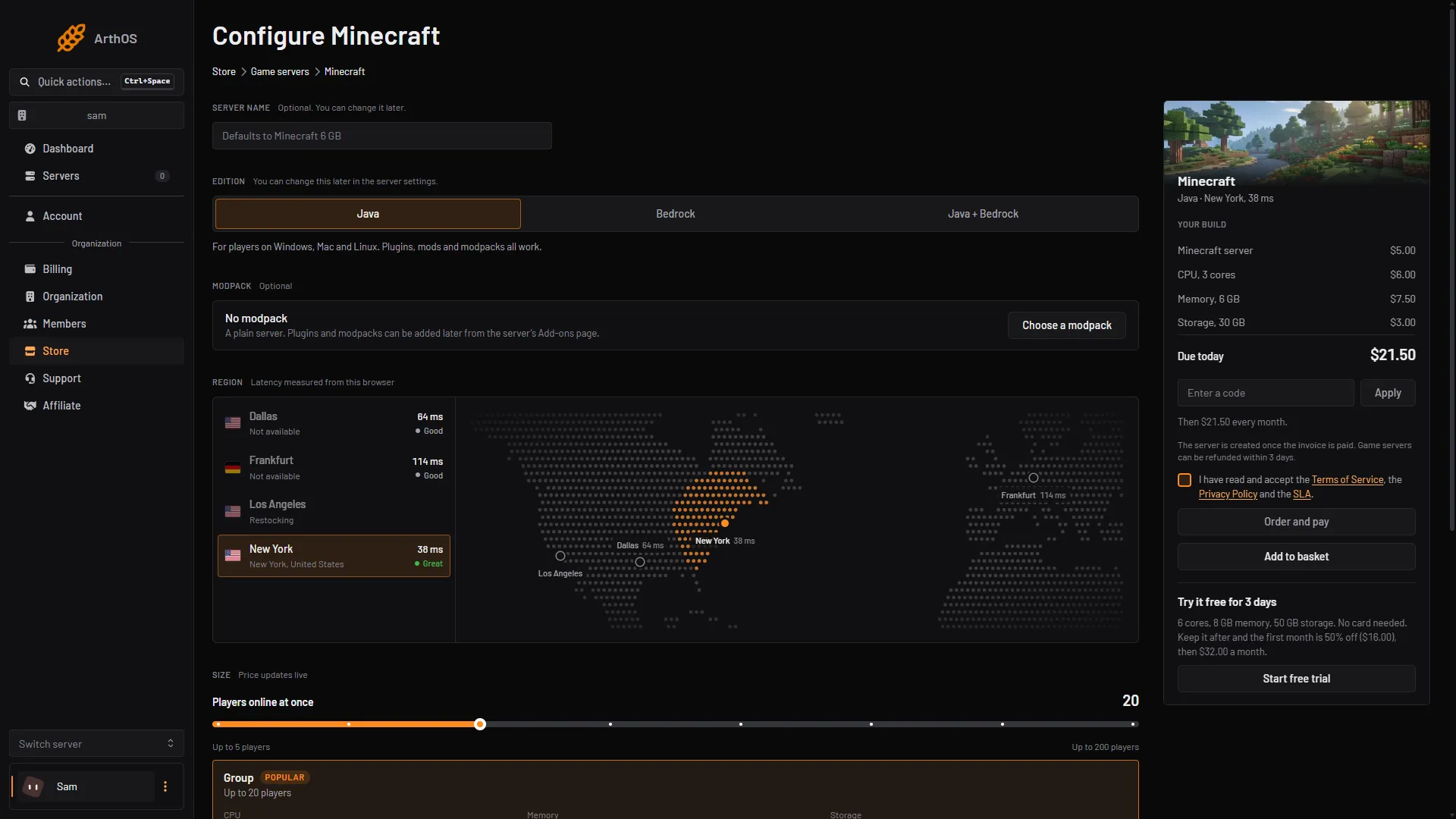
- Java
- Bedrock
- Java + Bedrock
- Pick a Region and Size, tick the terms box and choose Order and pay.
The page says: “You can change this later in the server settings.” If you start with Java and add Bedrock players later, open Settings on the server and use the Bedrock players card (1), then Let Bedrock players join (2). On a 26.3 server this first moves the server to Purpur 26.2. A world already saved by 26.3 may not open on 26.2, so take a backup first and read change your server version.
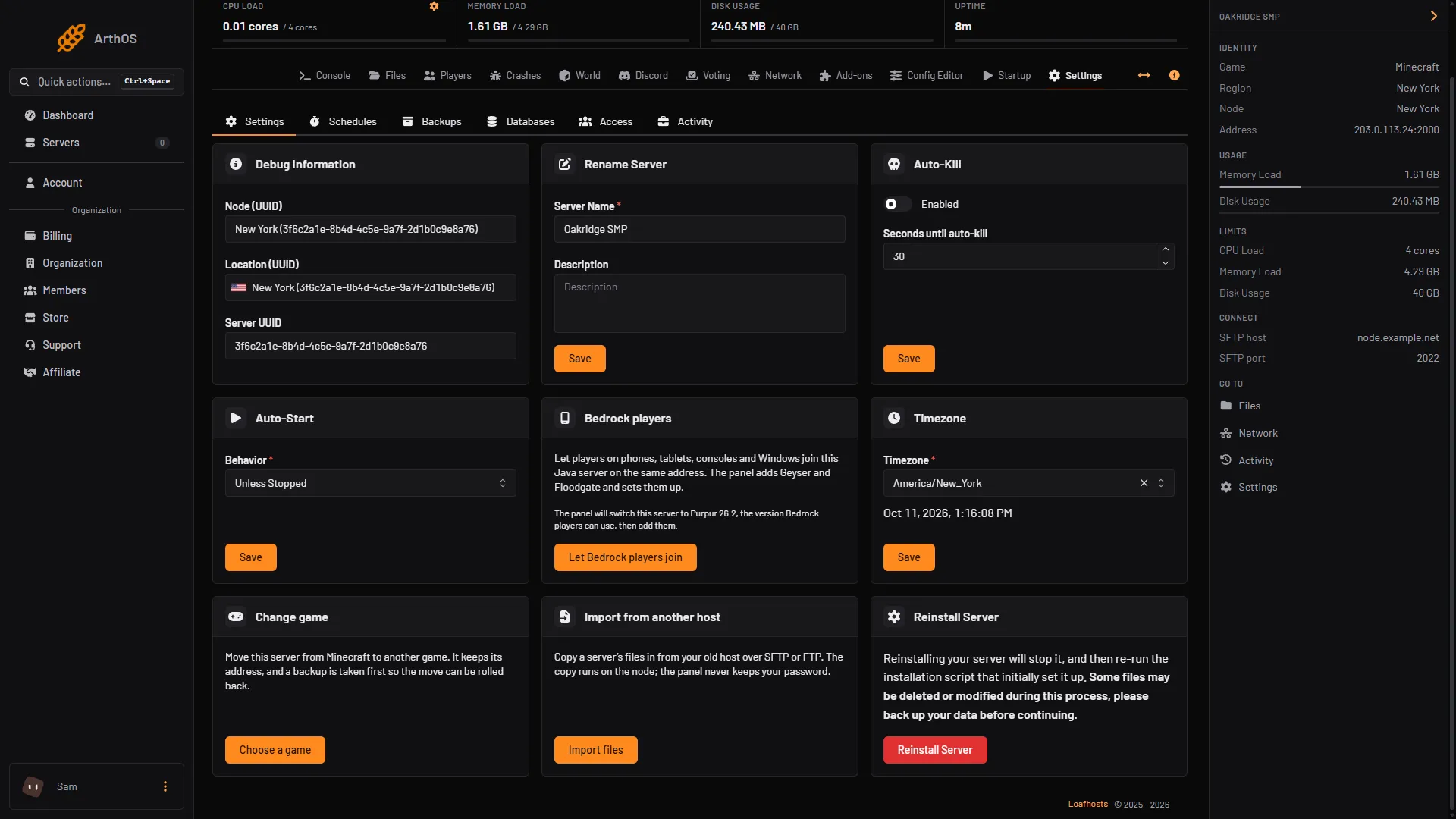
- Bedrock players card
- Let Bedrock players join
Pick in one minute
- Everyone plays Java Edition on a computer: Java.
- You want plugins such as permissions, homes or anti-grief tools: Java.
- You want a modpack or mods: Java.
- Everyone plays on phones, tablets or Bedrock for Windows, and you need no plugins: Bedrock.
- Some friends are on Java and some on Bedrock: Java + Bedrock.
- Your players are on consoles: no edition lets them type an address.
By hand
- Java: run
server.jarfrom Mojang. The default port is 25565, over TCP. - Bedrock: run Mojang’s Bedrock Dedicated Server. The default port is 19132, over UDP.
- Both: run a Java server on Paper or a fork, and add Geyser and Floodgate as plugins. Geyser currently supports Bedrock 26.30 to 26.52 and Java 26.2. Floodgate lets Bedrock accounts join without owning Java Edition.
If it does not work
- A Bedrock player cannot join your Java server. The server was ordered as plain Java and the Bedrock players card is off. Turn it on in Settings.
- A Java player cannot join your Bedrock server. That is by design. Java and Bedrock cannot join each other’s plain servers. Use Java + Bedrock.
- The panel says it cannot add Bedrock players. The server runs Fabric, Forge or NeoForge. Bedrock players need a plugin server, so use Paper or Purpur: switch to Paper or Purpur.
- A console player has no place to type the address. That is a limit of the game on that console.
More on the game: Minecraft servers.
Sources: minecraft.wiki: Edition, minecraft.wiki: Java Edition, minecraft.wiki: Bedrock Edition, minecraft.wiki: Setting up a Java Edition server, minecraft.wiki: Setting up a Bedrock Edition server, geysermc.org: Supported versions, geysermc.org: Floodgate