












You can cap how many buildings each player may place, and you can make buildings tougher or weaker. All of it is in the Bases and building group of the Config Editor. A new server has no building cap, and every multiplier is 1, which is the game’s own value. Changes apply at the next start.
Limit buildings
| Where | Game key | New server |
|---|---|---|
| Buildings per player row | MaxBuildingLimitNum | 0 |
MaxBuildingLimitNumPerPlayer row under Advanced | MaxBuildingLimitNumPerPlayer | 0 |
Buildings per player is the cap on buildings each player can have. Pocketpair, the maker of Palworld, documents its key as “Per-player building count cap (0 = unlimited).” 0 means no limit. Pocketpair uses 1000 in its PvP example. The panel accepts 0 to 1,000,000.
The file has a second key, MaxBuildingLimitNumPerPlayer, which Pocketpair does not describe. It is under Advanced in Game settings (choose Show them). Leave it at 0. Not checked on 1.0.5 as of 4 November 2026: what that second key does.
A cap helps a busy server. Pocketpair says on its PvP page that a cap on structures lowers server strain. See Palworld performance settings.
Make buildings tougher or weaker
These three are multipliers. 1 is the game’s own value.
| Panel label | Game key | What it does |
|---|---|---|
| Building health | BuildObjectHpRate | How much health walls and other buildings have |
| Damage to buildings | BuildObjectDamageRate | How much damage buildings take |
| Building wear | BuildObjectDeteriorationDamageRate | How fast buildings wear down by themselves |
For stronger walls, raise Building health or lower Damage to buildings. For a server where bases need upkeep, raise Building wear. The panel accepts 0 to 100.
Where players may build
No building near fast travel points is Off on a new server. When it is On, players cannot build close to fast travel points and other structures of the world. Pocketpair words it as “Prevent building near structures such as fast-travel points.”
Items on the ground
Dropped items cost the server too. Two rows control them:
- Items on the ground: the most dropped items lying in the world at once. The new-server value is 3000. Fewer helps a busy server.
- Dropped items last (hours): how long a dropped item stays before it disappears. The new-server value is 1 hour.
Change them in the panel
- Open your server and choose Config Editor.
- Choose Game settings at the top.
- In the Bases and building group, change Buildings per player (1), Building health (2), No building near fast travel points (3) or Items on the ground (4).
- Choose Save.
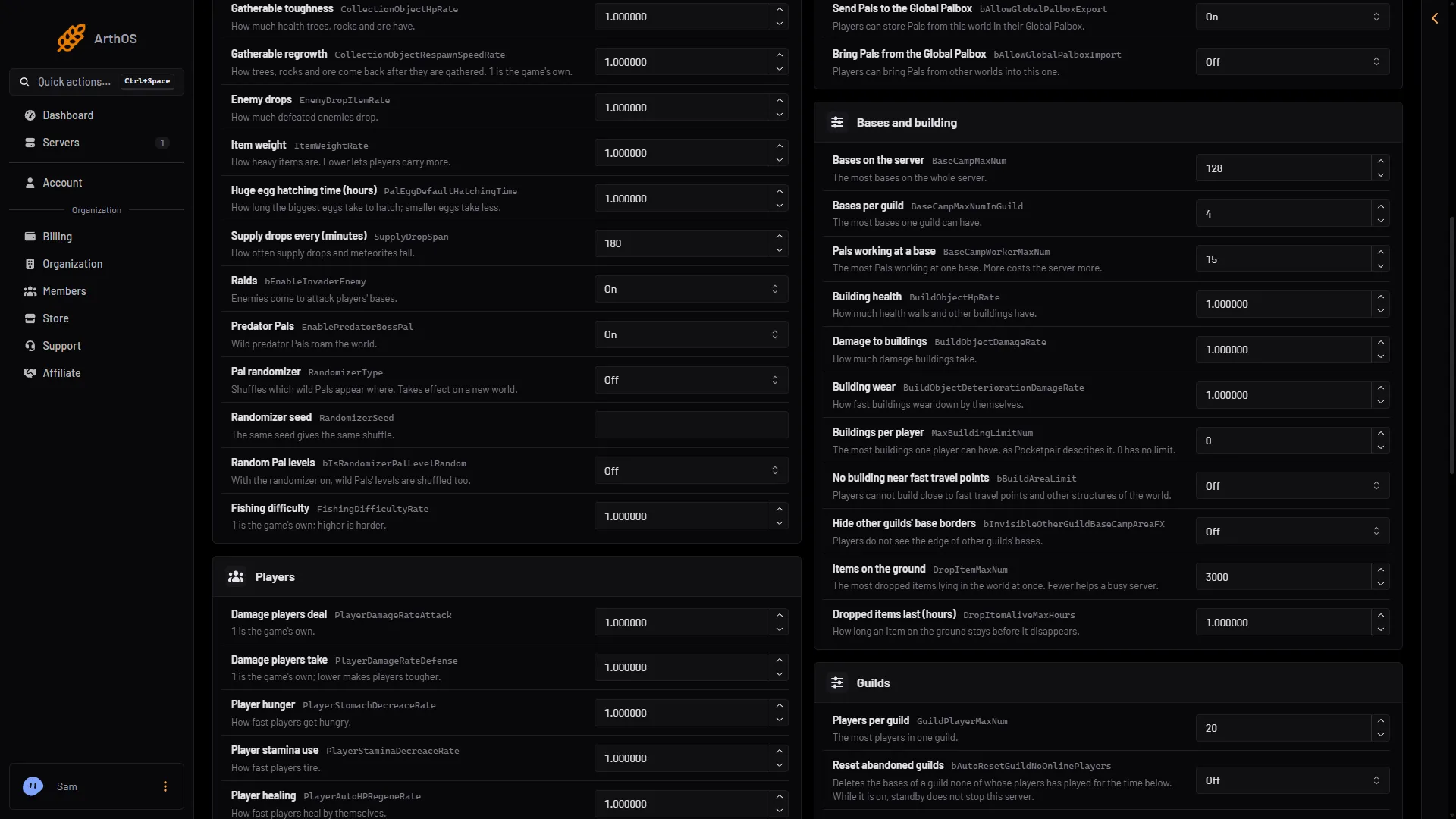
- Buildings per player
- Building health
- No building near fast travel points
- Items on the ground
If the server is running, the panel says “Saved, waiting for the next restart: (names).” Choose Restart now to apply it.
If it does not work
- A player still builds past the cap. The server has not restarted since you saved.
- The number goes back. It is outside the range. The panel answers “A whole number from (lowest) to (highest).”
- Nothing changes. A world with its own
WorldOption.savignores the Config Editor’s Game settings for the settings that file holds. See Palworld WorldOption.sav.
Not checked on 1.0.5 as of 4 November 2026: what happens to buildings a player already placed above a new, lower cap.
For base counts and workers, see Palworld base settings. More about the game: Palworld servers.
Sources: docs.palworldgame.com: Configuration