












Three numbers limit bases on a Palworld server: how many bases the whole server can have, how many one guild can have, and how many Pals can work at one base. They are in the Bases and building group of the Config Editor, and a change applies at the next start.
The settings
| Panel label | Game key | New server | Limit |
|---|---|---|---|
| Bases on the server | BaseCampMaxNum | 128 | 1 to 10,000 in the panel |
| Bases per guild | BaseCampMaxNumInGuild | 4 | 1 to 10 |
| Pals working at a base | BaseCampWorkerMaxNum | 15 | 1 to 50 |
Bases on the server is the total number of bases across the whole server, all guilds together.
Bases per guild is the most bases one guild can have. Pocketpair, the maker of Palworld, gives the default as 4 and the most as 10.
Pals working at a base is the most Pals that work at one base. Pocketpair gives the most as 50.
What this costs the server
Pocketpair says about both Bases per guild and Pals working at a base: “Increasing this value raises processing load.” Each extra base and each extra worker is more for the server to run.
Raise one number at a time. Watch how the server runs for a few days. If it starts to lag, lower the number again. See Palworld server lag.
Two more rows for bases
These are in the same group.
- Hide other guilds’ base borders. Off by default, so players see the edge of every base. Turn it On and players do not see the edge of other guilds’ bases.
- No building near fast travel points. Off by default. Turn it On and players cannot build close to fast travel points and other structures of the world.
Change them in the panel
- Open your server and choose Config Editor.
- Choose Game settings at the top.
- In the Bases and building group, change Bases on the server (1), Bases per guild (2) or Pals working at a base (3).
- Choose Save.
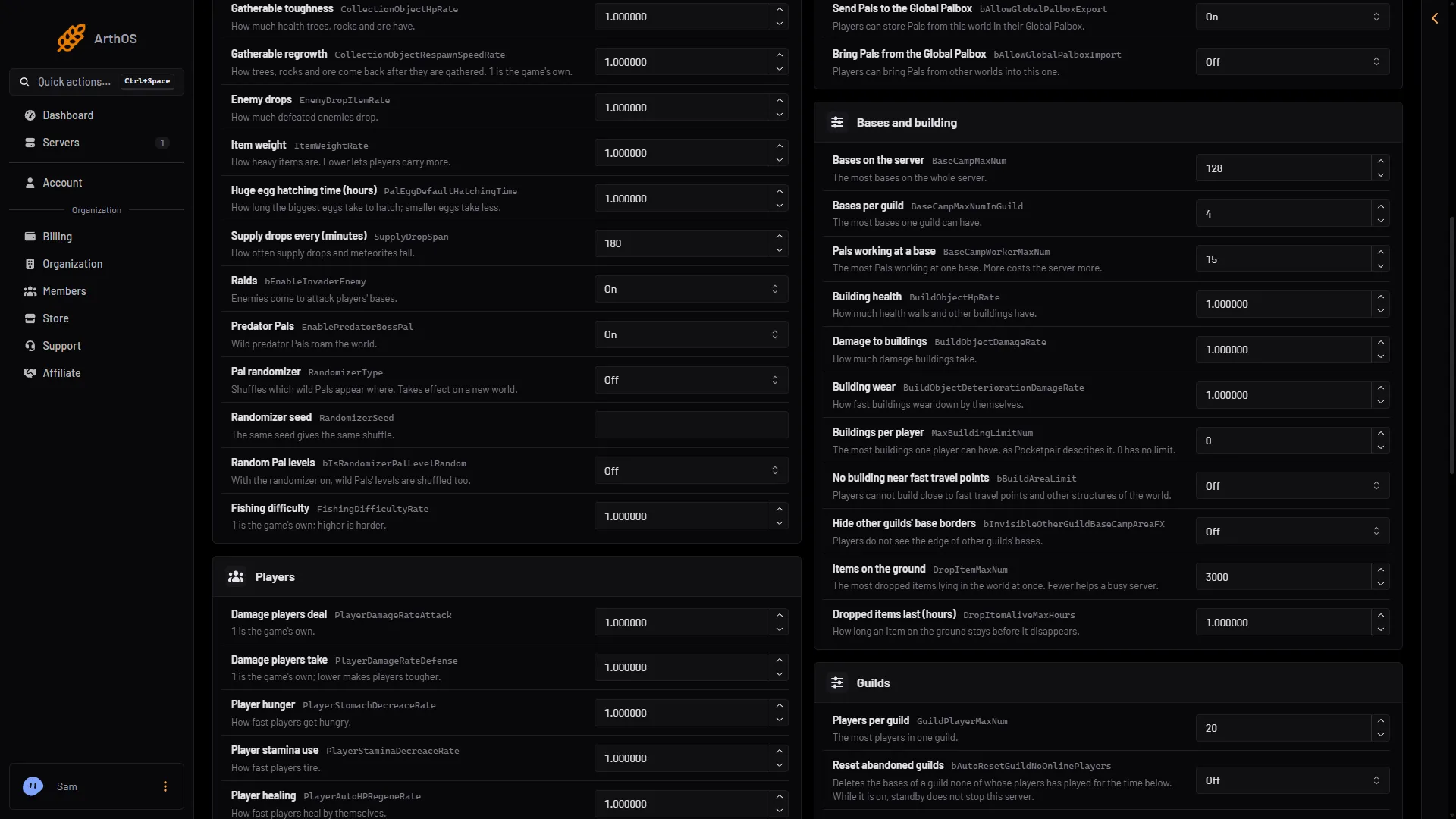
- Bases on the server
- Bases per guild
- Pals working at a base
If the server is running, the panel says “Saved, waiting for the next restart: (names).” Choose Restart now to apply it.
What happens to bases that already exist
Not checked on 1.0.5 as of 4 November 2026: what happens to bases that are over a new, lower limit. Lowering a limit is safest on a new world.
If it does not work
- The number goes back. You typed a value outside the range. The panel answers “A whole number from (lowest) to (highest).”
- Nothing changed in the game. The server has not restarted since you saved.
- A world uses its own settings. A world with a
WorldOption.savfile ignores the Config Editor’s Game settings for the settings that file holds. See Palworld WorldOption.sav.
For the number of players in a guild, see Palworld guild settings. More about the game: Palworld servers.
Sources: docs.palworldgame.com: Configuration