












Pocketpair recommends 4 CPU cores or more, 16 GB of memory and a fast SSD for a Palworld server. 8 GB of memory can start a server, but Pocketpair warns it makes crashes from running out of memory more likely.
Pocketpair’s numbers
From Pocketpair’s server guide:
| Part | What it says |
|---|---|
| CPU | 4 cores or more |
| Memory | 16 GB recommended, more for larger servers. 8 GB can boot, but crashes from running out of memory become more likely. |
| Storage | A fast SSD. Slow storage may corrupt saved data. |
The guide is written for version 1.0.4. The servers on Loafhosts run 1.0.5.
The Loafhosts sizes
| Size | CPU cores | Memory | Disk | Players |
|---|---|---|---|---|
| Small | 2 | 6 GB | 30 GB | 8 |
| Standard | 4 | 8 GB | 30 GB | 16 |
| Large | 6 | 12 GB | 50 GB | 32 |
These are the sizes you choose when you order.
The sizes sit below Pocketpair’s 16 GB recommendation, and Small has 2 cores, below Pocketpair’s 4. On Loafhosts, a new or quiet server uses about 1.2 to 2.2 GB of memory. The use grows as your world grows, so a busy server on a small size can run out of memory.
For a bigger size, open Billing, choose the service, then Customize, then Choose a new size. If a renewal invoice is waiting, a bigger size needs it paid first.
The panel’s own finding for a server that runs out of memory says: “Palworld needs about 8 GB with a few players and more as bases and Pals grow.” Pocketpair recommends 16 GB.
What makes a server need more
Memory and CPU use go up with:
- Bases. Every base keeps its buildings loaded.
- Pals working at bases. The setting Pals working at a base says that more costs the server more.
- Players. Each player loads more of the world around them.
- Wild Pals. The setting Wild Pals says that a higher number costs the server more memory and CPU.
If you keep the game settings at their defaults, you only need to watch bases and players. The two settings above are in the Config Editor, in the game settings. See server lag.
Check how you are doing
The numbers at the top of every server page show memory, CPU and disk use against your limits. The Players page shows how the game is doing: the Players count, the in-game day, the server’s frames per second and the game version.
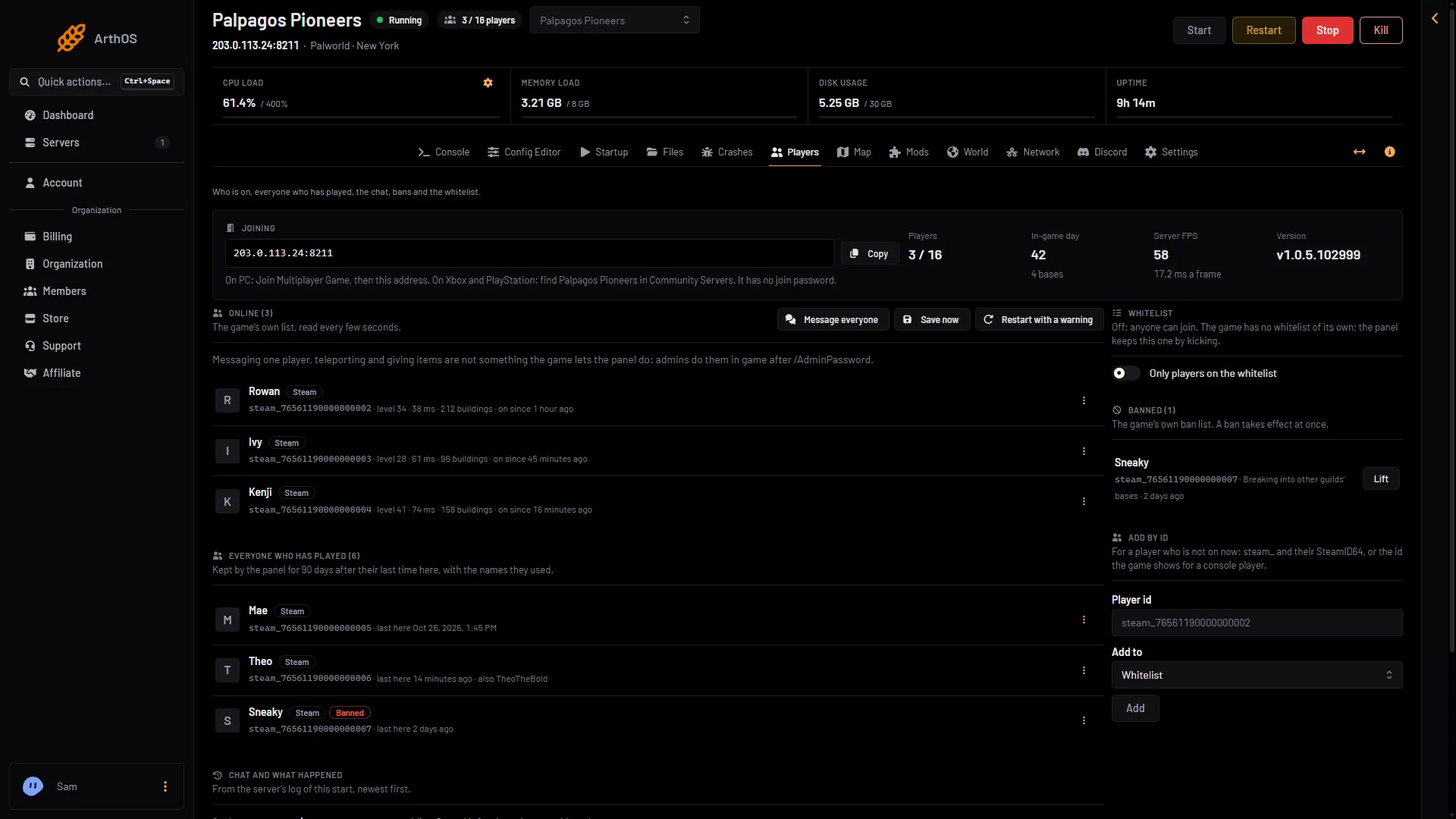
- Server FPS
- In-game day
- Game version
Open the Crashes page. It lists each start of the server and how it ended. A start that the machine ended for lack of memory shows Crashed (1) with “out of memory”, the text “The game stopped without being asked to.”, Exit code 137 and Out of memory set to Yes (2). The game’s own log usually has no line about it, so “What the panel can tell (0)” is normal for this crash.
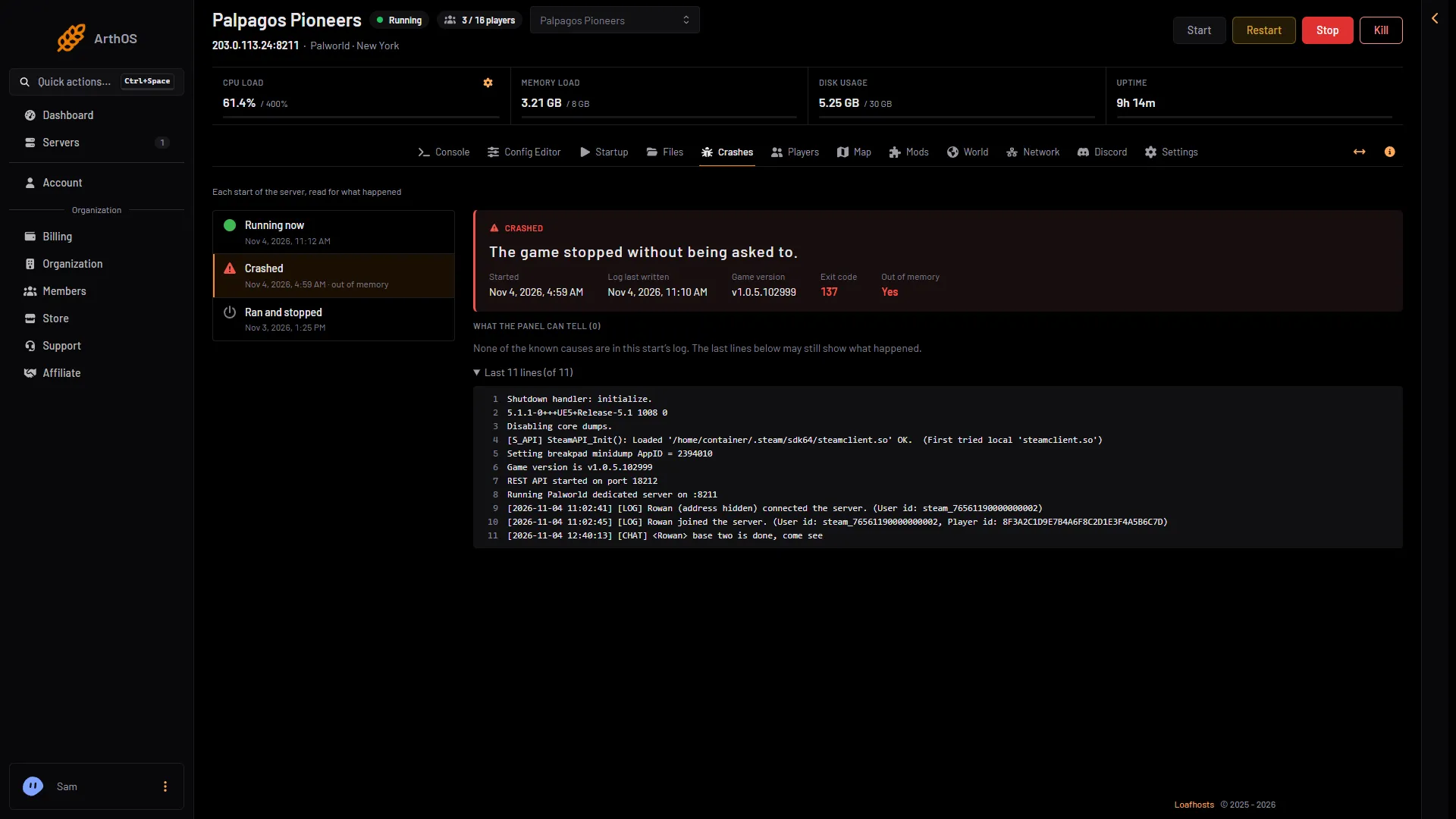
- A crash
- Out of memory
If this keeps happening, lower the player limit or choose a bigger size. A scheduled restart every day frees the memory the game has used. See scheduled restarts. For more on this crash see Palworld out of memory.
If it does not fit
- Crashes at busy times. Lower the player limit, or choose a bigger size. See max players.
- Lag but no crash. Lower Wild Pals or Pals working at a base, or lower the player limit.
More about the game: Palworld servers.
Sources: docs.palworldgame.com: Requirements