











There are two ways to restart a VEIN server in the panel. Restart restarts at once. Restart with a warning runs a countdown and tells the players in the game. Both save the world before the server stops.
Why the save matters
VEIN saves nothing by itself when it is simply stopped. The panel saves the world before every stop, restart and backup, so a restart from the panel does not lose what players did since the last autosave.
Restart with a warning
Use this when people are playing.
- Open the Players page.
- Choose Restart with a warning.
- In Restart in (2), pick 10 minutes, 5 minutes or 1 minute.
- In Message (3), type what players should read, or leave it empty. The box takes up to 120 characters. Empty gives “The server restarts in”.
- Choose Start the countdown (4).
The box (1) also lists the notices players will see.
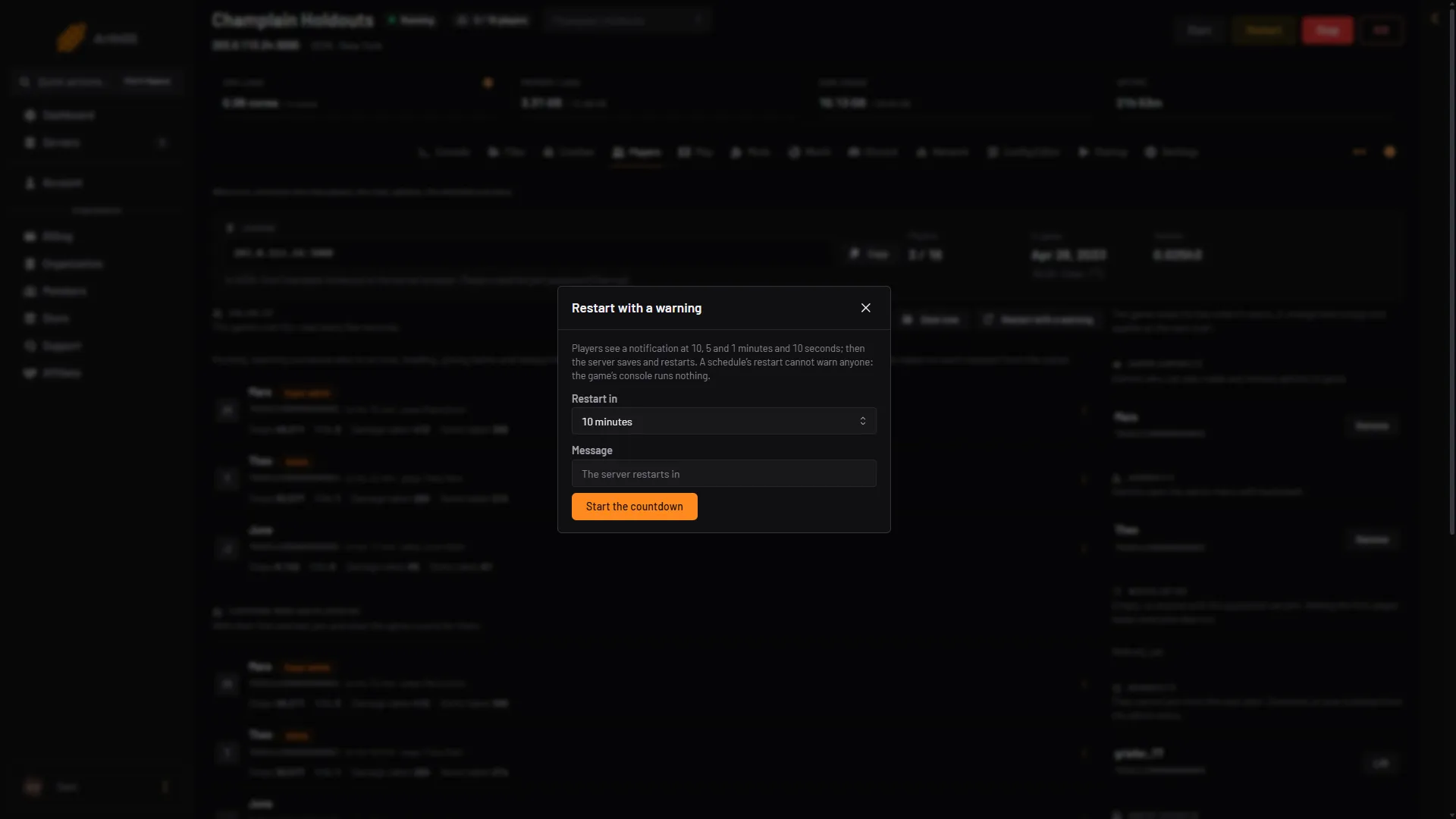
- What players see
- Pick the time
- Type a message
- Start the countdown
Players see a notice in the game right away, then more at 10 minutes, 5 minutes, 1 minute and 10 seconds before the restart. A shorter countdown skips the notices that are longer than it. A 5 minute countdown gives notices at 5 minutes, 1 minute and 10 seconds.
Each notice is your message followed by the time. With the message “Patch day: restart in”, players read “Patch day: restart in 5 minutes.”
When the time is up, the server saves and restarts.
If the server cannot be reached for the first notice, the countdown does not start.
Stop the countdown
While a countdown runs, the Players page says when the server restarts, and the window shows Stop the countdown. Choose it and the server keeps running.
Restart at once
Choose Restart at the top right of the server page when nobody is playing, or when you do not need a warning. The panel saves first, then restarts. Start and Stop are in the same place.
A schedule cannot warn players
A restart set on Settings, then Schedules, works, and it saves first, but it cannot warn anyone. VEIN’s console runs no commands, so a schedule has no way to send a notice. If you want a daily restart, pick an hour when the server is empty.
What a restart does
- Settings you changed on Startup apply at the next start. This includes the player limit.
- Admin, whitelist and ban lists are read when the server starts, so a change made while it runs applies after the restart.
- If Update on start is on, the server also checks for a new game build. See update a VEIN server.
- The server appears in the game’s server browser about 30 seconds after it is ready.
If it does not work
- The countdown never ended in a restart. The panel holds a countdown in memory. If the panel itself restarts during the countdown, the countdown is lost and the server keeps running. Start a new one.
- Players did not see a notice. The notice is the game’s own notification. A later notice that cannot be sent is skipped, and the restart still happens on time.
- Restart with a warning is missing. Your role may not allow restarting the server.
More about the game: VEIN servers.