

















To put a world back, open the World page and press Put back next to the backup you want. The panel copies that backup into a new world of its own and loads it from the next start. Your current world stays where it is.
A Space Engineers server has two kinds of backup, and they work differently. The game makes its own backups as it saves. You make the panel’s backups yourself, or on a schedule. This guide covers both.
Put back one of the game’s own backups
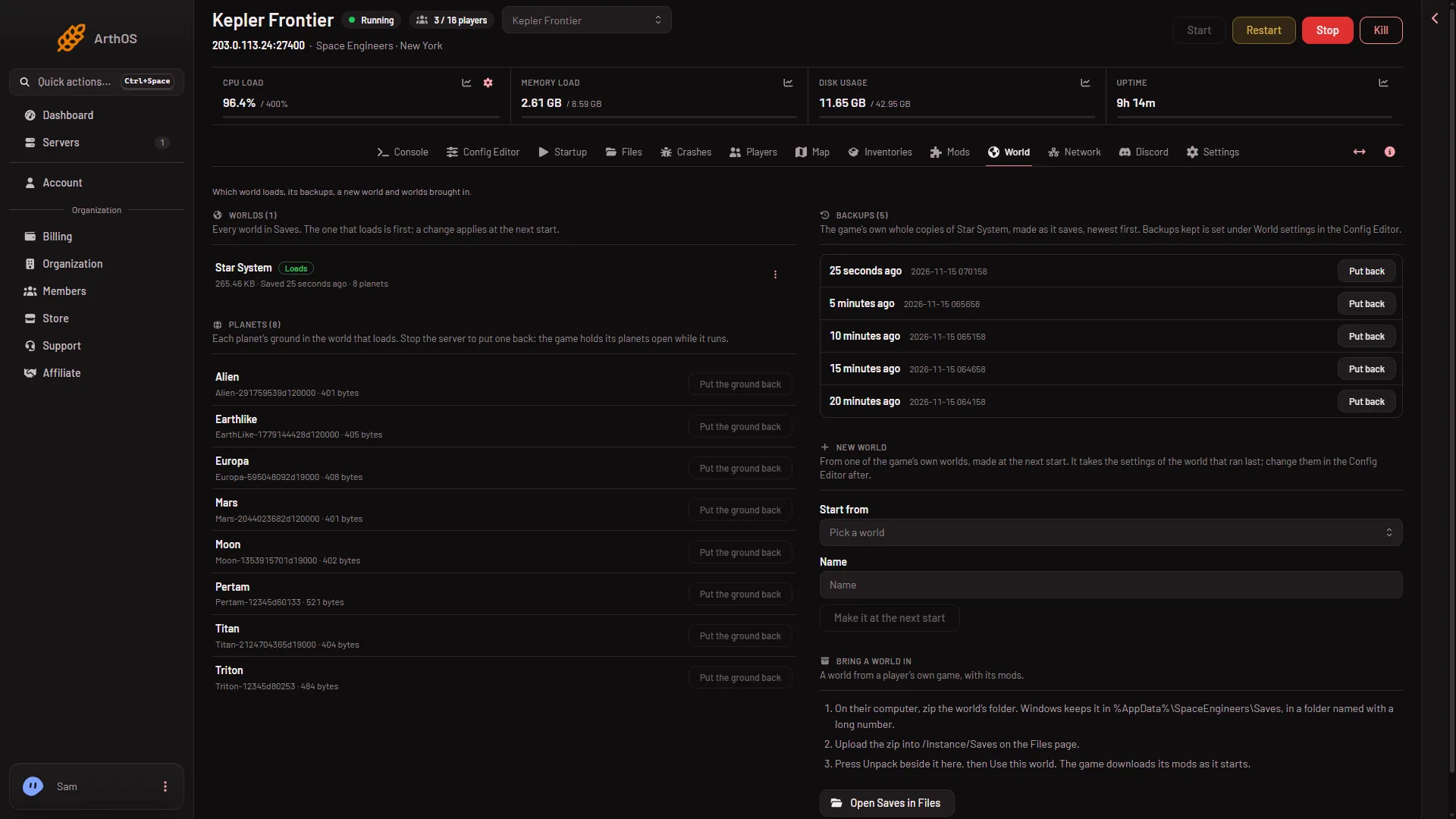
The game keeps a whole copy of the world each time it saves, up to the number set in Backups kept. They are listed on the World page. This is the safest way to go back, because nothing is overwritten.
- Open the World page.
- Find the Backups card on the right. Its text says “The game’s own whole copies of (world), made as it saves, newest first.” Each row shows how long ago it was made and its time. The picture shows one such time.
- Pick the backup from the time you want, and press Put back (1).
- The panel says the backup “is copied into a world of its own and loads from the next start”.
- Restart the server from the top of the page. The game loads the copy.
- Put back
What Put back does
- It makes a new world folder named after your world and the backup’s time, for example the world’s name followed by “(backup” and the backup’s date and time. The name is cut to 60 characters if it is longer.
- It sets that new world as the one that loads, and the old world loses its Loads tag. Look for the tag on the World page after the next start.
- Your old world, and every other backup, stay as they are. To go back to the old world, press Use this world on its row and restart.
- The backup keeps its own mod list and settings, because it is a copy of the whole world folder.
- You can press it while the server runs. Nothing changes in the game until the next start. Anything built since the backup is lost when the server loads the copy, so tell players first.
Restore a panel backup
The panel’s own backups are in Settings, Backups. They copy the server’s files, not just one world.
- Open Settings, then the Backups tab.
- Find the backup and choose Restore.
- Read the box that opens before you confirm.
A restore stops the server and overwrites files with the ones in the backup. Files newer than the backup can be lost. Use it when you need to bring back more than one world, or settings and files outside the saves. To keep a copy of what you have now first, press Create, then Create Backup. See panel backups.
If it does not work
- There is no Put back button. Your role may not allow it. It needs permission to create files and to change the startup.
- The panel says the world is on the server already. You pressed Put back twice for the same backup. The copy exists: press Use this world on it.
- The Backups card is empty. It says “No backups yet. The game makes one when it saves.” The game has not autosaved since the world loaded, or Backups kept is
0(the game then deletes the copies it has). See how many backups are kept. - The old world still loads. The change applies at the next start. Restart the server.
More about the game: Space Engineers servers.