

















Two settings decide how safe your world is. Autosave every (minutes) (AutoSaveInMinutes) is how often the game saves. Backups kept (MaxBackupSaves) is how many whole copies of the world it holds on to. In a self-hosted world both live in Sandbox_config.sbc, under <Settings>. On Loafhosts you change both in the Config Editor, under World settings, in the Saving and clean-up group.
Be careful with Backups kept. The game’s own wording is: “When you set this to zero, existing backups will be deleted.” Setting it to 0 does not only stop new backups. It removes the ones you have.
Change them
World settings are saved only while the server is stopped. The game writes this file itself when it stops, over anything changed while it runs.
- Stop the server from the top of the page. A normal stop saves the world.
- Open the Config Editor.
- Choose World settings. The source is named after the world that loads.
- Find the Saving and clean-up group (1).
- Set Autosave every (minutes). It takes a whole number from 1 to 1440.
- Set Backups kept. It takes a whole number from 0 to 1000.
- Press Save, then start the server.
A new server shows only Passwords and Server settings until it has started twice: the first start makes the world, the next start names it as the world that loads. Start it again (or restart it), then stop it to change world settings. The same happens after Make it at the next start on the World page. Use this world shows the tab at once.
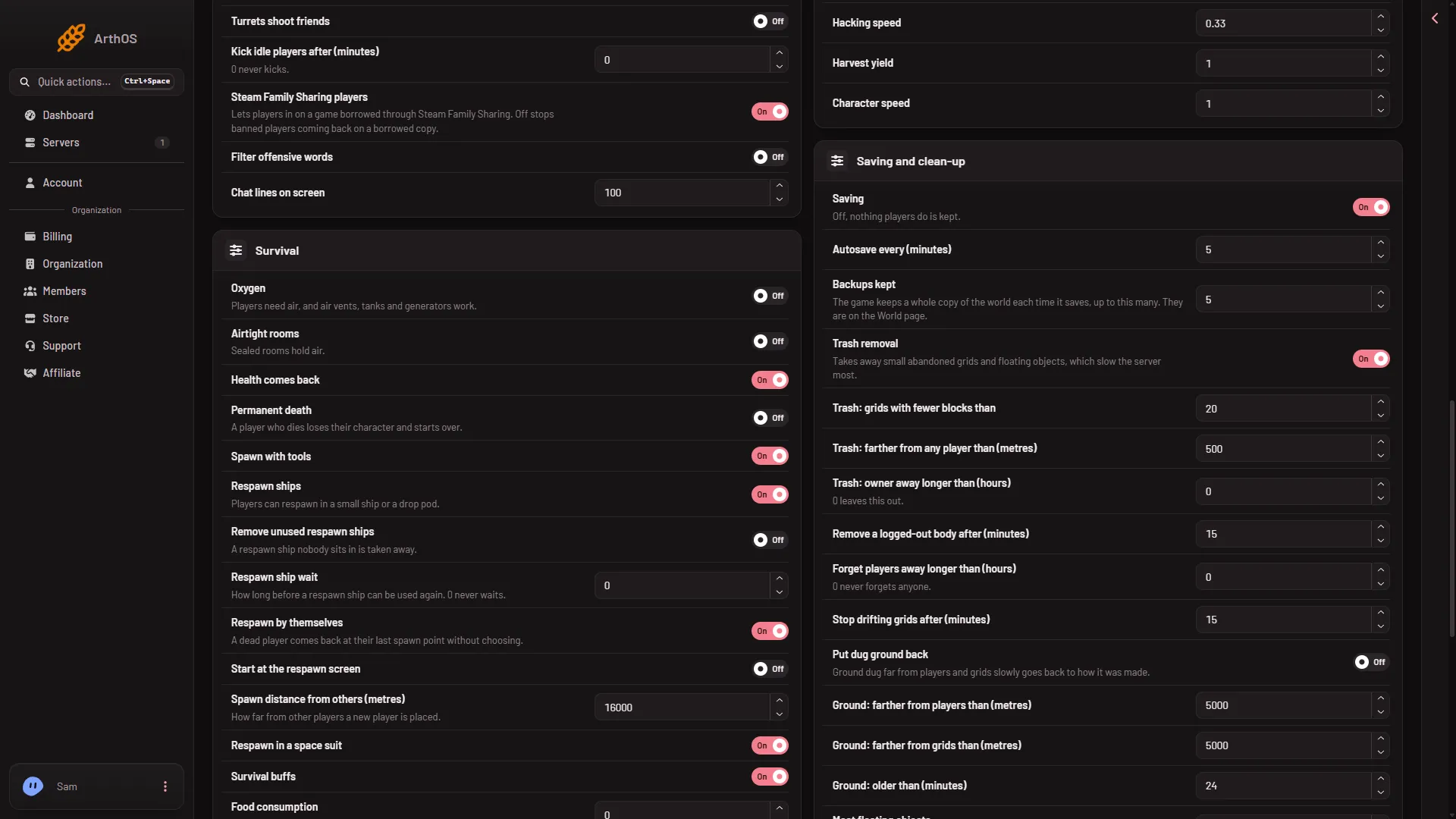
- Saving and clean-up
The picture shows the group and its rows; its numbers are demo values. The game’s own default for the autosave interval is 5 minutes. Your server may show different numbers.
If you open World settings while the server runs, you can type a value, but the Save button stays off. The page tells you to stop the server to change these settings.
What each one does
- Autosave every (minutes). The game saves the world on this timer. After a hard kill from the panel, you lose what happened since the last autosave. A normal stop loses nothing.
- Backups kept. The help line says: “The game keeps a whole copy of the world each time it saves, up to this many. They are on the World page.”
The game keeps up to that many copies. How far back they reach depends on both numbers: a short autosave time with a small number gives only a few minutes of history, a longer autosave time with the same number reaches further back. Not checked on 1.210 as of 15 November 2026: which copy goes first once the limit is reached.
See the backups
Open the World page. The Backups card (1) lists them, newest first, and its text (2) says “Backups kept is set under World settings in the Config Editor.” The card shows only the world that loads. To go back to one, see restore a backup.
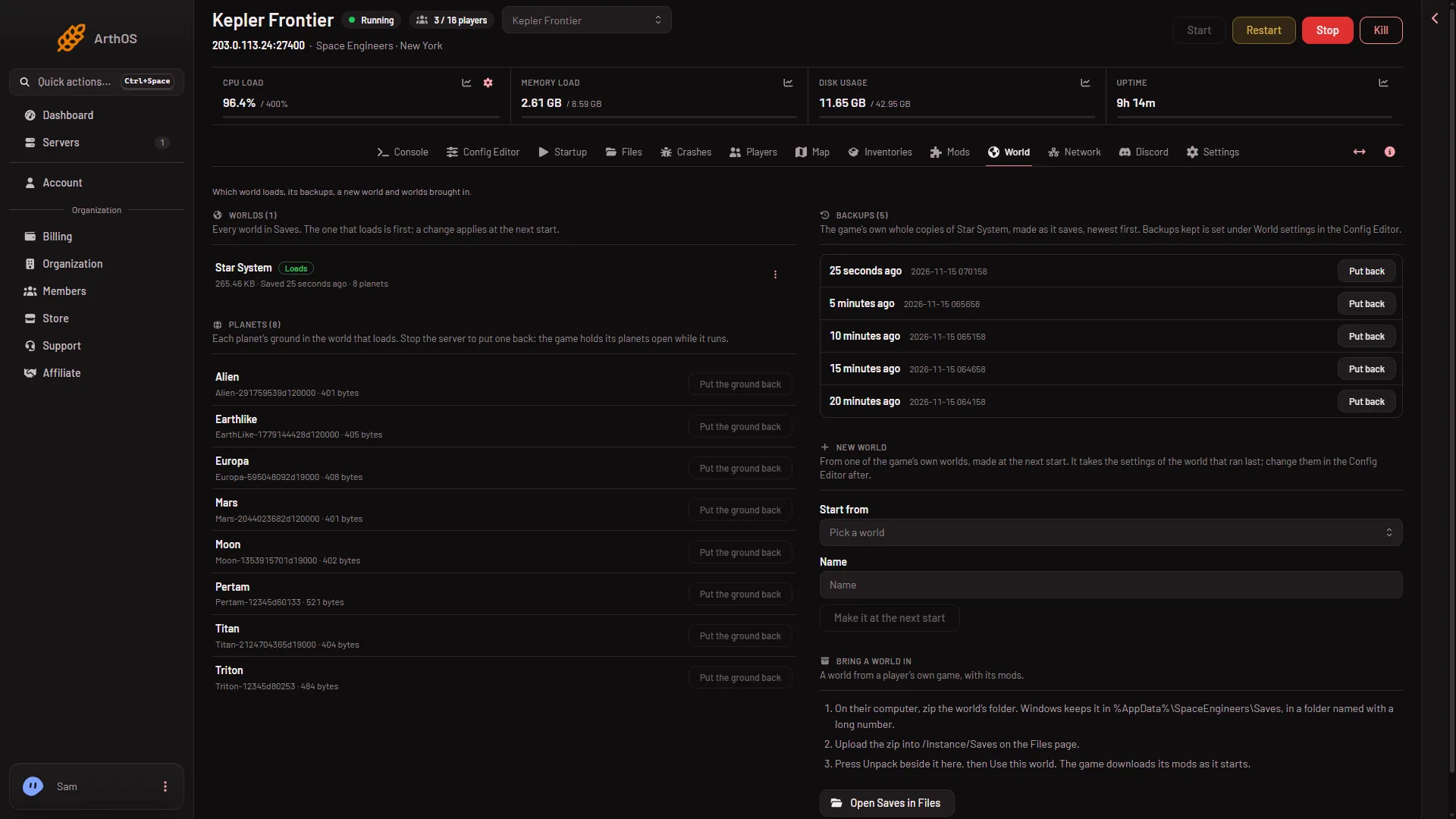
- Backups
- Backups kept
If it does not work
- Save is greyed out. The server is not stopped. Stop it, then save.
- The Backups card is empty. Either Backups kept is
0, or the game has not autosaved since the world loaded. It says “No backups yet. The game makes one when it saves.” - Backups disappeared. If Backups kept was set to
0, the game deletes the existing ones, as its own text says. Check the setting. - The old numbers are back. A save made while the server ran can be overwritten when it stops. Change these settings with the server stopped.
More about the game: Space Engineers servers.
Sources: spaceengineers.wiki.gg: World Settings, spaceengineers.wiki.gg: SessionSettings