









Facepunch’s forced wipe is at 19:00 London time on the first Thursday of the month. The update does not always reach Steam at that moment. A server that wipes too early starts on the old build, and players on the new game cannot join it. The Safety group on the Wipes tab makes the panel wait for the update first.
Turn the wait on
These settings only work while the plan is on. Check the switch at the right of the band at the top of the Wipes tab. If you turn it on, choose Turn on wipes when the panel asks.
- Open the Wipes tab and find the group Safety.
- Switch on Wait for Facepunch’s update at the forced wipe. It is on in a new plan.
- Set Wait at most (hours) from 1 to 12. The box shows while the switch is on, and it starts at 6.
- Choose Save.
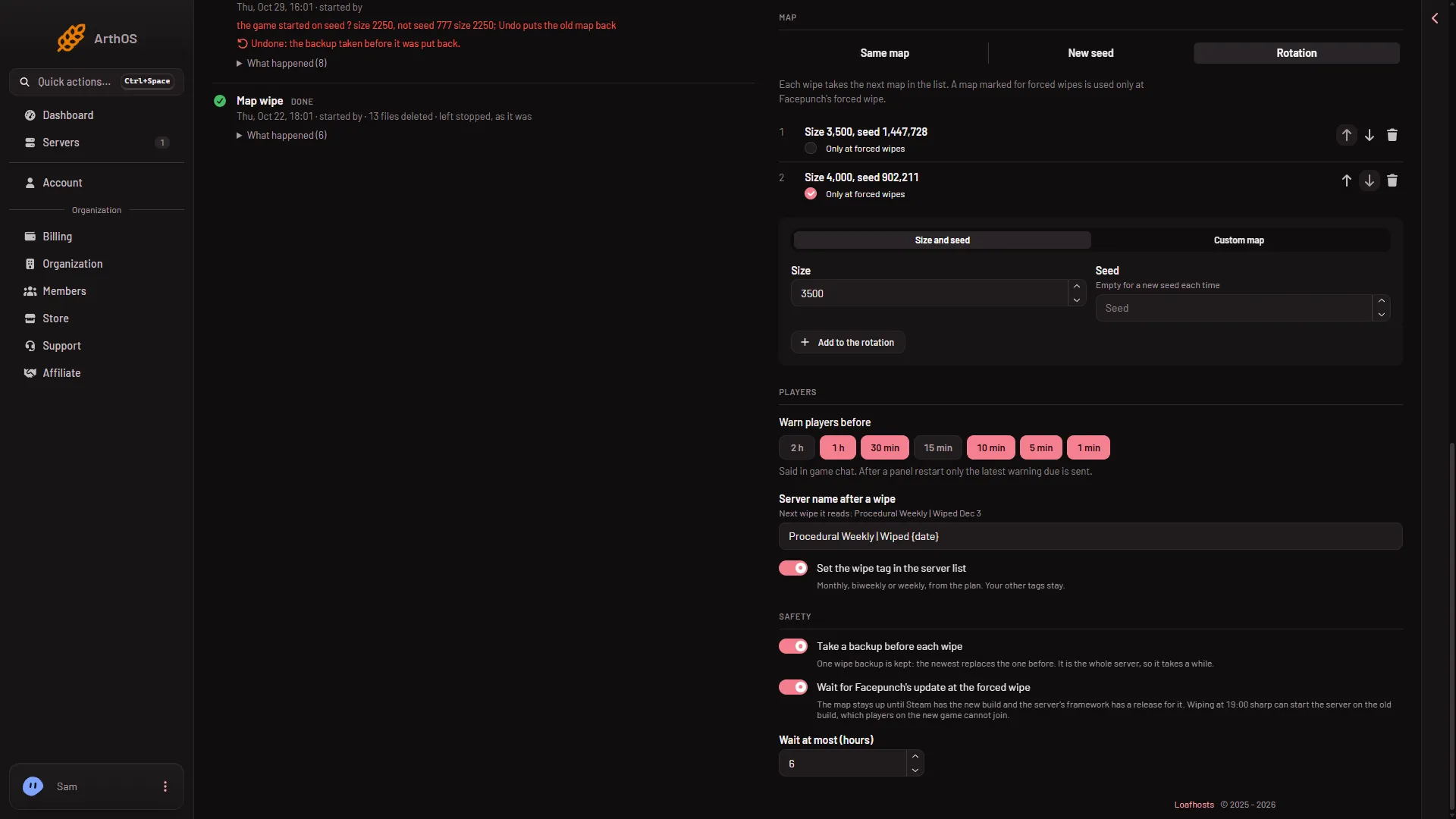
- Backup before each wipe
- Wait for the update
- Wait at most
Saving needs a role that can change startup settings and delete files. The forced wipe is always part of your plan, whatever schedule you pick. See forced wipe day.
What the wait does
At the forced wipe time the panel checks two things. If both are already out, the wipe starts at once. If not, the old map keeps running until both are out:
- Steam has the new build of the Rust server.
- With Oxide or Carbon, the framework has a release for that build. On a vanilla server, only the Steam build counts.
Every 30 minutes players hear in game chat that the wipe is waiting for Facepunch’s update and that the old map keeps running until it is out.
The band at the top of the tab says what it is waiting for. The title reads “The forced wipe is waiting for Facepunch’s update”. The reason under it is one of these:
- Facepunch’s update is not out yet, and it names the build Steam still offers.
- The update is out, and the panel is waiting for your framework’s release for it.
- The list of builds or releases could not be read, so it tries again in a minute.
When both are out, the wipe runs and the server starts on the new build.
The longest wait
If the update or the release is still missing after Wait at most (hours), the panel wipes without it. The History row says “Waited” with the hours, and why it went ahead. A server that wipes without the update can start on the old build. Raise the limit if your framework is often late.
With the switch off, the forced wipe starts at its time like any other wipe.
Stop waiting
While a forced wipe waits, the band has a Stop waiting button. It asks first. It needs a role that can change startup settings and delete files. The wipe is recorded as skipped and the server keeps its map until the next wipe in the plan. The game still resets the map at the server’s first start after the update.
Take a backup first
Switch on Take a backup before each wipe in the same group. It is off in a new plan.
- One wipe backup is kept. The newest replaces the one before it. It is the whole server, so it takes a while.
- With Roll back on the wipe’s banner, the panel puts that backup back. See fix a Rust wipe that went wrong.
- A backup you made by hand is never replaced. If every backup slot is full, the panel replaces the oldest unlocked backup that an earlier change made (not one you made by hand). A full set of hand-made backups therefore means no wipe backup: delete one first.
If no backup can be taken, the scheduled wipe continues without it. The History row says why. The reasons are the same as for any backup: the plan has no backups, no backup storage is set up, or all slots are in use.
If it does not work
- The wipe ran at 19:00 without waiting. The switch was off, or the plan was off, or the update was already out at 19:00 so there was nothing to wait for. With no plan on, the panel does nothing on forced wipe day.
- The band says it cannot read the builds. It tries again every minute. Nothing is lost.
- The wipe waited the whole limit. Read the reason in History. Your framework may not have a release yet.
- “the wipe plan was turned off”. You switched wipes off while one was waiting.
- A wipe that finds another change running on the server waits for it. After two hours it fails and says so in History.
More about running Rust on the Rust page.