







Wipe now on the Wipes tab wipes your Rust server straight away, without waiting for a plan. It lists the files it will delete, can warn players first and can take a backup you can put back. You confirm by typing the server’s name.
If you would rather wipe on a timetable, see schedule automatic wipes. To delete the files yourself, see wipe a Rust server. More about the game: Rust servers.
Wipe the server now
- Open the Wipes tab and choose Wipe now. The button is red. It is hidden unless your role has the rights listed under “What to know”, and while a wipe is already running.
- At the top of the dialog, choose Map (1) or Map and blueprints (2).
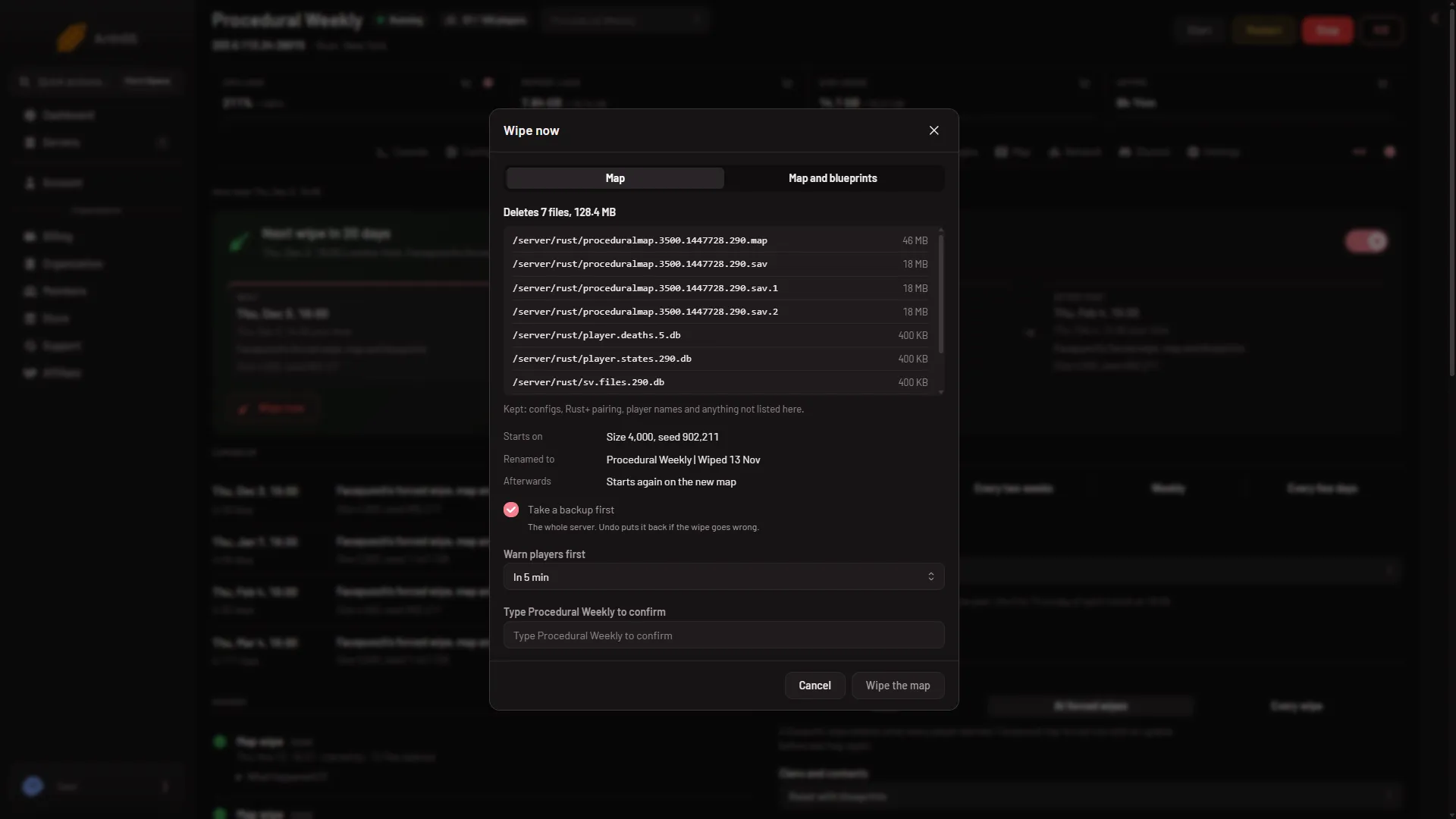
- Read the list (3). The dialog opens your server’s folder and shows the exact files that will go, with their sizes.
- Decide on Take a backup first (4) and Warn players first (5).
- Type the server’s name in the box under “Type (name) to confirm”.
- Choose the red button, Wipe the map or Wipe map and blueprints.
The panel answers at once with “Wipe started”. The banner at the top of the server then shows how far it has got.
- Map
- Map and blueprints
- What it deletes
- Take a backup first
- Warn players first
What each part does
- Map deletes the world: the map, the saves and the data that goes with them. Players keep what they learned.
- Map and blueprints also deletes what every player learned. The panel has no blueprints-only wipe.
- Deletes (count) files is the list of what goes. It never includes your configs, Rust+ pairing or player names. These stay: “Kept: configs, Rust+ pairing, player names and anything not listed here.” Kept means not deleted.
- Starts on is the map the server starts on next. It comes from your saved plan. With no plan, the map stays the same and the world is made again.
- Renamed to shows up when you saved a Server name after a wipe.
- Afterwards says “Starts again on the new map” or “Stays stopped, as it is now”.
- Take a backup first backs up the whole server. If the wipe goes wrong, Roll back puts it back. The dialog calls this Undo; the button on the banner is Roll back. It starts ticked when your plan has the backup switch on. One wipe backup is kept: the newest replaces the one before.
- Warn players first is shown while the server runs. The choices are Wipe straight away, In 1 min, In 5 min (the default) and In 10 min. Players read the warnings in game chat. The last one says the map wipe is now and the server is back in a few minutes.
Plugin data and clans follow your saved plan. The dialog only chooses map or map and blueprints, the backup and the warning.
What happens after you confirm
- The server warns players, if you chose a warning.
- It saves the world and stops.
- It takes the backup, if you ticked it.
- It deletes the files on the list.
- It sets the next map in Startup and starts the server again.
- It waits for the game to answer and checks that a new map file exists and that the size and seed are the ones it set.
The server can take several minutes to come back on a new map. The panel waits up to 45 minutes for the game to answer. The History on the Wipes tab keeps every step.
What to know
- Who may do it. You need to change startup settings, delete files and restart the server. You also need to be allowed to read files, so the list can be shown.
- One change at a time. If something else is running on the server, wait for it to finish.
- A wipe you started replaces a waiting one. If a scheduled forced wipe was waiting for Facepunch’s update, it is marked skipped.
- Roll back. When the wipe took a backup, the banner has Roll back. It asks “Roll this change back?” and replaces the server’s files with the backup. Anything changed since is lost. It needs the rights to change startup settings and to restore backups.
- Deleted files are not in the Trash. Files a wipe removes are gone. The backup is the way back.
If it does not work
- There is no Wipe now button. Your role is missing one of the rights above, or a wipe is already running. Wait for the banner to finish.
- “Type the server’s name exactly to confirm the wipe”. The name must match the one in the dialog, letter for letter.
- “The server is suspended”. A suspended server cannot be wiped.
- “Another change is already running on this server; wait for it to finish”. Wait for the banner to say it is done.
- “A file rule limits your role on the files a wipe deletes”. A file rule on the data folder blocks your role. Ask the owner.
- No backup can be taken. Under Take a backup first the panel says why, for example the plan has no backups or all backup slots are in use. You can continue without a backup, but then there is nothing to roll back to.
- The wipe stopped part way. Read the reason in the banner and in History. See read your Rust wipe history and fix a failed wipe.