











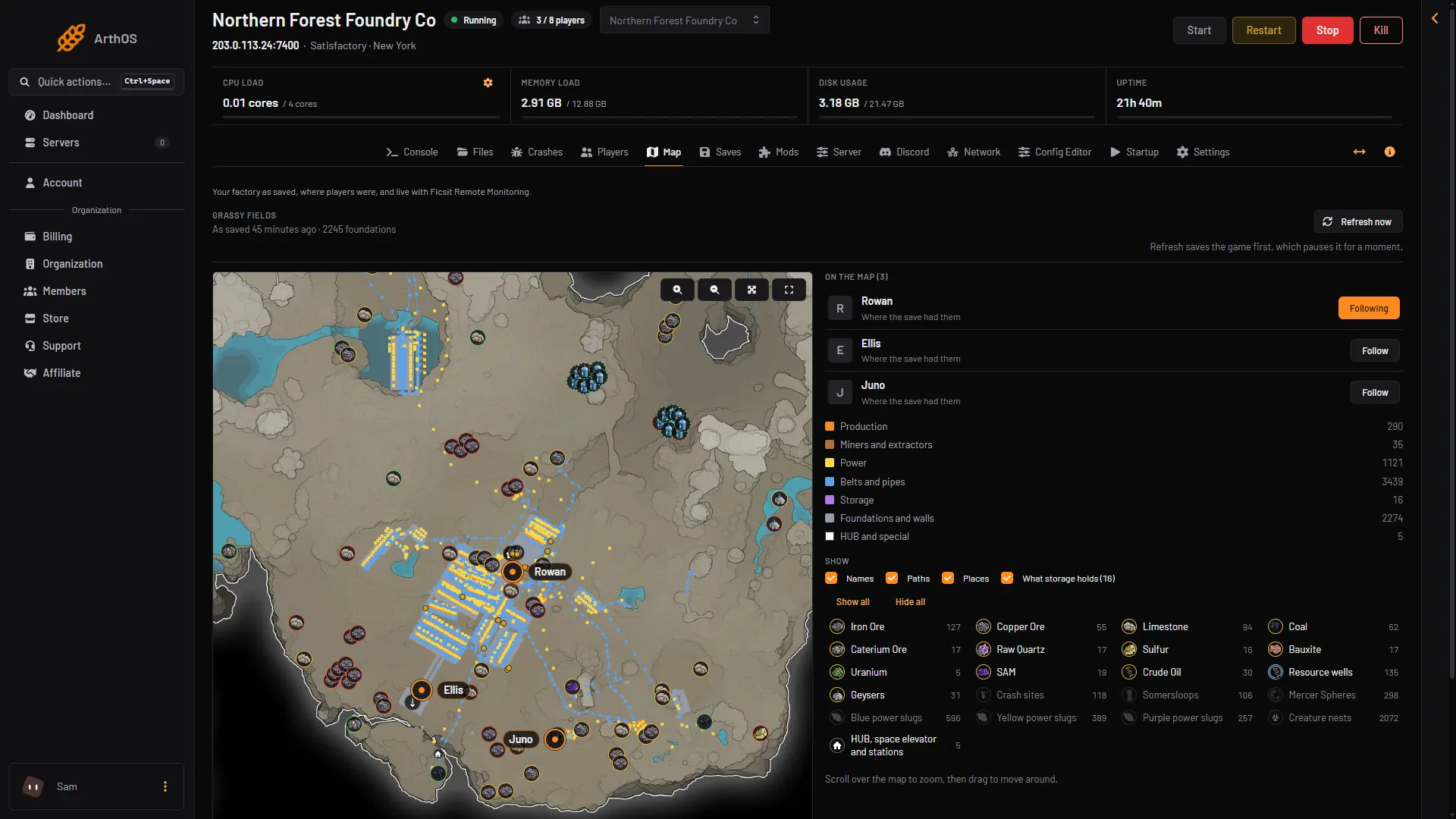
The Map page draws your factory from the newest save, on the game’s own map. It shows where players were when the save was made. For positions that move live, you need a mod (see below).
Open the map
Open the Map page. The heading shows the session name (a session is one factory and all its saves), and under it “As saved” with the time of the save and the number of foundations.
The map needs a save. A new server has none. If the page says “No save yet. Start a game on the Saves page and the map draws itself from its first save.”, start a game with New game on the Saves page. The map then draws itself.
- Refresh now
- Buildings by kind
What you see
The buildings are drawn in colours by kind. The list beside the map shows each kind with its count:
- Production
- Miners and extractors
- Power
- Belts and pipes
- Storage
- Foundations and walls
- HUB and special
Players are drawn where the save last had them. Their card says “Where the save had them”. Without a mod, the map cannot show where players are now.
The map also draws the game’s own places, in rows with a count each. Resource nodes show by kind and purity. The other rows are resource wells, geysers, crash sites, Somersloops, Mercer Spheres, blue, yellow and purple power slugs, creature nests, and the HUB, space elevator and stations.
At first the map shows the resources, Resource wells and Geysers. Picked up shows too, but only when the save has picked anything up. Crash sites, Somersloops, Mercer Spheres, the three power slug rows and Creature nests stay hidden until you tick them. A place that is already used or picked up is marked so (”, in use”, ”, picked up”).
Under Show, four switches turn parts of the map on and off: Names, Paths, Places and What storage holds.
Point at a storage box, or tap it on a phone, to see its name and what it holds, written as the name, a colon, then each item with its count. An empty box says “empty”.
How old is the map?
The map is only as new as the newest save. The game autosaves every 300 seconds by default, so the map can be up to five minutes behind. See autosave settings to change that.
To draw it now, press Refresh now.
- Start the server. Refresh now does nothing while it is stopped.
- Choose Refresh now.
- Wait. The panel saves the game first, which pauses it for a moment, then draws the map again.
The panel says “Saved and drawn again.” when it is done. The save it makes is named after the session, with _panel at the end. Save now with an empty name, the save before a load, a new game or an upload, and Refresh now all write that same file, and each one replaces what the last one wrote. For a rollback point, use Save now with a name of your own.
You can press it once a minute at most. After a press the button reads “Again in (seconds) s”. If you do not see the button, a member’s role must allow it.
Zoom, move and follow
- Scroll over the map to zoom, then drag to move around. On a phone, zoom with the buttons on the map.
- Zoom in, Zoom out and Whole map are buttons on the map. Full screen fills the screen.
- Under On the map, each player has Follow. The map then stays centred on that player. Dragging the map stops it.
- On the Players page, Show on the map next to a player opens the map and follows them.
Live positions
With the Ficsit Remote Monitoring mod, the map shows players, trains, drones and vehicles moving. See live map with Ficsit Remote Monitoring. Read its warning first.
If it does not work
- “The newest save is larger than the map reads.” The map reads saves up to 256 MB.
- “The newest save could not be read.” The page gives the reason in brackets. The newest save may be damaged. See load a save to go back to an earlier one.
- Players are missing. They show only if the newest save knows them. Press Refresh now after they have played.
- Refresh now is greyed out. The server is stopped, or you pressed it less than a minute ago.
More about the game: Satisfactory servers.