

















Two things can restart a Space Engineers server on its own. The game has its own restart rows in Server settings of the Config Editor. And the panel starts a server that stopped by itself, through the Auto-Start card on the Settings tab.
Not checked on a Loafhosts server: whether the game’s own rows restart it at all, and what Crashes then shows. The panel reads a game that ends by itself as a crash.
The rows
All are in the Server card on Server settings. The game keeps them in SpaceEngineers-Dedicated.cfg, and the tab prints each key beside its label. The key AutoRestatTimeInMin is spelled that way in the game’s own file.
- Restart after a crash (
AutoRestartEnabled). On or off. The help line says: “The game’s own; the panel’s daemon also starts a server that stopped by itself.” - Restart every (minutes) (
AutoRestatTimeInMin). A whole number from 0 to 100000. This is the game’s own timed restart. 0 means never. - Save before a timed restart (
AutoRestartSave). On or off. By its name, it asks the game to save before the timed restart. - Warning before a stop (minutes) (
ManualActionDelay). A whole number from 0 to 1440. - Stop warning (
ManualActionChatMessage). The words of the warning. Write{0}where the minutes left should appear, for exampleServer will shut down in {0} minutes. - Watchdog check every (seconds) (
WatcherInterval). A number from 0 to 3600. - Watchdog: slowest simulation speed (
WatcherSimulationSpeedMinimum). A number from 0.0 to 1.0. A simulation speed of 1.0 is real time.
The game’s wiki does not describe the two watchdog rows, so what they do is not checked. By their names, the game checks every so many seconds against the slowest speed you set. Test any change on a quiet server first.
Not checked with a player on 1.210 as of 15 November 2026: whether players see the stop warning, and what the warning rows do under the panel.
Set them
- Open the Config Editor tab and choose Server settings (1).
- In the Server card, change the rows you want.
- Press Save.
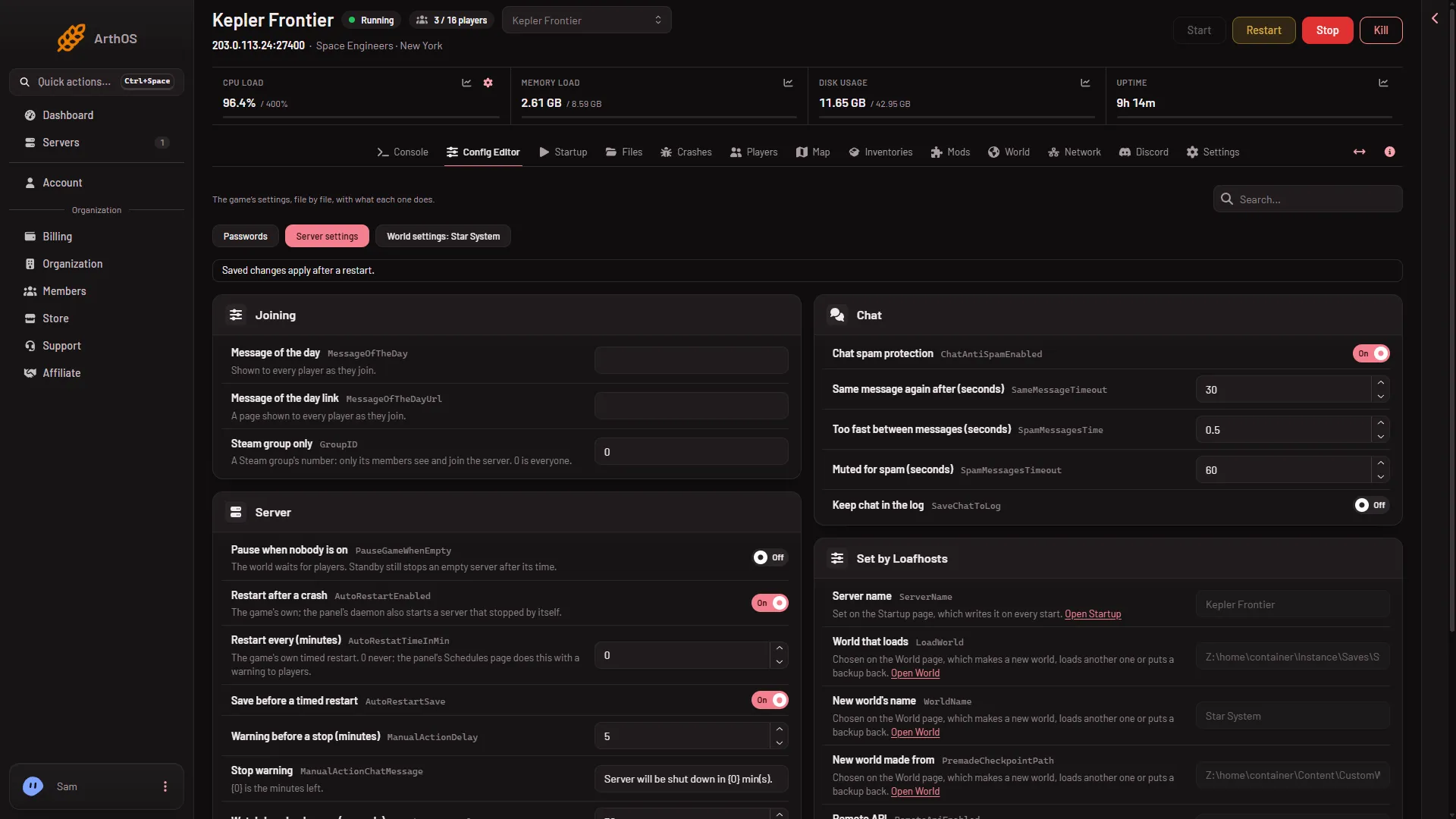
- Server settings tab
Settings apply at the next start. You can save while the server runs, and the values stay after a stop.
What the panel does as well
The Settings tab has an Auto-Start card with a Behavior list for starting a server that stopped by itself. A server you stop from the panel stays stopped. A game that ends on its own counts as a crash, and the Crashes tab shows it. See what to do when it crashes.
Warn players before a restart
A restart set on the Schedules page does not warn players. To warn by hand, use Message everyone on the Players page, which needs the panel tools. This game has no restart with a countdown on Schedules. See a daily restart schedule.
If it does not work
- Nothing restarts. Check Restart every (minutes) is not 0, then restart the server so the setting is read.
- It restarts again and again. Open Crashes and read the newest start. A world that cannot load reads Crashed or Failed to start: read the finding.
More about the game: Space Engineers servers.
Sources: spaceengineers.wiki.gg: Setting up a Space Engineers Dedicated Server