

















Use Stop to shut your Space Engineers server down. A stop saves the world first, in 1 to 3 seconds, and the server is off 3 to 9 seconds after you press it. Kill does not save: you lose what happened since the last autosave.
The four buttons
They sit at the top right of every server page.
- Start starts a stopped server. The first start makes the world, and players can join once the Console shows
Game ready. For about 11 minutes after the first start the server builds .NET files (the game’s software framework) in the background, so it works harder and may run slower. A later start of a small world took about half a minute on a Loafhosts server (measured: 31 seconds, Star System with three mods). - Stop asks the game to save and shut down. Use this one.
- Restart stops the server and starts it again. Every player is disconnected. With the panel tools on, warn them first with Message everyone on the Players page.
- Kill ends the process at once. It does not ask the game to save.
Press Stop and wait until the server shows as offline before you press Start again.
Save first, if you want to be sure
With the panel tools on, the Players page has Save now. It asks the game to save the world and does not wait, so wait a few seconds after you press it. It does not stop the server. Without the panel tools, a normal Stop saves. See Space Engineers panel tools and save the world.
Auto-Kill: when a stop takes too long
Stop asks the game to save and shut down. If the server is still running after a set number of seconds, the panel kills it, so a stop that does not finish cannot block the server. That is Auto-Kill.
- Open Settings.
- In the Auto-Kill card, keep Enabled on (1).
- Check Seconds until auto-kill (2). A new Space Engineers server shows 30.
- Press Save. The panel says “Server auto-kill updated.”
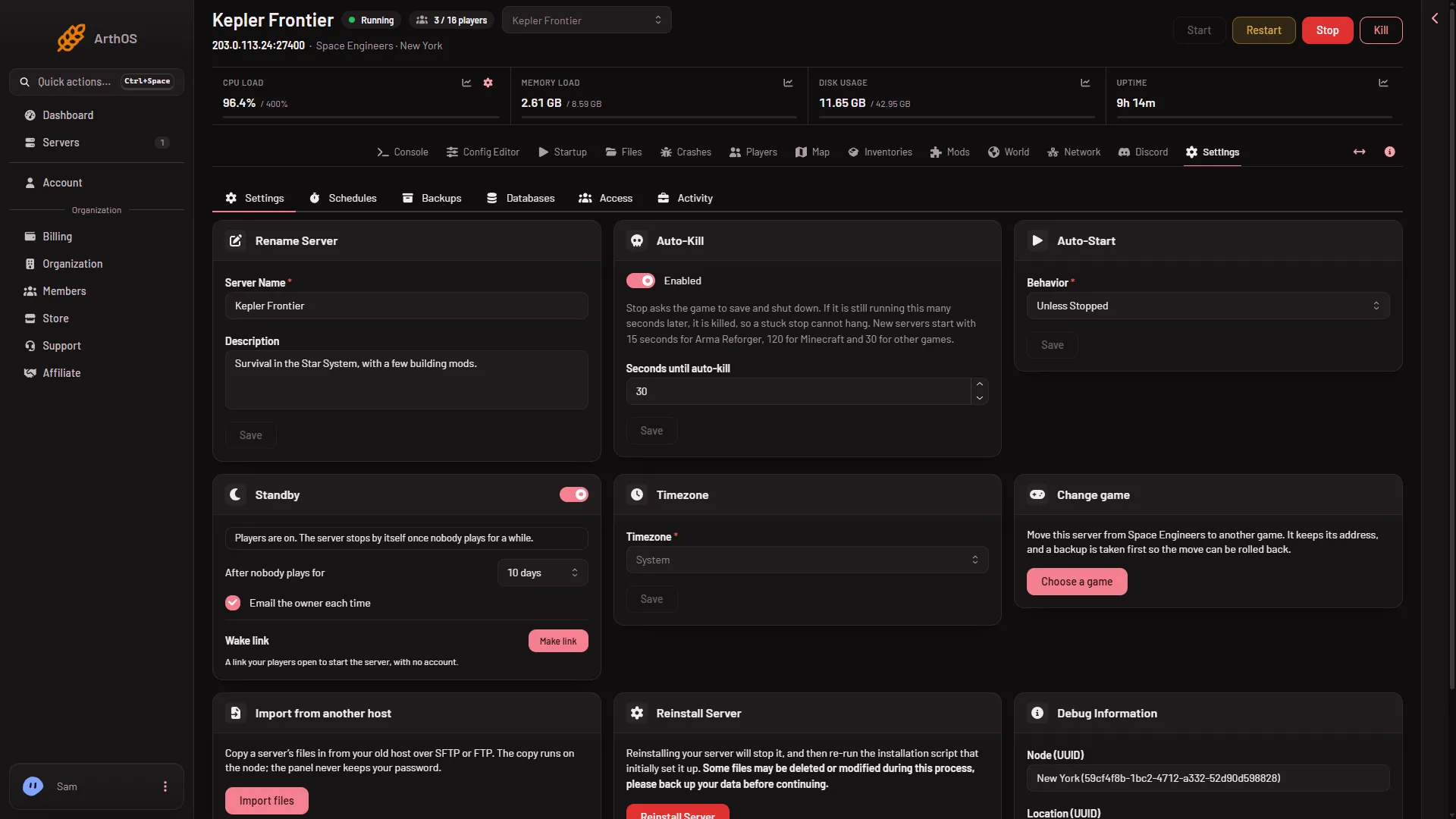
- Auto-Kill
- Seconds until auto-kill
A normal stop on a small world ends in 3 to 9 seconds, so 30 is enough. A big world may need longer to save. If a stop of a big world is cut off at the limit, raise the number. Not checked with a big world on 1.210 as of 15 November 2026.
Never use /stop in the game
Space Engineers has an admin chat command /stop that saves and stops a dedicated server. Do not use it on Loafhosts. It ends the server on its own, and the panel reads that as a crash. Stop the server from the panel. That saves too.
If it does not work
- Stop takes a long time. The world may be big. Wait for Auto-Kill, or raise it for next time.
- The server does not stop and Auto-Kill is off. Press Kill. Then turn Enabled back on.
- It stopped by itself. Open the Crashes page and read the start. See lost progress.
- Start is greyed out. The server is not offline yet. Wait for it to finish stopping.
More about the game: Space Engineers servers.
Sources: spaceengineers.wiki.gg: Chat, spaceengineers.wiki.gg: Setting up a Space Engineers Dedicated Server