

















Make a schedule with a Daily trigger and one step, Send Power Signal, set to restart. The server then restarts at the same time every day. A scheduled restart does not warn players. They are disconnected when it happens, so tell them in advance.
Create the schedule
- Open the Settings tab, then the Schedules tab.
- Press Create Schedule.
- In Schedule Name (1), type a name such as
Daily restart. - Under the trigger, set Runs (2) to Daily, then pick the time in At. Times use the server timezone, which the dialog shows and the Timezone card on Settings sets.
- Press Create (4).
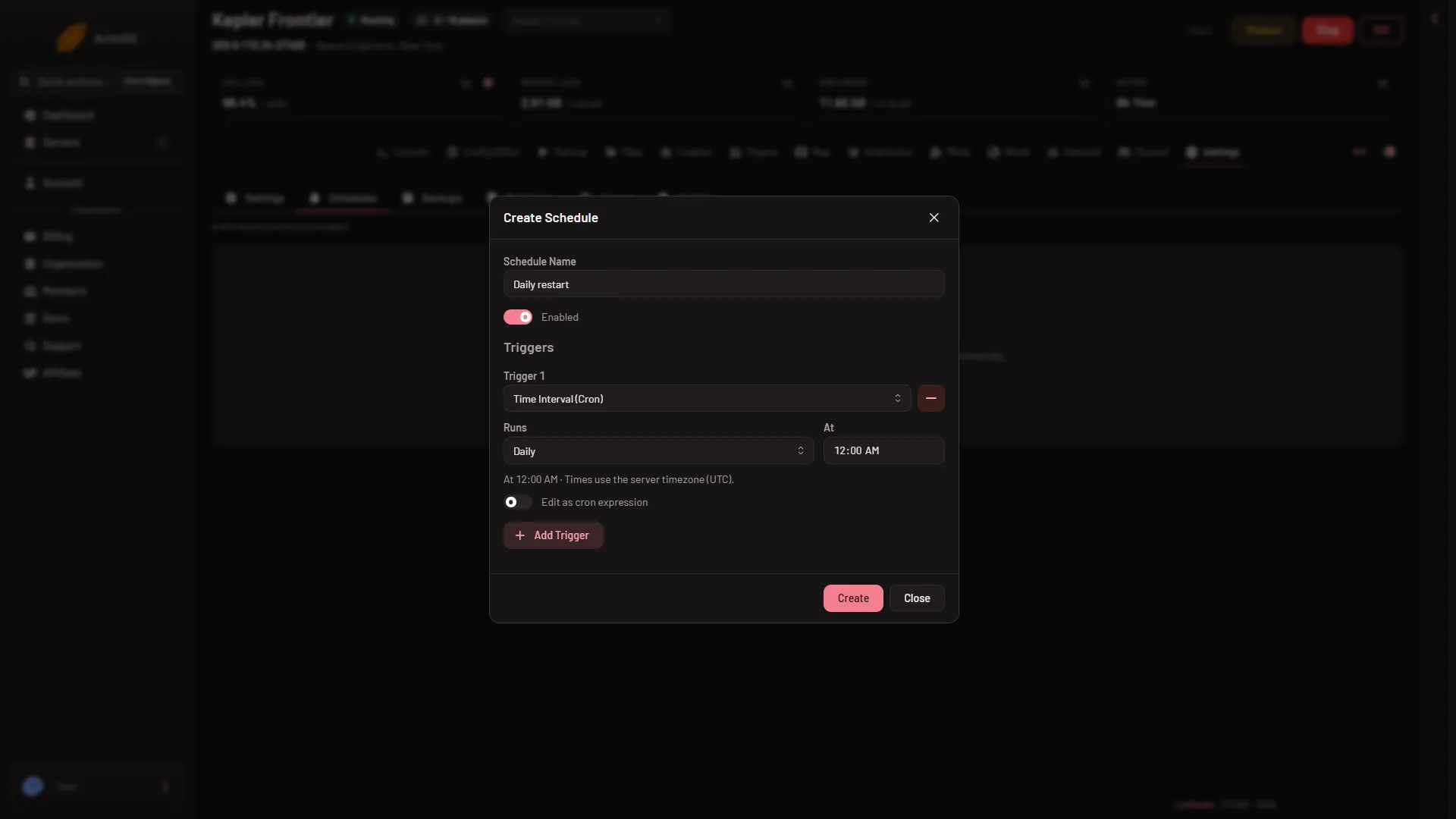
- Schedule Name
- Runs
- Add Trigger
- Create
Add Trigger (3) adds a second time, for a server you want restarted twice a day.
Add the restart step
The schedule exists but does nothing yet. It needs a step.
- Open the new schedule.
- Press Add Step.
- Choose Send Power Signal.
- Set Power Action to Restart and save the step.
The schedule is on when its Enabled switch is on. Use Run Now once to check it. Do that at a quiet time, because it restarts the server.
The restart does not warn players
A Space Engineers server has no restart with a countdown. That one is for Minecraft only. The restart goes straight through, and players are disconnected.
To warn them, send a message a few minutes before. On the Players page, press Message everyone, type your text and press Send. It shows in the game’s chat from “Server”. This needs the panel tools on and you at the keyboard, see message players. Not checked with a player on 1.210 as of 15 November 2026.
Save first, then restart
A stop saves the world, and a normal restart takes a few seconds. A restart that is still running after the Auto-Kill time (30 seconds on a new server) is killed, and a kill does not save.
The game’s own timed restart
The Config Editor has its own rows under Server settings, Server:
- Restart every (minutes) (
AutoRestatTimeInMin). A value of 0 means never. - Save before a timed restart (
AutoRestartSave). - Warning before a stop (minutes) (
ManualActionDelay) and Stop warning (ManualActionChatMessage).
The game spells the first key that way in its own file. Changes apply at the next start.
Not checked as of 15 November 2026: whether the game’s own Restart every (minutes) works under the panel, what Crashes then shows (the panel reads a game that ends by itself as a crash), and whether players see the stop warning. The help line on Restart every (minutes) says that Schedules warns players. It does not, for this game. Use one way or the other, not both.
If it did not restart
- The server was in standby. Schedules wait while a server sleeps and do not wake it. See standby.
- The time was wrong. Times use the server timezone, not yours. Check the dialog and the Timezone card.
- The schedule is off. Open it and turn Enabled on.