

















“PCU limit reached” means the world has run out of PCU, so nobody can build more until some blocks are removed or the limit goes up. PCU stands for Performance Cost Unit. Every block a player places costs some PCU, and removing a block gives it back. To fix it, raise PCU limit (TotalPCU) in the Config Editor with the server stopped, or let an admin ignore the limit in the game.
The message shows on a player’s screen in game. It does not mean the server has a fault. Your server keeps running.
Check what is using the PCU
Before you raise anything, know what the limit is doing. The game’s wiki says an armor block costs 1 PCU on PC, and projected blocks cost 1 PCU each. A block that is placed but not welded yet costs 1 PCU too. Block weapons cost the most. A player can see the PCU of a grid (a ship or a station) on its Info screen, and in the G menu at the bottom right. With the panel tools on, the Inventories page shows a grid’s PCU as well.
If one player or one faction built a large fleet, a bigger limit may only move the problem. Large builds slow the server for everyone. See PCU limit for how the limit is shared out.
Raise the limit in the panel
The world’s limits are world settings. The game writes the world’s settings file itself when it stops, over anything changed while it runs. So the panel only lets you save them while the server is stopped.
- Open the server’s page and choose Stop. A normal stop saves the world.
- Open the Config Editor.
- Choose the world’s settings source, named World settings with the world’s folder name. A new server shows only Passwords and Server settings until it has started twice: the first start makes the world, the next start names it as the world that loads. Start it again (or restart it), then stop it to change world settings. The same happens after Make it at the next start on the World page.
- Go to the Building and limits group (1).
- Check Block limits (2) first. Keen Software House, the game’s makers, says None turns the limits off: there is no PCU limit at all, and Most blocks in one grid and Most blocks per player are ignored. With None, raising PCU limit changes nothing. The other choices are For everyone together, Per faction and Per player.
- Change PCU limit (3). This is a whole number. How it is shared depends on Block limits:
- For everyone together: one pool for the whole world.
- Per faction: the number is divided by Most factions (
MaxFactionsCount). When that is 0, each faction gets the whole number. Players with no faction get none. - Per player: the number is divided by the world’s player limit.
- If players hit a limit on one ship or one person, also check Most blocks in one grid (
MaxGridSize) and Most blocks per player (MaxBlocksPerPlayer).0means no limit on both. - Press Save, then start the server.
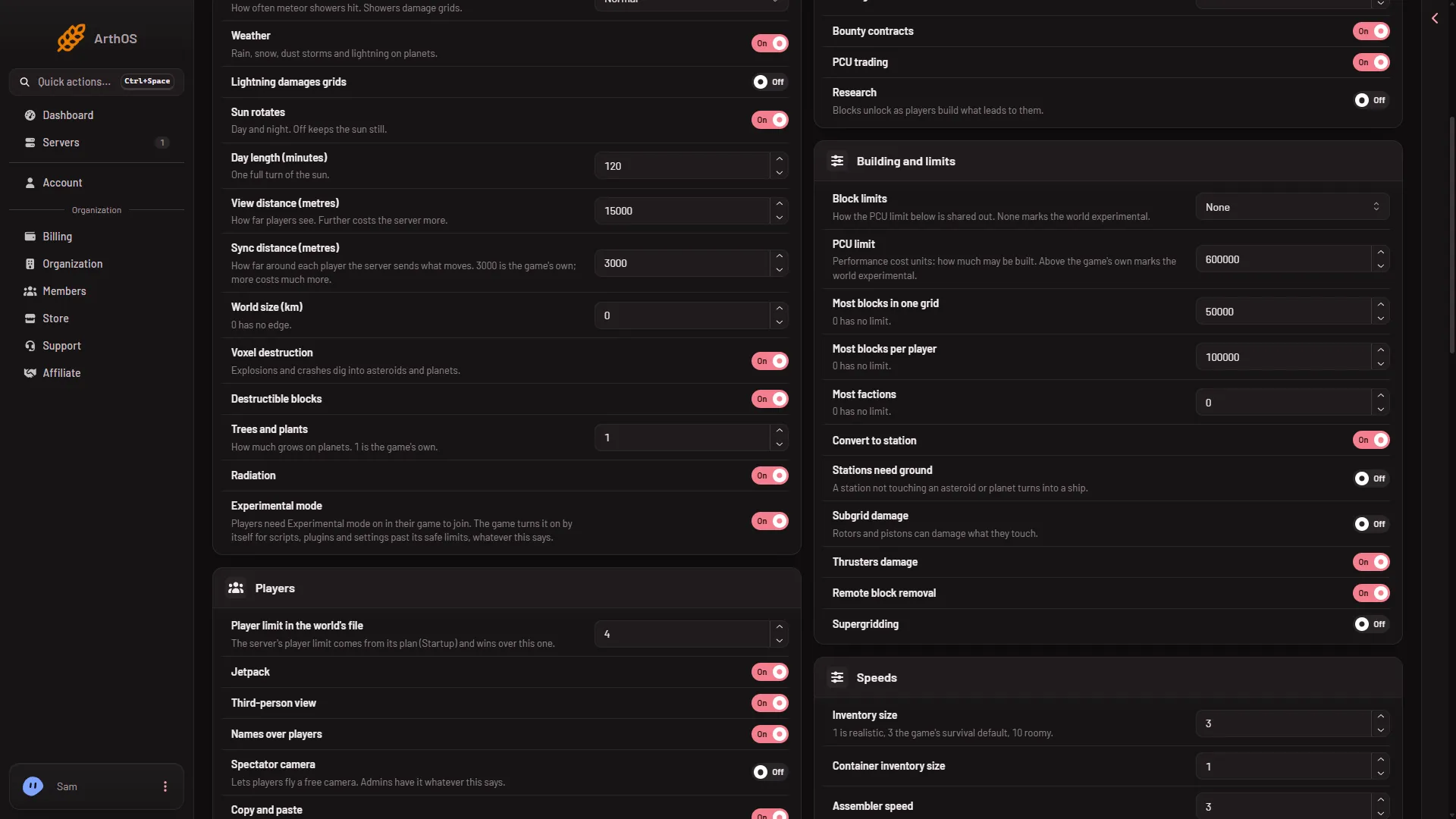
- Building and limits
- Block limits
- PCU limit
The picture shows Block limits on None next to a PCU number: that is a demo, and with None the number is not used. The new value is read at the next start. A running server does not change.
Experimental mode
On a new server players already need Experimental mode on in their game (Options, Game), because the world it makes has Programmable block scripts on and Block limits on None. A very high PCU limit is a further reason, so is any other limit outside the game’s safe range. To see what your server counts, open the Console, find the line Experimental mode: after Loading session, and read the reason line under it. See Experimental mode for how a player turns it on.
Let an admin ignore the limit
An admin can skip the limit for themselves while they are in game. This is useful for a fix, or for an admin who builds for the server. It does not change what other players can build.
- In game, press
Alt+F10to open the Admin Screen. Your player must be an Admin. - In Admin Tools, turn on Ignore PCU limits.
- Choose Submit Changes.
The game’s own text says: “When enabled, you will completely ignore all PCU limits. This may cause you to go into negative PCUs.”
Admin Screen changes apply to the running world and reach the next save. They are not the server’s settings. See Admin Screen.
If it does not work
- The Save button is greyed out. The server is not stopped. Stop it and try again.
- A player still sees the message after the restart. Check that Block limits is not None, then check Most blocks in one grid and Most blocks per player. Not checked with a player on 1.210 as of 15 November 2026.
- Players say they cannot join after the change. The world may be experimental for a new reason. Read the reason line in the Console, as above.
- PCU seems to move between players. The switch PCU trading in the Economy group lets players sell PCU to each other. Turn it off if you do not want that. It does nothing while Block limits is None.
Back to Space Engineers hosting.
Sources: spaceengineers.wiki.gg: PCU, spaceengineers.wiki.gg: Admin Screen, spaceengineers.wiki.gg: World Settings, spaceengineers.wiki.gg: SessionSettings