

















PCU is the game’s way of counting how much players have built. The PCU limit row (TotalPCU), in the Config Editor on World settings, sets how much the world allows in total. It only counts while Block limits is not on None: with None there is no PCU limit at all. Change it with the server stopped, save, then start.
PCU stands for Performance Cost Unit. Each block costs some PCU when it is placed, and removing the block gives the cost back. On a PC an armor block costs 1 PCU. Weapons and some machines cost much more. When a player has used up their share, the game shows “PCU limit reached.” and refuses to build more until something is removed.
Set the limit
- Choose Stop and wait for Offline. World settings cannot be saved while the server runs. A new server shows the World settings tab only after two starts: see the world settings guide.
- Open the Config Editor and choose World settings.
- Find the Building and limits group (1).
- Set Block limits (2) first, to anything but None.
- Set PCU limit (3). The picture shows a number next to Block limits on None: that number counts for nothing while limits are off.
- Set Most blocks in one grid and Most blocks per player if you want them, then choose Save and Start.
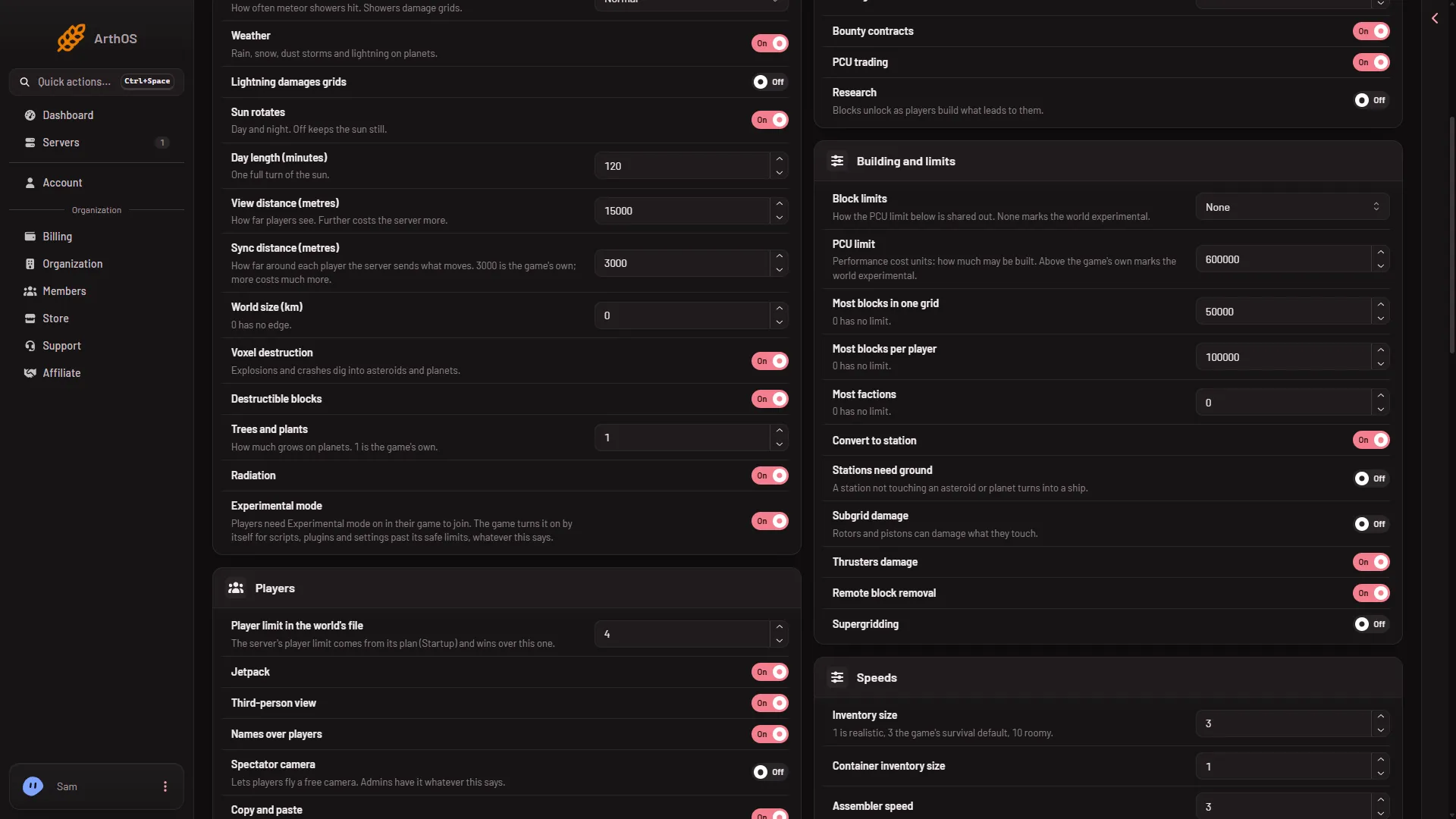
- Building and limits group
- Block limits
- PCU limit
How the limit is shared
Block limits decides who shares the number. Per Keen Software House, the game’s makers:
- For everyone together: one pool for the whole world.
- Per faction: the number is divided by Most factions. When that is 0, each faction gets the whole number. Players with no faction get 0 PCU.
- Per player: the number is divided by the world’s player limit.
The block limits guide covers these choices in more detail.
What each row does
- PCU limit: a whole number from 0 to 100000000. Not checked as of 15 November 2026: which number the game uses by default, because Keen’s own pages disagree. Read the number the panel shows and write it down before you change it.
- Most blocks in one grid: the biggest single ship or station (a grid is one connected build), counted in blocks. 0 has no limit.
- Most blocks per player: how many blocks one player may own. 0 has no limit.
Experimental mode
The game counts some values as experimental. Block limits on None is one of them, and a PCU limit past the game’s safe range is another. Players then need Experimental mode on in their game (Options, Game) to join. A new server already needs it, because it has scripts on and Block limits on None, so raising the limit adds nothing the players must change.
The game turns the mode on and off by itself, so to switch it off every reason has to go. To see what is left, open the Console, find Experimental mode: after Loading session, and read the reason line under it. Read the Experimental mode guide.
Keen says values outside the range its own game screens allow are not tested and not officially supported. Raise the limit in steps and watch the server.
Who can ignore the limit
An admin can switch on Ignore PCU limits in the game’s admin tools. Then they ignore all limits, and the game warns this may take them below zero. Use it for repairs, not for a normal player.
Pirates and other computer-run factions have their own budget, Pirates’ PCU, in the Encounters and NPCs group. Changing the world’s PCU limit does not change it.
PCU trading (in Economy) lets players sell PCU to each other. See the world settings guide for every row.
If it does not work
- Save is greyed out. The server is not offline. Stop it first.
- I raised the PCU limit and nothing changed. Block limits is on None, so the PCU limit and the two grid rows do nothing. Pick another choice.
- Players say “PCU limit reached”. Raise PCU limit, or ask them to remove blocks. See the PCU limit reached guide.
- Nobody can join after a change. Players need Experimental mode on in their game. Check the Console reason line to see which setting causes it.
More about Space Engineers servers on Loafhosts.
Sources: spaceengineers.wiki.gg: PCU, spaceengineers.wiki.gg: Experimental mode, spaceengineers.wiki.gg: SessionSettings