

















Everything that is not a player lives under Encounters and NPCs in the world settings: pirate drones, animals, cargo ships, wrecks and supply drops. Switch a row off to stop it, with the server stopped. The change takes effect at the next start.
The rows are keys in the world’s Sandbox_config.sbc file, under <Settings>. EnableWolfs is spelled that way in the game’s own file.
Change the rows
- Stop the server from the header. These settings can only be saved while it is stopped, because the game writes the world’s settings file when it stops.
- Open the Config Editor and choose the World settings tab, for example World settings: Star System.
- Scroll to the Encounters and NPCs group (1).
- Change the rows you want, press Save in the bottom bar, then start the server.
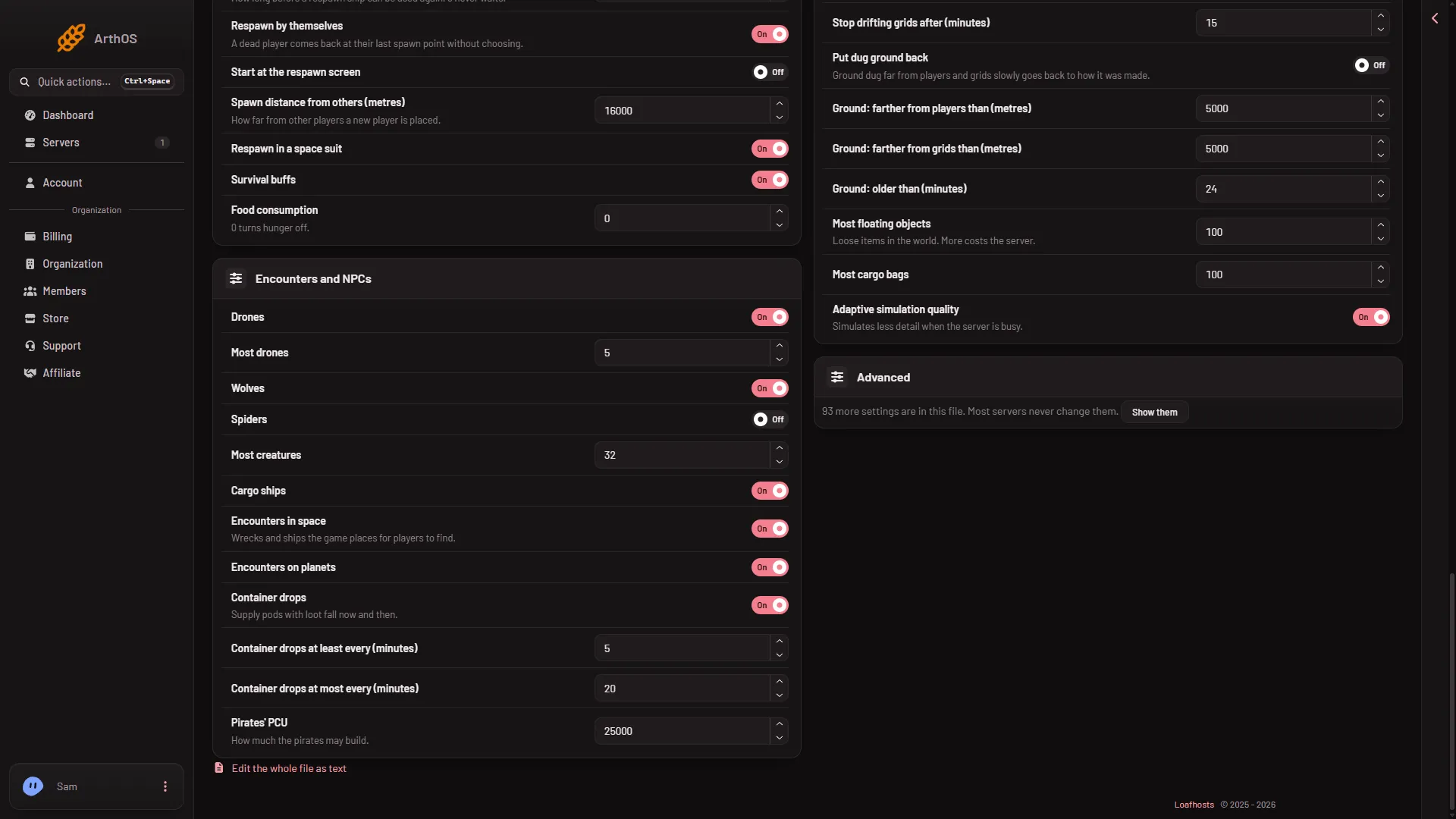
- Encounters and NPCs group
A new server shows only Passwords and Server settings until it has started twice: the first start makes the world, the next start names it as the world that loads. Start it again (or restart it), then stop it to change world settings. The same happens after Make it at the next start on the World page.
What each row does
- Drones (
EnableDrones). Pirate drones. Keen Software House, the game’s makers, say in their wiki that pirates send armed drones if you approach the game’s NPC stations. Off stops them. - Most drones (
MaxDrones). A whole number from 0 to 1000: the most drones at once. - Wolves (
EnableWolfs) and Spiders (EnableSpiders). The animals. Keen’s wiki says the wolves are Cyberhounds and the spiders are Saberoids. Each is its own switch. - Most creatures (
TotalBotLimit). A whole number from 0 to 1000: the most animals at once. Keen’s wiki says the game’s range is 16 to 512 and that nothing above 64 is recommended. - Cargo ships (
CargoShipsEnabled). The ready-made NPC ships that fly by. Keen’s wiki says they are on by default and that armed ones fire at hostile players and ships that come close. Keen’s reference also says this switch plays a part in whether NPC factions and stations are generated. - Encounters in space (
EnableEncounters). The panel says “Wrecks and ships the game places for players to find.” Some of these ships can be armed. - Encounters on planets (
EnablePlanetaryEncounters). The same kind of thing on planets. - Container drops (
EnableContainerDrops). The panel says “Supply pods with loot fall now and then.” Keen’s wiki says an unknown signal makes a cargo drop fall on a parachute. - Container drops at least every (minutes) (
MinDropContainerRespawnTime) and Container drops at most every (minutes) (MaxDropContainerRespawnTime). Whole numbers from 1 to 10000: the shortest and longest wait between drops. Keen’s reference calls them minutes between unknown signal spawns for each player, and its own server tool takes 0 to 100. - Pirates’ PCU (
PiratePCU). A whole number from 0 to 10000000. The panel says “How much the pirates may build.” PCU is the Performance Cost Unit, a number the game gives every block. A lower number keeps the pirates’ grids small. A grid is a ship or a station.
If the server lags
Which of these rows costs a server the most was not measured. See the lag guide.
If it does not work
- The Save button is greyed out. The server is not stopped. Stop it, then change the rows.
- No World settings tab. See the note under the picture: start the server again, then stop it.
- Pirates still come. Check Drones is off in the world that loads, and that you saved with the server stopped. The tab name shows the world.
- An animal still shows up. Animals that were already in the saved world may stay until they are removed. Not checked with a player on 1.210 as of 15 November 2026.
- A row you expected is missing. Rows the panel does not list sit under Advanced, with Show them.
More about the game: Space Engineers servers on Loafhosts.
Sources: spaceengineers.wiki.gg: World Settings, spaceengineers.wiki.gg: SessionSettings