

















A friend gets access to your server through a role on your organization. You give the role this server, then you give your friend the role. Settings, Access on the server shows who can reach it today. There are no separate invites for one server.
See who has access
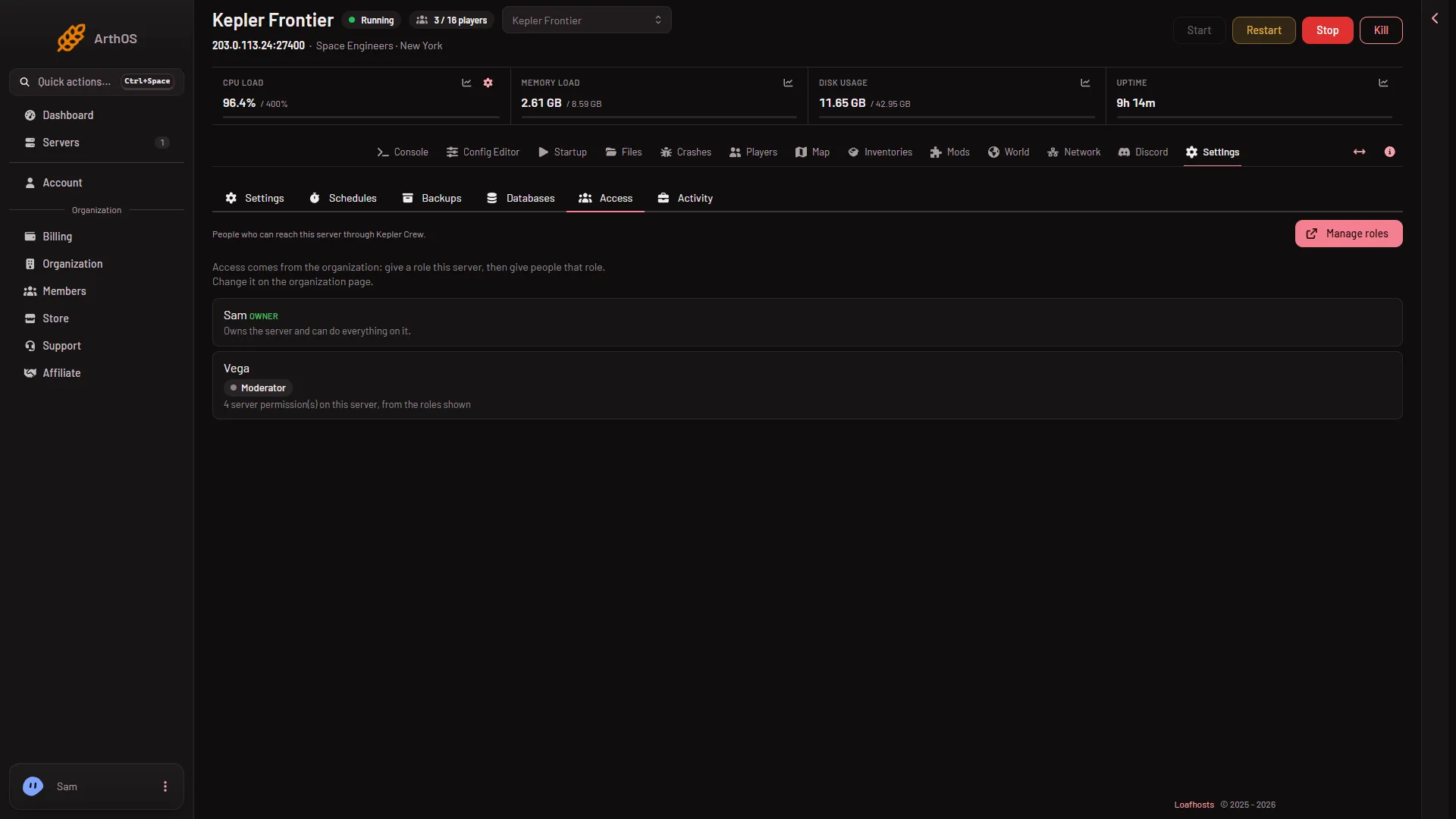
- Open your server and choose Settings, then the Access tab.
- Read the text at the top: “People who can reach this server through (your organization).”
- The first row is you, marked as the owner: “Owns the server and can do everything on it.” The owner has every permission, so nothing below limits you.
- Every other row is a person who reaches the server through a role. It shows the role and how many server permissions that role gives.
- Manage roles
- The owner
The picture uses made-up names. Your list shows your own people.
Give a friend a role
- On Access, press Manage roles (1). It opens the organization page. You can also reach it from the organization page itself: Settings, Access, Manage roles.
- Make a role, or open one you already have.
- Give the role this server. On the role form, the permissions are listed by their key under Game server access. Tick the ones from the table below.
- Give your friend the role.
Access comes from the organization. Change it there, not on the server. A role with this server but no permission ticked gives nothing on it, and Access says so.
What each page needs
A page or button a person has no permission for is left out for them. It is not greyed out. Pick permissions with that in mind.
| What your friend wants to do | Permission to tick |
|---|---|
| Open the Players page and a player’s inventory | players.read |
| Message, kick, ban, lift a ban, and change the Admins, Bans and Reserved slots lists | players.moderate |
| Save now, send to the respawn screen, move a player, give and remove items | players.game |
| Open the Map | live-map.read |
| See ships and stations and open Inventories | live-map.private (Inventories needs live-map.read as well) |
| Give or remove an item inside a ship or station block | players.game and live-map.private |
| Turn the panel tools on or off | startup.update |
| Open the World page and Crashes | files.read-content |
This guide covers these pages only. Other pages, such as power, console and files, have their own permissions on the same form.
The panel tools are an add-on the server loads (a plugin). Without them the Players page still lists everyone the world knows. A person with players.moderate can still ban, lift a ban and use Make admin or No longer admin there, and the change applies at the next start. Kick, message, move, give items and Save now need the tools. See the Players page tour.
Take access away
Open the role on the organization page and take the server off it, or take the role off your friend. Your Access list then shows the new picture.
If it does not work
- My friend sees the server but not a page. The role lacks the permission in the table. Add it on the organization page.
- My friend opens a page and sees no buttons. Buttons need a stronger permission than the page. For example,
players.readshows the Players page, but kicking needsplayers.moderate. - A person is missing from Access. They have no role with this server yet. Give a role this server first, then give them the role.
- Buttons are there but nothing happens in the game. The panel tools may be off or not loaded yet. Not checked with a player on 1.210 as of 15 November 2026.