

















The Players page shows who is on your server, everyone the world knows, the server’s lists and what happened. With the panel tools on, it also lets you act in the game: message, kick, ban, change rank, move and give items. With the tools off, it shows names only, plus a few list actions. This page walks through it from top to bottom.
The panel tools line decides what you can do
Under the Join box sits a strip about the panel tools. They are an add-on the server loads (a plugin). The strip has one sentence and, for people allowed to change startup settings, one button.
- Off: the strip says who is on shows names only, and the panel cannot act in the game. The button is Turn on the panel tools.
- Waiting: the tools are on in Startup but not loaded yet. They load at the next start.
- Running: the tools are running. The button is Turn off.
Players of a new server already need Experimental mode on in their game, with the tools on or off. See Experimental mode. Turning the tools on or off changes a setting and nothing else. It never restarts the server, and it takes effect at the next start. Details are in the panel tools guide.
The Join box and the three numbers
- Copy the address
- Simulation speed
- On now
- Message everyone
- Save now
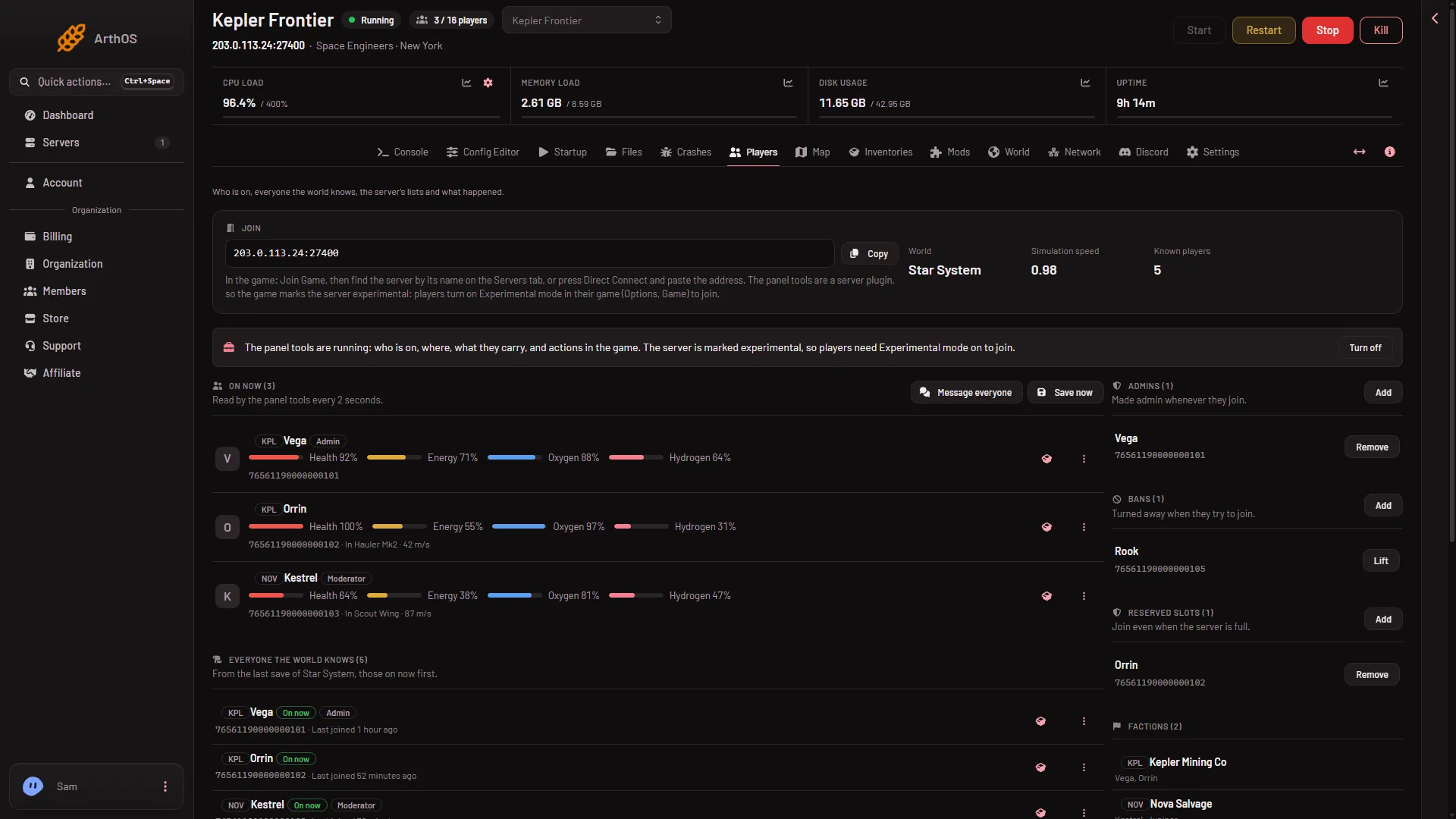
Join shows the server’s address with its port in one box. Press Copy (1) to copy it. The text under it tells players what to do in the game: Join Game, then find the server by its name on the Servers tab, or press Direct Connect and paste the address. That name is Server name on Startup. A new server is called Hosted By Loafhosts.com until its owner changes it.
Not checked with a player on 1.210 as of 15 November 2026: how Direct Connect takes the port.
Next to it are three numbers:
- World: the world that loads, by its folder name. A dash means no world is chosen yet.
- Simulation speed (2): how fast the game runs. 1.00 is full speed. It shows a dash with the tools off.
- Known players: how many people the world’s last save knows.
On now
On now (3) lists who is on. With the tools running, the panel reads the game every 2 seconds. Each row shows:
- a faction tag before the name, if they have one;
- a rank tag: Scripter, Moderator, Space Master, Admin or Owner. Someone with no rank gets no tag;
- Dead if their character is dead, and Banned if they are on the ban list;
- bars for Health, Energy, Oxygen and Hydrogen of their suit, with percentages;
- their SteamID64, a 17-digit Steam account number. Press it to copy it;
- the ship or station (a grid) they sit in, and their speed from 1 m/s.
The percentages were not checked with a player on 1.210 as of 15 November 2026.
With the tools off, On now falls back to the Steam player query, the list of players the game reports to Steam. It shows each name and how long they have been on, and nothing else, and its rows have no actions. If the game does not answer, the panel says it may still be loading its world. A stopped server shows “The server is stopped.”
Message everyone and Save now
Above the list, with the tools running:
- Message everyone (4) opens a box for up to 200 characters on one line. It shows in the game’s chat as a message from the server. It needs
players.moderate. - Save now (5) asks the game to save the world. It does not wait for the save to finish: wait a few seconds after it. It needs
players.game. Press it before you take a panel backup. Without the tools, a normal Stop saves.
The owner has every permission. A friend with a role needs the matching key: see letting a friend run the server.
The row menu
On On now, with the tools running, each row has a box button, which opens what that person carries, and a three-dots menu named Actions for their name. The menu holds:
- Message: one person only.
- Send to the respawn screen: their character dies where it stands, and what they carry stays with the body. Use it for someone stuck in a wall.
- Move to another player: puts them 2 m behind that player. It does not work on a dead player, or one sitting in a seat.
- Change rank: see player ranks and make yourself admin.
- Kick: they leave now and can join again. A kick writes nothing to any list.
- Ban: they leave now and are turned away when they try to join.
Kick and ban have an optional Reason. The player never sees it. It is kept in the server’s Activity and in What happened. Message, kick, ban and change rank need players.moderate. Respawn and move need players.game. Not checked with a player on 1.210 as of 15 November 2026.
Everyone the world knows
- Everyone the world knows
- On now tag
- Banned
- Factions
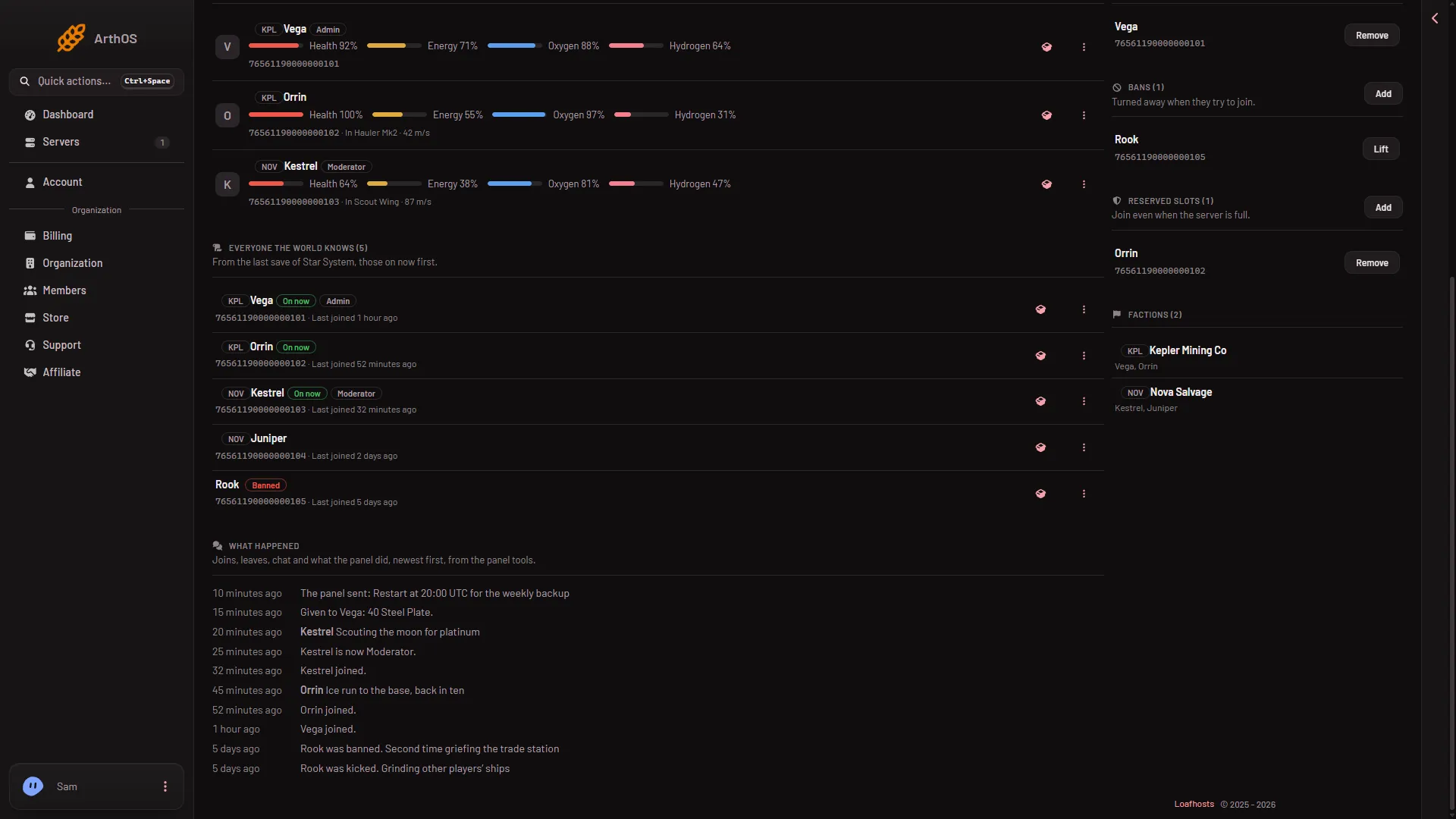
This list holds everyone who has played in the world that loads, read from the world’s last save. People on now come first, then the rest by latest join. Each row has a faction tag, an On now tag, a rank tag, a Banned tag, the SteamID64 and the time they last joined. The page draws the 200 most recent and counts the rest.
With the tools running, the menu on a row holds Change rank and Ban, or Lift the ban for someone already banned. With the tools off, a row here still offers Ban or Lift the ban (needs players.moderate) and Make admin or No longer admin, which edit the Admins list for the next start. Change rank needs the tools. The names, ranks and last joins here were not checked with a player on 1.210 as of 15 November 2026.
What happened
- What happened
- A message from the panel
- A rank change
- A ban
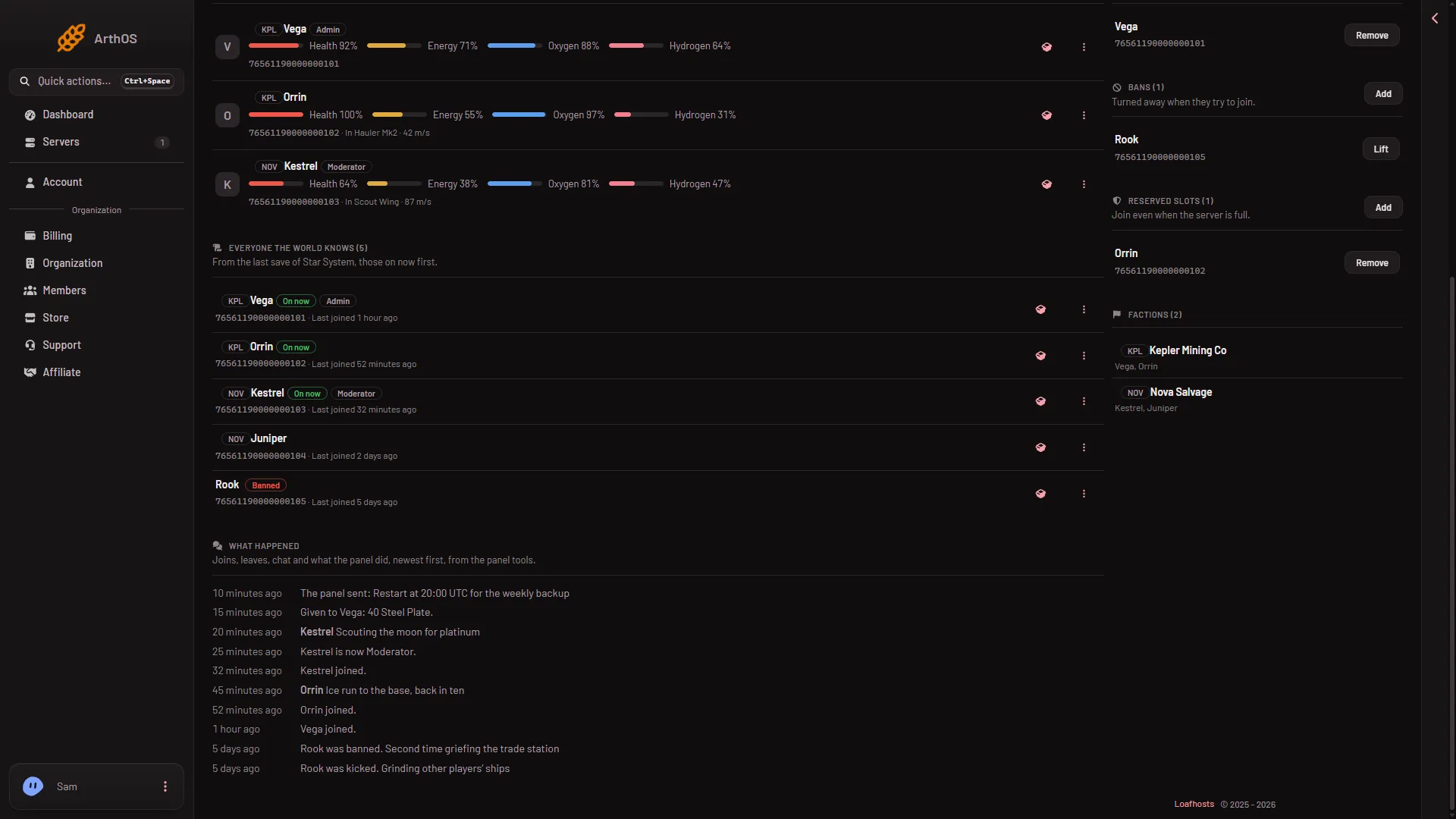
What happened shows the newest 40 events, with times: joins, leaves, chat, messages to everyone, kicks, bans, lifted bans, rank changes, respawns, moves, deleted ships and items given or removed. It comes from the panel tools, so with the tools off, or before they have run, it is empty. It does not record Save now, a message to one person, or a change to the lists.
Admins, Bans and Reserved slots
On the right are three lists. Each has an Add button for people with players.moderate.
- Admins: “Made admin whenever they join.” The game’s file calls it
Administrators. - Bans: “Turned away when they try to join.” Each row has Lift. The file calls it
Banned. - Reserved slots: “Join even when the server is full.” Each row has Remove. The file calls it
Reserved.
The three lists are in SpaceEngineers-Dedicated.cfg. Add asks for a SteamID64: 17 digits starting 7656119, for example 76561190000000150. The note says the list is read as the server starts. A change to these lists applies at the next start. The lists belong to the server, so they apply to every world on it. A ban stays for every world.
A ban or rank change made while the tools are ready acts at once. Made without the tools, it is written to the lists and applies at the next start.
Factions
Factions appears when players made factions. Each row shows the tag, the name and the members, leaders first. The game’s own pirate and trader factions are not listed.
When the panel tools are off
The page still shows who the world knows. On now shows names and time on from the Steam player query, with no actions. Everyone the world knows, the three lists and Factions show, from files. What happened is empty. A kick, a message, a move and Save now need the tools. You can still ban, lift a ban, make someone admin and edit the three lists, and they apply at the next start.
If it does not work
- A button is missing. Your role lacks its permission. See letting a friend run the server.
- A red message says the panel’s tools are not running yet. They load when the server starts. Turn them on, then restart. A restart disconnects every player.
- A red message says the game did not answer. It may be saving. Try again in a moment.
- A player is not on the Known list. The list reads the last save. A player on now who the save does not have yet is added at the top.