

















Open the Players page and read On now. With the panel tools on, it lists each player with their health, energy, oxygen and hydrogen, and the ship they are in. With the tools off, it lists names and how long each has been on.
In the game itself, a player can see who is online in the Steam server list: Server Details has View online players.
With the panel tools on
On now shows the count in its title, and the hint “Read by the panel tools every 2 seconds.” Each row has:
- The player’s name, with their faction tag before it and their rank after it.
- Dead when their character is dead.
- Banned when their SteamID64 is on the ban list.
- Bars for Health, Energy, Oxygen and Hydrogen, which are those of their suit. A dead player has no bars.
- Their SteamID64. Press it to copy it.
- “In (ship)” when they sit in a ship or station, and their speed in metres a second from 1 m/s.
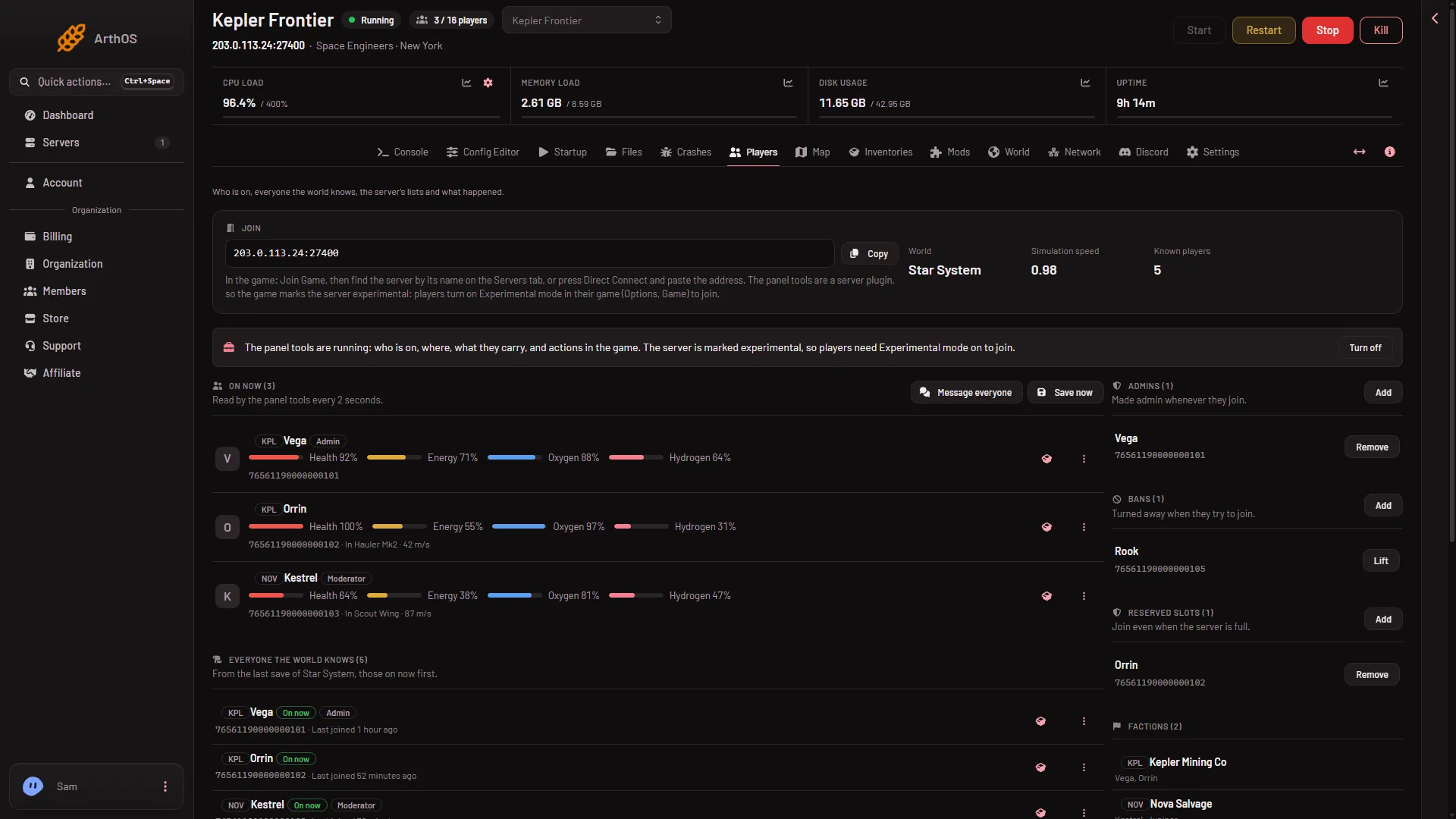
- On now
- Simulation speed
The box under the Join heading also shows the world’s name, Simulation speed (2) and Known players. A simulation speed of 1.00 means the server keeps up at full speed.
With the panel tools off
The panel asks the game for its list of players with the Steam player query, the list of players the game reports to Steam. That gives names and how long each has been on, and nothing else: no rank, no health, no ship and no buttons.
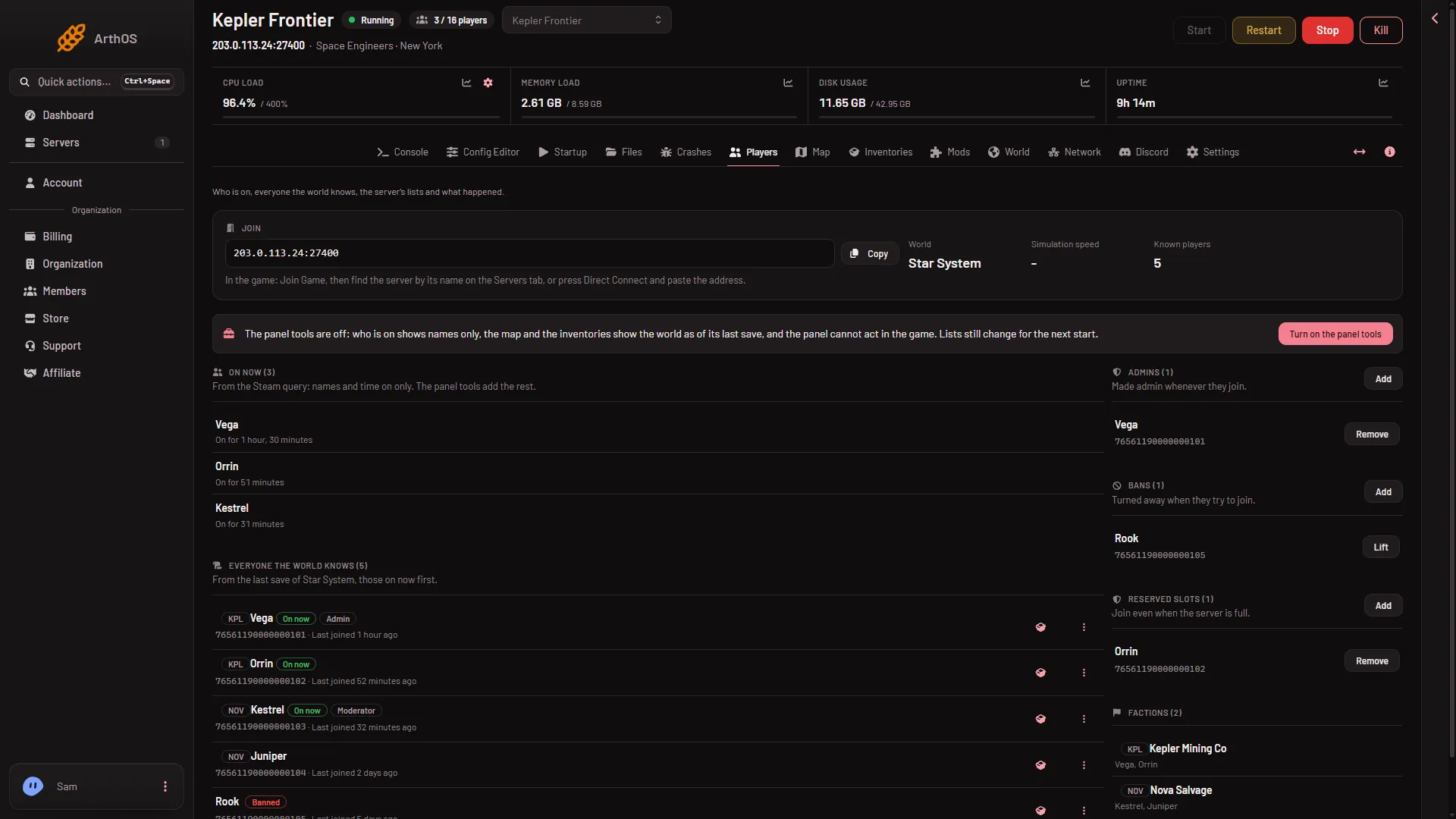
- From the Steam query
- Turn on the panel tools
The hint (1 in the second picture) reads “From the Steam query: names and time on only. The panel tools add the rest.” To get the rest, press Turn on the panel tools (2 in the second picture). The tools load at the next start. Players need Experimental mode on in their game (Options, Game) on a new server with the tools on or off, so the tools add nothing they must change. See the panel tools.
If the server does not answer the query, the panel says “The server did not answer the Steam query. It may still be loading its world.” If nobody is on, it says “Nobody is on.”
The count in the header
The server’s player count, as at the top of the page, comes from the panel tools when they have a fresh reading. Without it, it comes from the Steam player query. The Players page itself reads again every 3 seconds with the tools running, and every 10 seconds without them.
Everyone the world knows
Below On now is Everyone the world knows. It lists everyone who has played in the loaded world, from its last save, with those on now first. The last 200 who joined are shown. Each row has “Last joined (time)”. It can lag behind On now, because it is read from the last save.
When the server is stopped
On now says “The server is stopped.” (or “The server is starting.”). The lists and Everyone the world knows still show.
If it does not work
- The list is empty but players say they are on. The server may be loading. Wait for the world to load, or read On now again after the tools line says they are running.
- Names only, though the tools are on. The tools may not be loaded yet: the strip above On now says “load at the next restart”. Restart the server.
- No health bars for a player. A dead player has none.
More about the game: Space Engineers servers.