
















PvP means players can hurt each other. On a TShock server you choose how it works with one setting called PvP. It has four choices. This setting exists only on TShock, the server program that adds accounts, groups and bans to Terraria. Terraria servers on Vanilla or tModLoader do not show it.
The four choices
- Players choose. PvP is up to each player. Nobody is forced into it.
- Always on. PvP is on for everyone.
- Always off. PvP is off for everyone.
- On, teams not allowed. PvP is on, and teams are not allowed.
If you do nothing, the server keeps whatever the setting holds now. Check it before you change it, so you know where you start.
Change it in the panel
- Check that the server runs TShock. Open the World page. The Server software card shows which program runs. To switch, see change the server software.
- Open the Config Editor.
- Choose the file TShock. This file is listed only when the server runs TShock.
- Find the group World, then the setting PvP (1).
- Pick one of the four choices, then choose Save in the bar that appears.
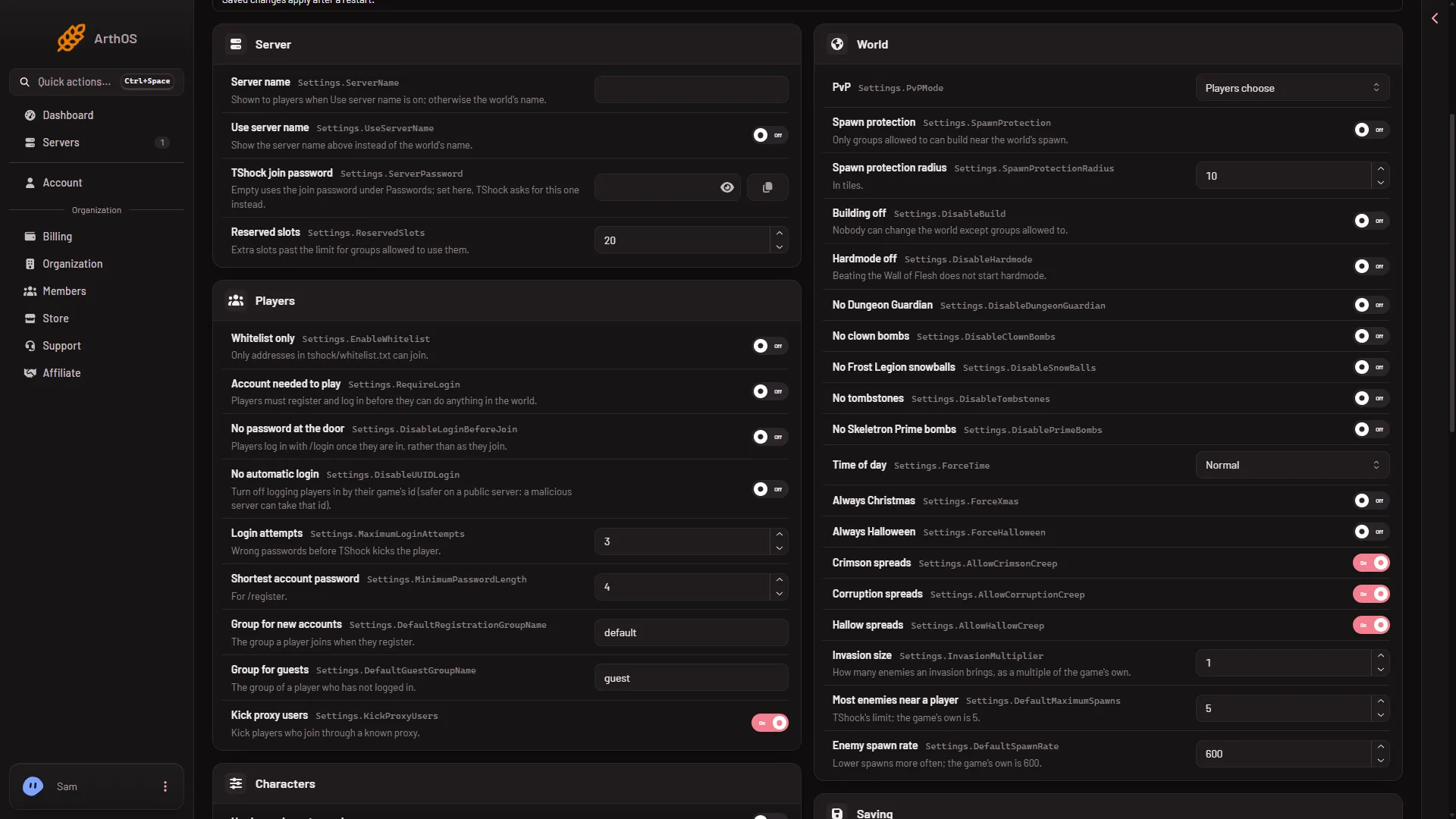
- Pick the PvP choice
- Restart the server so TShock reads the new value. The panel says: “Saved. Restart the server to apply the changes.” A restart disconnects everyone who is on, so warn them first with Message everyone on the Players page.
See who has PvP on
On the Players page, a player on the server can carry the tag PvP on their row. It shows that the panel reads PvP as turned on for that player. The tag is a reading, so an empty server shows none.
By hand
The setting lives in tshock/config.json, inside the Settings object, under the key PvPMode. The panel’s choices map to these words:
normalis Players choosealwaysis Always ondisabledis Always offpvpwithnoteamis On, teams not allowed
To edit it by hand, stop the server first, then open Files, go to tshock/config.json, change the value of PvPMode and save. Keep the quotes:
"Settings": {
  "PvPMode": "always"
}
Change the existing line in the real file. Do not replace the whole Settings object. Not checked on TShock 6.2.1 as of 13 November 2026: whether TShock rewrites this file when it starts.
If it does not work
- The TShock file is not in the Config Editor. The server is not running TShock. Switch the software on the World page, then start the server.
- Nothing changed in the game. Restart the server. The value is read when TShock starts.
- Players still choose. The setting is still Players choose. Pick Always on or Always off if you want the server to decide.
Not checked on TShock 6.2.1 as of 13 November 2026: how each choice plays with a real player in the game. The names are the panel’s own.
Sources: github.com: TShock