
















Spawn protection is a TShock setting. When it is on, only groups that TShock allows can build near the world’s spawn. Everyone else cannot change the ground there. Spawn protection radius says how far the protected area reaches, in tiles. These two settings exist only on a server that runs TShock.
Before you start
- The server must run TShock. On Vanilla or tModLoader the file is not there. You can change the program on the World page. See vanilla, TShock or tModLoader.
- A tile is one block of the world. The radius counts blocks out from spawn.
- Spawn is the world’s spawn point, where new players start. The Map page can show it with the Spawn filter.
Set it
- Open the Config Editor for your server.
- Choose the file TShock.
- In the group World, find Spawn protection and turn it on.
- In Spawn protection radius, enter a number from 0 to 1000.
- Choose Save and restart the server. A restart drops everyone who is on, so warn them first with Message everyone on the Players page.
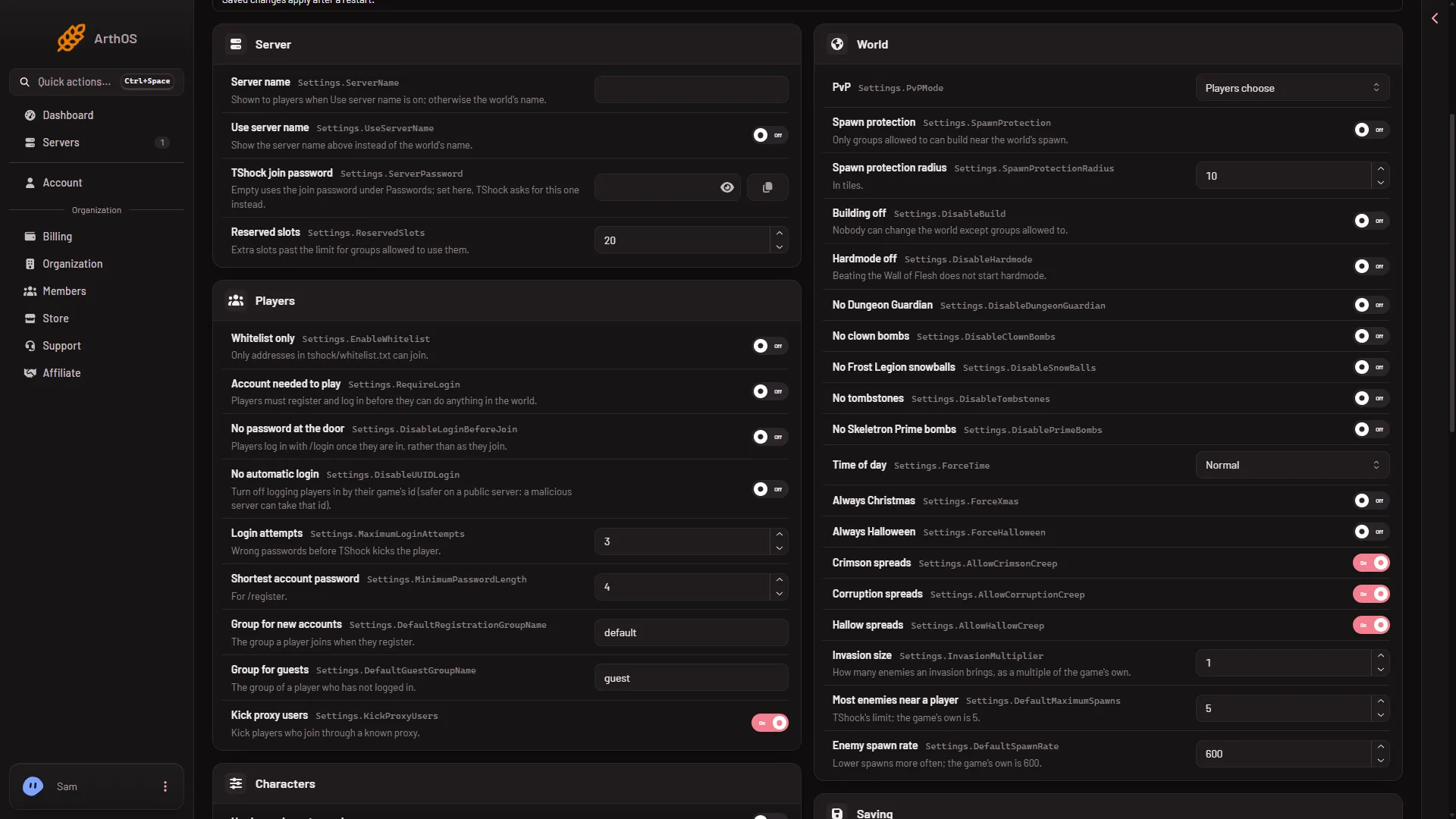
- Spawn protection
The switch (1) is off in this picture. The radius box sits right under it, set to 10 tiles.
To turn the protection off, turn Spawn protection off. The radius is then unused.
Who can still build
The panel’s help for the switch reads: only groups allowed to can build near the world’s spawn. So the protection depends on the groups on your server. A player in a group that TShock allows builds in spawn as usual. A player in any other group cannot.
Players get a group when they register or when they are a guest. You can change a player’s group on the Players page, in the list TShock accounts, with the button Group. See accounts and groups.
A good radius
There is no single right number. A small radius protects the spawn point and the first few steps. A large one keeps players away from a lot of ground around it, so they may not be able to build near where they start. Pick a radius, restart, and walk out from spawn to see where building stops. Change it if it is too small or too large.
Spawn protection or Building off
The group World also has Building off. That setting stops everyone from changing the world, except groups that are allowed to. Spawn protection limits only the area around spawn.
When it applies
Save the file, then restart the server. Not checked on TShock 6.2.1 as of 13 November 2026: whether TShock picks up a change without a restart.
By hand
The settings are in tshock/config.json, in the Settings part:
{
  "Settings": {
    "SpawnProtection": true,
    "SpawnProtectionRadius": 10
  }
}
This shows only the two keys. The real file holds many more, so change just these two values and keep the rest. The 10 is the value on the pictured server. Edit the file in Files, then restart the server. TShock writes this file only when it is missing, so your edits stay.
If it does not work
- There is no TShock file in the Config Editor. The server is not running TShock. Switch on the World page and restart.
- Players still build in spawn. They may be in a group that TShock allows to build there. Check their group. Or the server has not restarted since you saved.
- Nobody can build in spawn, you included. Your own group is not allowed. Check your group on the Players page.
More about the game: Terraria servers.
Sources: github.com: TShock