









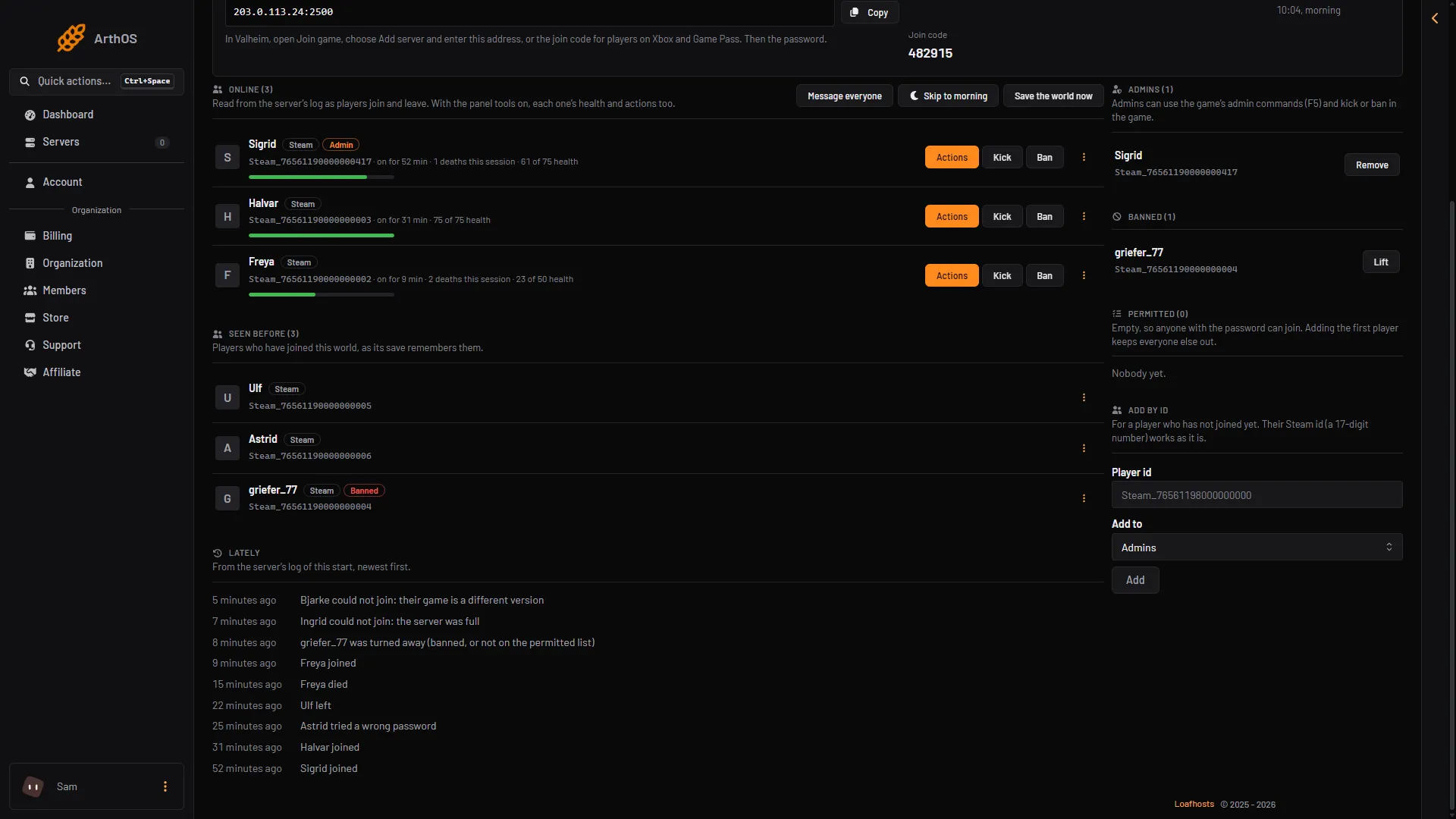
When a player cannot join, the server usually knows why. Open the Players page and read the Lately list. It is made from the server’s log of this start, newest first. Whatever message the player sees in the game, the Lately list shows the real cause. Match the line to a cause below. More about the game: Valheim servers.
- Different version
- Server full
- Turned away
- Wrong password
Wrong password
The line reads “(name) tried a wrong password”. The name can be the player’s address, because the game logs an address at this step.
- Open the Startup page, or the Config Editor, and read the password.
- Give it to the player.
If you change the password, restart the server. See set a server password.
Server full
The line reads “(name) could not join: the server was full”. A Valheim dedicated server takes 10 players at most. No setting raises it. Ask someone to leave, then try again.
Different version
The line reads “(name) could not join: their game is a different version”. The game and the server must run the same version, and the current one is 1.0.20.
- Update the game on the player’s side.
- On the server, Update on start keeps the server current at every start. A server on the Public test branch needs players on the test version. Check Game branch in the Config Editor.
Turned away: banned or not permitted
The line reads “(name) was turned away (banned, or not on the permitted list)”.
- On the Players page, check Banned. If the player is there, choose Lift next to the name.
- Check Permitted. While it has anyone on it, only those players can join, and admins too only if they are on it. Add the player with Add by id, or choose Take off the permitted list for the one you do not want.
List changes apply at once. No restart is needed. See the permitted list.
Crossplay not connecting
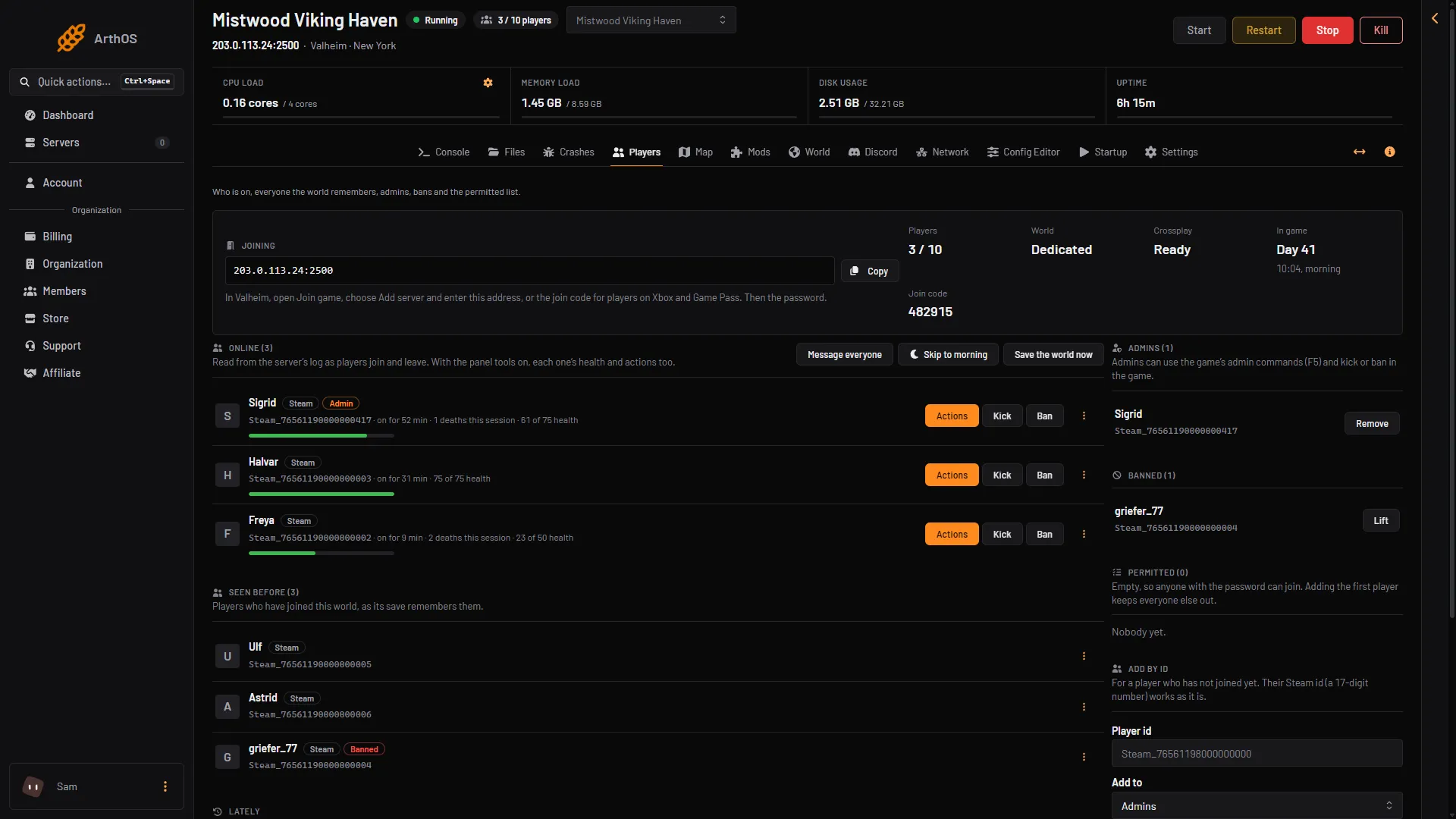
If the Crossplay stat does not reach Ready, or the Crashes page shows “Crossplay could not reach its relay”, the server cannot reach the relay. Then nobody joins it, not even by the address. With crossplay, players do not connect straight to your server. They connect through a Microsoft service that passes the traffic on, called a relay. The full explanation is in crossplay not working.
- Choose Restart at the top of the server page.
- If it keeps failing, turn Crossplay off in the Config Editor, save and restart. Steam players then join by the address. Players on Xbox and Game Pass cannot join until crossplay is on and working again.
A join code can change at the start. Copy the current one from the Joining card.
- Joining
- Crossplay
- Join code
Mods players need
With mods on, players need the same mods. On the Mods page, a mod marked Players need it too must be installed on each player’s game. Players on Xbox and Game Pass cannot install mods, so a mod like that keeps them out of a crossplay server. Turn Load mods off for the plain game.
The server is stopped or still starting
A stopped server cannot be joined. A server nobody has played on for 3 days stops by itself (Standby, in Settings), and players then see no server until it is started. Choose Start at the top of the server page, or use its wake link (Make link in the Standby card). A server that is starting takes players only after it shows Game server connected, about 17 seconds for a new server and longer with mods or after an update. The Players page says “The server is starting” until then.
No line in Lately
If nothing shows, either nobody has tried since the last start, or the failure did not reach the game. Lately only covers the current start, so a restart clears it. Ask the player to try again now. The log of an older start is in logs; see server logs. Check that the address and the port are the ones in the Joining card, that the player does not use a local or loopback address, and that the server is running.
If it does not work
Read the Crashes page. It reads the last ten starts and names a refused password, a world that could not load, a crossplay relay that could not be reached, or a mod that did not load.