











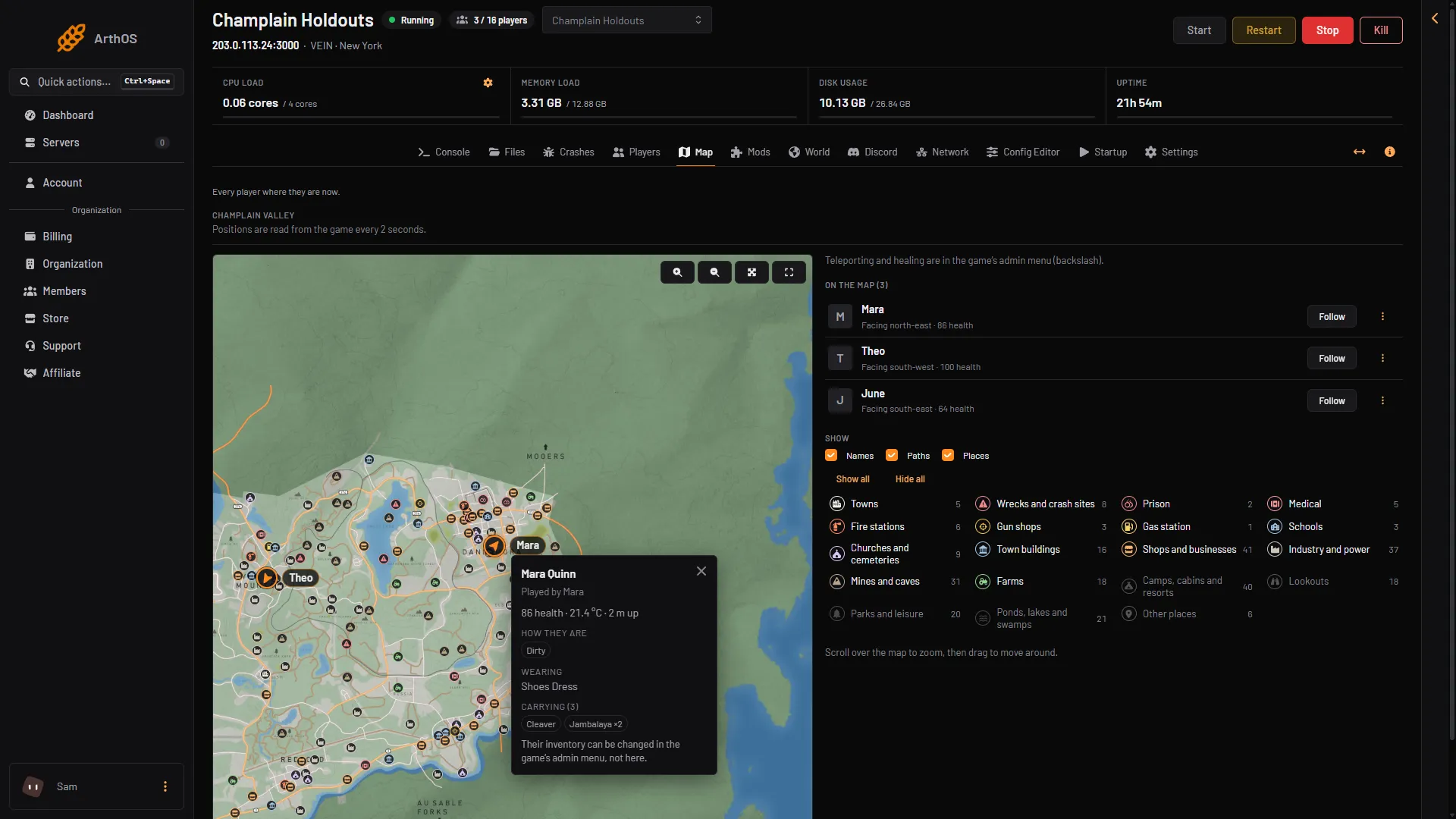
The Map page shows where every player on your VEIN server is right now. It draws them on the game’s own map of Champlain Valley. You need nothing installed on the server.
Open the map
- Start the server and wait for it to load its world.
- Open the Map tab.
- Follow
- Places
- Towns and places by kind
The page reads each character from the game every 2 seconds. The page also says “Updated (n) s ago”, where n is the seconds since the last reading. The positions are live. They are not where the player was at the last save.
If the server is stopped, the page says “The server is stopped.” If nobody is on, it says “Nobody is on the server.”
Move around the map
- Zoom. Scroll over the map, then drag to move around. On a phone, use the zoom buttons on the map.
- Whole map. Zooms out to show everything.
- Full screen. Fills the screen. Leave it the same way.
Follow a player
Under On the map there is one row per player, with a Follow button. Choose it and the map keeps that player in view as they move. The button then reads Following. Choose it again to stop. Dragging the map also stops following.
Names and Paths
Under Show, three boxes control what is drawn:
- Names: the player’s name beside their marker.
- Paths: the line a player has walked while you watched.
- Places: the game’s 290 named places, such as towns, farms and gun shops. Each kind has its own tick box and a count. Kinds such as Towns, Medical and Farms are shown at first, while Camps, cabins and resorts, Lookouts, Parks and leisure, Ponds, lakes and swamps and Other places stay hidden until you tick them.
Tick or clear them as you like. The panel remembers your choice.
A player’s card
Choose a player’s marker, or the three dots on their row, to open their card. It shows:
- the character’s name, and “Played by” with the Steam name and the character’s occupation;
- health, for example “82 health”, and temperature in degrees C;
- Unconscious, when they are, and how many metres up they are;
- How they are: what is wrong with them, such as a condition or illness;
- Wearing: their clothes;
- Carrying: what is in their inventory, with a count.
You can only look. The card says their inventory can be changed in the game’s admin menu, not here. More about the card: VEIN player inventory.
A player who is not on the map
A player who is dead, or still choosing a character, is not in the world. The page lists them under the map: “Not in the world right now (dead, or choosing a character)”. They show again once they are back in the world.
Teleport and heal
The panel cannot teleport or heal a player. An admin does both in the game: press backslash (\) in game to open the admin menu. See the VEIN admin menu.
If it does not work
- Nobody shows but players are on. Wait a few seconds. The page shows a message when the game does not answer.
- A player is missing. Check the list under the map. They may be dead.
- The map looks stuck. The page shows “Updated (n) s ago”. If that number keeps growing, check that the server is running.
To see the list of who is on, see who is online. More about the game: VEIN servers.