











You can see what a player wears and carries on the Map page. Pick the player and read their card. The panel only shows this. It cannot give, take or move items. For that, an admin uses the admin menu in the game.
What the card shows
The card is for a player who is in the world right now. It shows:
- Health, temperature and how high they are, such as “100 health”, “24.5 °C” and “12 m up”.
- Unconscious, if they have passed out.
- How they are: the conditions that weigh on them, heaviest first, such as Encumbered or Dirty. Illnesses are listed here too. The card shows at most eight conditions. A condition that barely weighs on them is left out.
- Wearing: the clothes on their body.
- Carrying: everything else in their inventory. The number in brackets is the total count of items. The same item is shown once, with its count, such as “Jambalaya ×2”. The list shows the first 30 different items.
A section with nothing in it is not shown. A player with no illness has no illness line.
The card also names the character. A VEIN player can have several characters. The card says who plays it, for example “Played by (player name), Chef”.
In the panel
- Open the Map page.
- Wait for the players to appear on the map. The panel reads them every 2 seconds.
- Select the player on the map.
- Read Wearing, Carrying and How they are on their card.
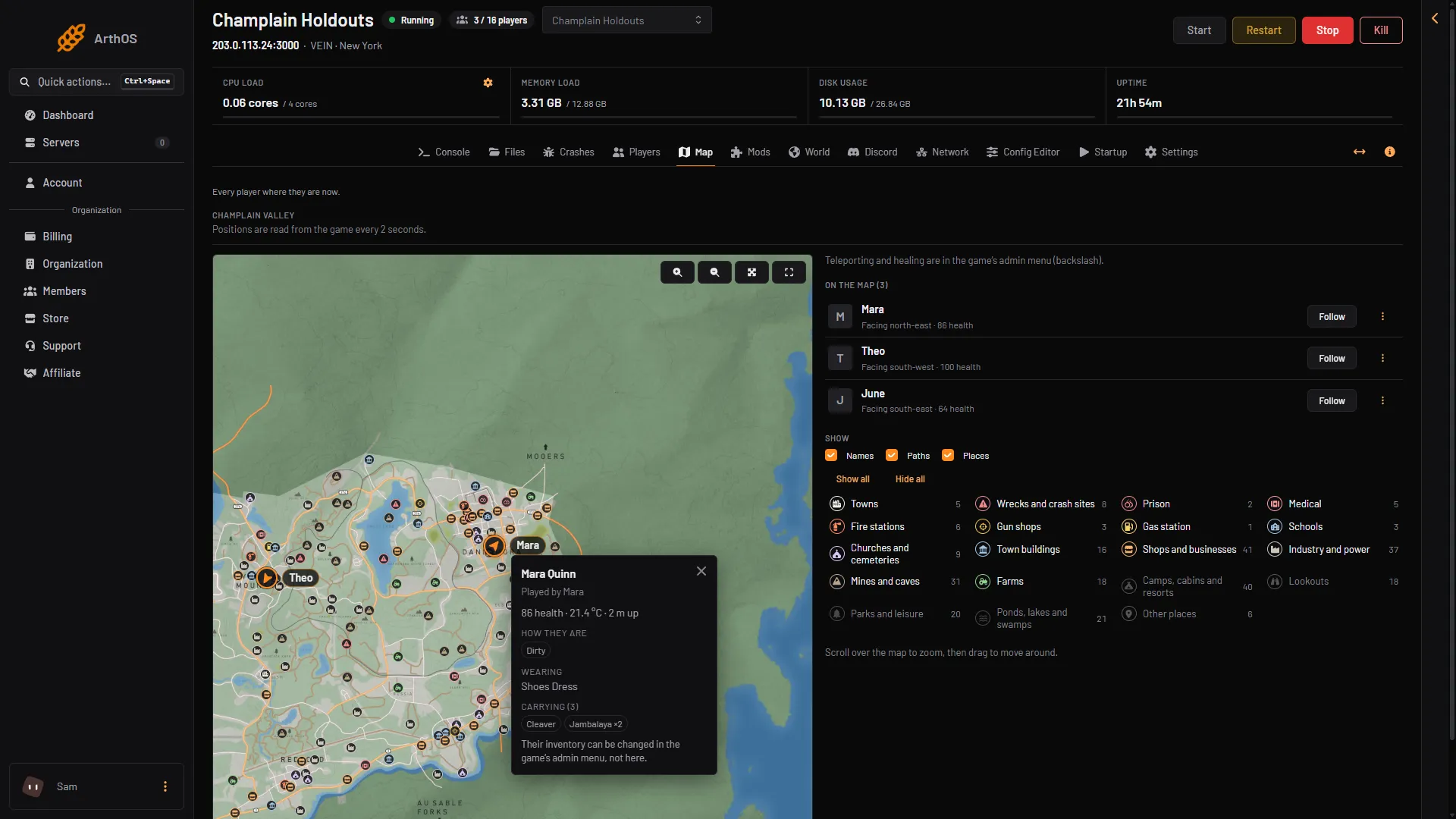
- The player's card
- What they wear
- What they carry
The card updates as the player’s bag changes. If you picked up something in the game and it is not there yet, wait a few seconds.
Change what someone carries
You cannot do this in the panel. The card says so: “Their inventory can be changed in the game’s admin menu, not here.”
In the game, an admin opens the admin menu by pressing the backslash key (\). Healing, giving items and teleporting are done there, and so is kicking. The panel cannot do these. VEIN has no RCON (a way to send commands from outside), and its console runs nothing. To become an admin first, see make yourself admin.
If it does not work
- The player is not on the map. The map shows players who are in the world. A player who is dead or choosing a character is listed under “Not in the world right now” and has no card.
- The map says “The server is stopped.” Start the server. The map reads the running game.
- The map says “Nobody is on the server.” There is no one to show.
- The Carrying list stops at 30. The card shows the first 30 different items only.
- An item you expect is missing. An item the panel cannot name is left out. Not checked on 0.025 as of 27 October 2026.
More about the game: VEIN servers.