











If the Crashes page shows “The server ran out of memory”, or the start says Out of memory Yes, the VEIN server needed more memory than it has. Raise the server’s memory, or restart it to clear what built up.
How much memory VEIN needs
VEIN is a heavy server. On Loafhosts, a server with nobody on uses about 3.1 to 3.7 GB of memory. With one player on it was about 4.5 GB (measured on 0.025). Every extra player and every base adds more.
Ramjet, the makers of VEIN, say the server needs at least 8 GB to start on Windows, and that the need grows with the number of players and your settings. The Loafhosts figures above are what the Linux server used. A small size runs out fast once people play.
VEIN has no server mods yet, so mods are not the cause. Players, bases and a long uptime are.
Check that it was memory
- Open the Crashes page.
- In the list on the left, open the start that ended badly. It is marked Crashed.
- Look for either of two signs. Both mean memory.
- Out of memory says Yes in the start’s details. The node stopped the server because it used more memory than its size allows. The game’s own log may say nothing about it.
- Under What the panel can tell, the finding “The server ran out of memory”. The panel finds it by reading the game’s log for words such as “out of memory” or “failed to allocate”.
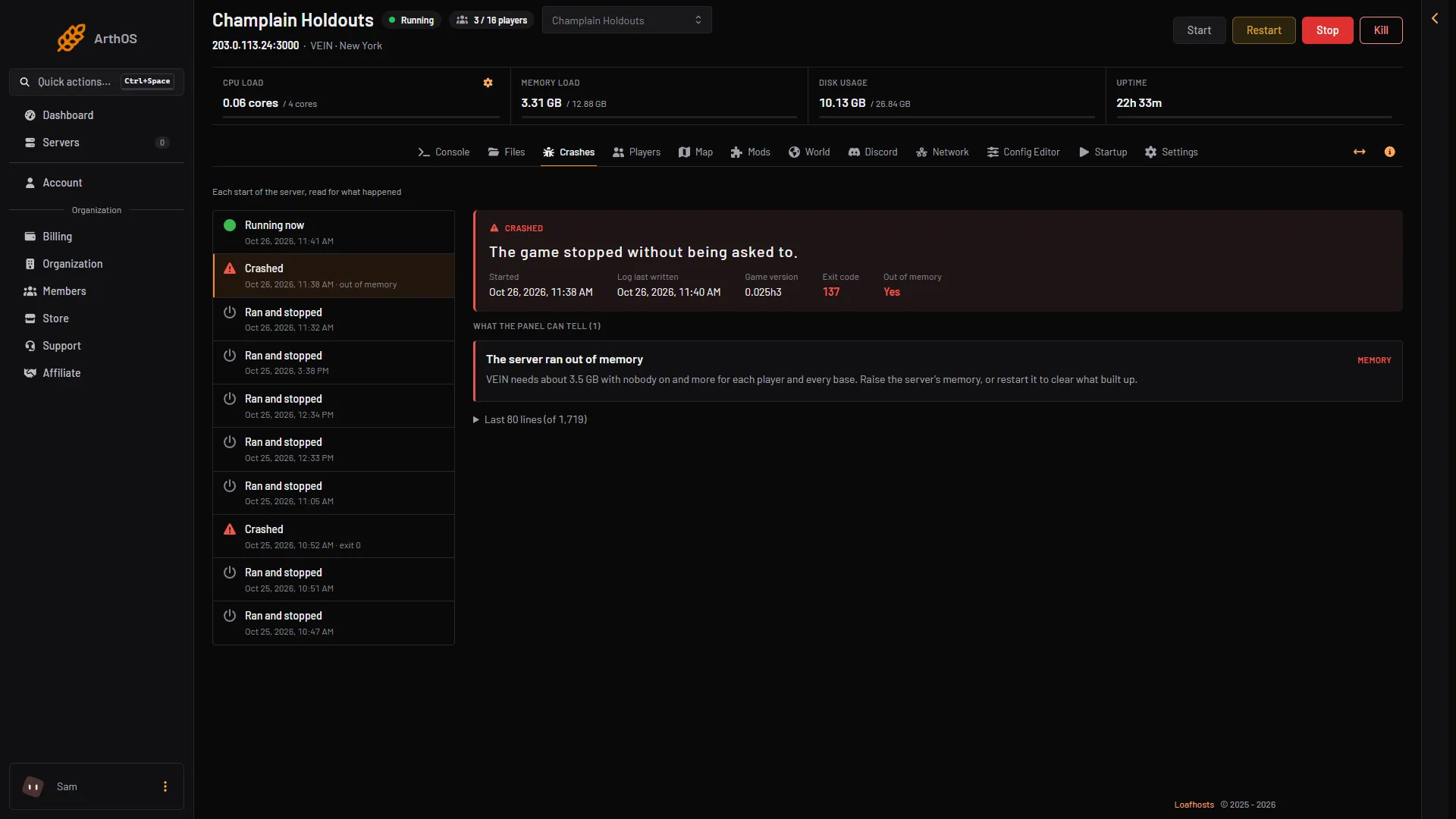
- The start that was stopped
- Out of memory: Yes
- The finding
A stopped start usually shows an exit code too, but the number can differ. Only when both signs are missing is the cause something else. See server crash.
Raise the server’s memory
- Open the server list. In the menu of the server’s row, choose Customize. You can also open Billing and choose Customize on the service.
- Pick a size with more memory. The page shows each size as cores, GB of memory and GB of storage.
- Pay the difference. Account credit is used first.
- Choose Restart at the top right of the server page.
You need permission to order and pay for the organization. If Customize is missing, ask the owner of the account.
Not checked on 0.025 as of 27 October 2026: when the server gets its new size, and whether the game needs a restart to use it.
Use less memory
If you do not want a bigger size, take load off the server.
- Choose Restart at the top right of the server page. A restart clears what built up while it ran.
- Lower Players on the Startup page. The game reads it at the next start.
If it does not work
- It runs out of memory again soon after a restart. The size is too small for your players. Raise it.
- The server stops with neither sign. It may be a crash that is not memory. Read the start on the Crashes page and see server crash.
- The world was not saved. A full disk causes that, not memory. See progress lost.
More about the game: VEIN servers.
Not checked on 0.025 as of 27 October 2026: the exact memory needed for a given number of players or bases.