











Three things can slow a VEIN server: it runs short of memory, it has a lot of zombies and other AI, or a lot of players are on it. Look at memory first, because it is the one you can measure.
Watch memory and CPU
- Look at the CPU load and Memory load figures at the top of any server page. The panel has no tick readout for VEIN, so these two figures are what you can watch.
- Watch them with nobody on, then with players on.
On Loafhosts servers (Linux), VEIN used about 3.1 to 3.7 GB of memory with nobody on, and about 4.5 GB with one player. The game’s wiki says 8 GB for Windows, and that memory grows with the number of players and depends on settings. The Crashes page says every base needs memory too.
If memory sits close to the server’s limit, the game slows down and may run out of memory. Choose Restart at the top right of the server page to clear what built up, or give it more memory. See VEIN out of memory.
Fewer zombies and other AI
Two settings set how many things spawn. Both are against the game’s normal, where 1 is normal.
- Stop the server. The Config Editor saves this file only while the server is stopped.
- Open Config Editor, then Game rules, group Zombies and AI.
- Zombie numbers sets how many zombies there are. All AI numbers sets how many of everything that spawns. For a quick test, Zombies and animals is the first row of the group: Off means nothing spawns at all, so you can see whether AI is the load.
- Lower one, for example to 0.5, and save.
- Start the server. The change applies at the start.
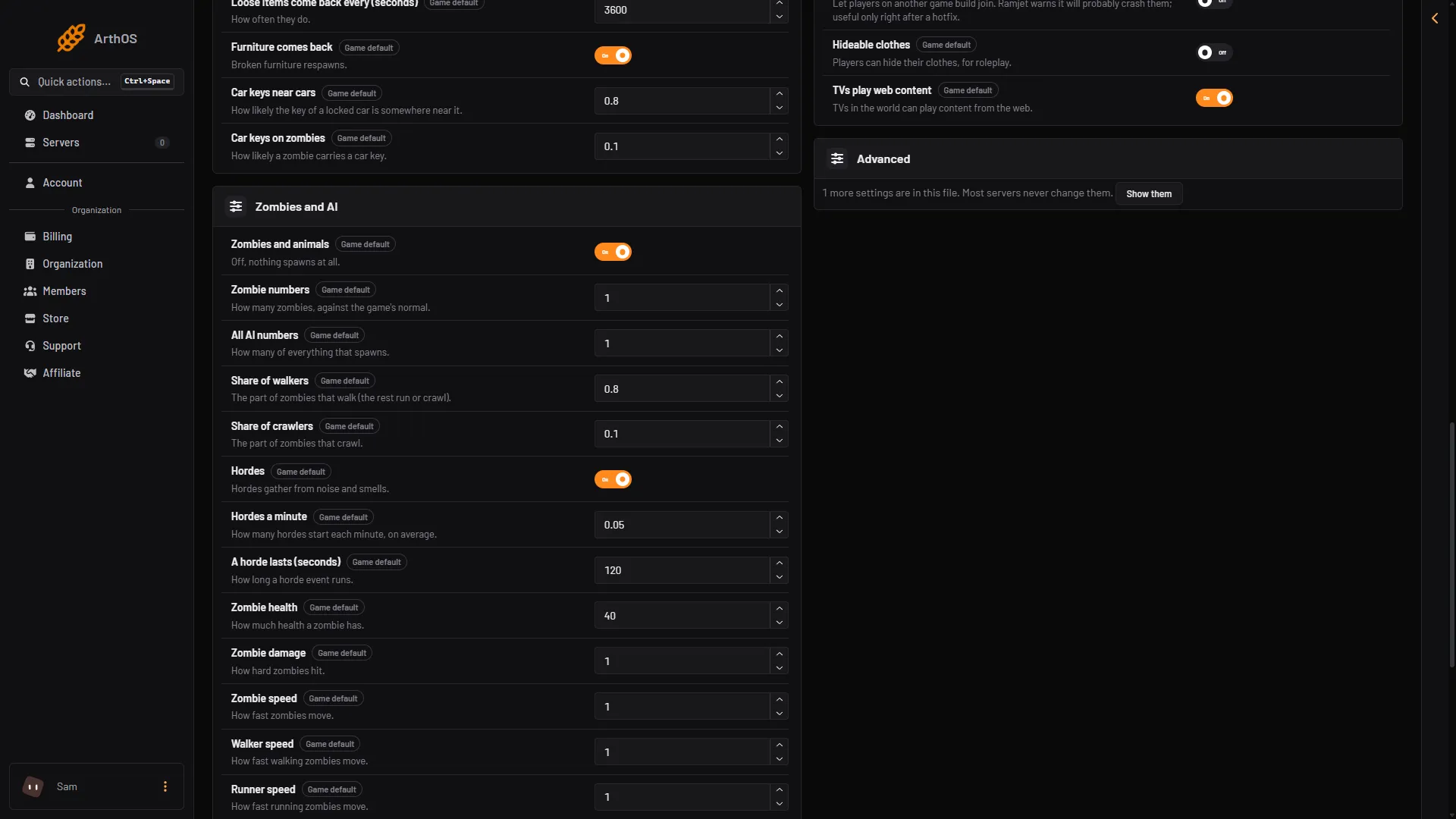
- Zombies and animals
- Zombie numbers
- Hordes
Lower numbers mean fewer of them in the world. Not checked on 0.025 as of 27 October 2026: how much lag this removes on a busy server. Try a step, then watch the figures again.
Many players
More players use more memory. Players on Startup sets how many can be on at once. The game’s own default is 16. If lag only appears when the server is full, lower the number and choose Restart at the top right of the server page.
If it does not work
- Memory keeps climbing. Choose Restart at the top right of the server page to clear what built up, or raise its memory.
- Lag for one player only. Check the server’s own figures at the top of the page. If they look fine, the cause is not the server’s memory. The panel cannot tell a player’s own connection problem from the server’s: turn Zombies and animals off for a short test and see whether it changes.
- A crash instead of lag. See VEIN server crash.
More about the game: VEIN servers.