









Arma Reforger
server hosting
Run a real Arma Reforger squad on 1.8. A mod manager that surfaces hidden workshop mods, one-click load order repair for the updates that break your list, and a crash dump reader that names the mod at fault. All of it in LoafHub.
- Mod Troubleshooting (automatic boot-failure diagnosis)
- Org-Wide Moderation (alt detection, one-action bans)
- Mod Manager, including unlisted workshop mods
- RCON+ Admin Console
- Crash Dump Reader
- Chat Auto-Moderation
- Server Stats and killfeed
- Map Rotations
- Discord Killfeed & Alerts
- Config Editor
- MILSIM
- Unlimited
- About a minute
- Ryzen 9
- 7950X and 9950X, up to 5.7 GHz, in every node.
- DDR5
- Across every build, no exceptions.
- NVMe
- SSD throughout, with daily snapshots.
- 5
- New York, Dallas, Los Angeles, Frankfurt, Sydney.
Arma Reforger panel features that pull weight.
Every tool LoafHub adds for Arma Reforger server hosting, included free, no add-ons, no upsells.
New
Mod Troubleshooting
Reads your startup log, checks every mod against what is actually on disk, and tells you why the server will not boot before it touches anything. When the log alone is not conclusive it asks permission, names the cost in minutes, then narrows the list to the mod at fault and puts your configuration back byte for byte.
New
Org-Wide Moderation
Records every player connection across all of your unit's servers and groups them by identity, so accounts sharing an IP address are obvious at a glance and VPN connections are flagged. Ban one offender across every server you manage in a single action, from a ledger that is also where you lift it later.
Mod Manager
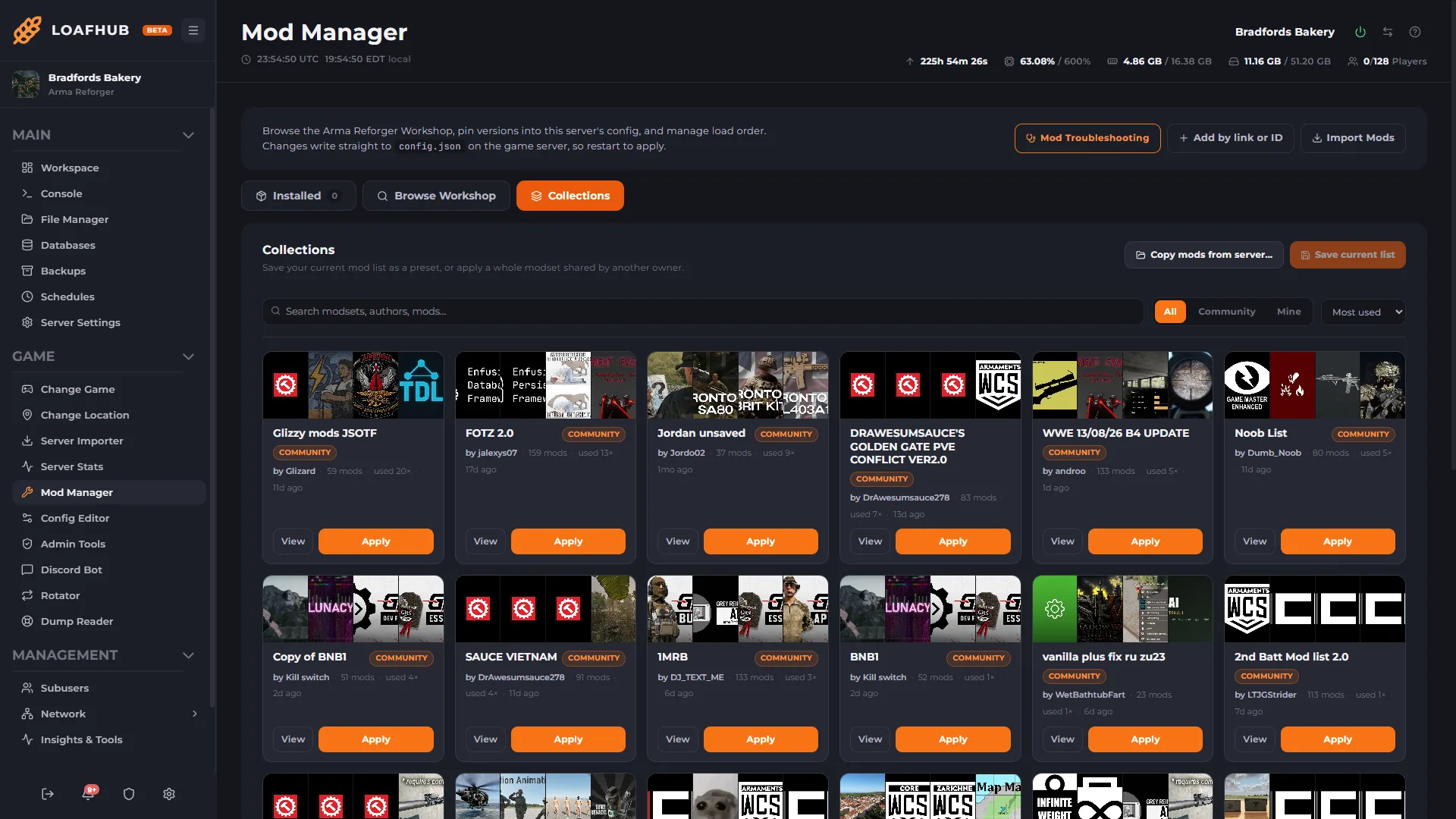
Browse, install and update mods straight from the panel, including hidden mods that are unlisted on the Arma Reforger workshop. Fix a broken load order in one click, update everything outdated in one batch, or pin a mod to a known good version when the latest one breaks you.
RCON+
Send BattlEye RCON commands from the panel with a live player roster beside them, so you can see who you are acting on. One-click kick and ban quick actions, plus a raw console with the full command reference when you want it.
Crash Dump Reader
When the engine writes a crash dump, the panel parses it and hands you the answer instead of a binary file: the terminating signal, the faulting module and offset, and the full map of loaded modules. That map settles the only question that matters, whether the crash was the engine or one of your mods. Repeat crashes group by signature, so a crash loop is obvious at a glance.
Chat Auto-Moderation
Triggers watch in-game chat and act on a word, phrase or pattern when nobody is awake to do it. Every rule starts in log-only, so you see exactly what it would have caught before it can touch a player. Per-player cooldowns, an admin allowlist and a hard cap on actions per tick mean one chat line can never storm your server.
Server Stats
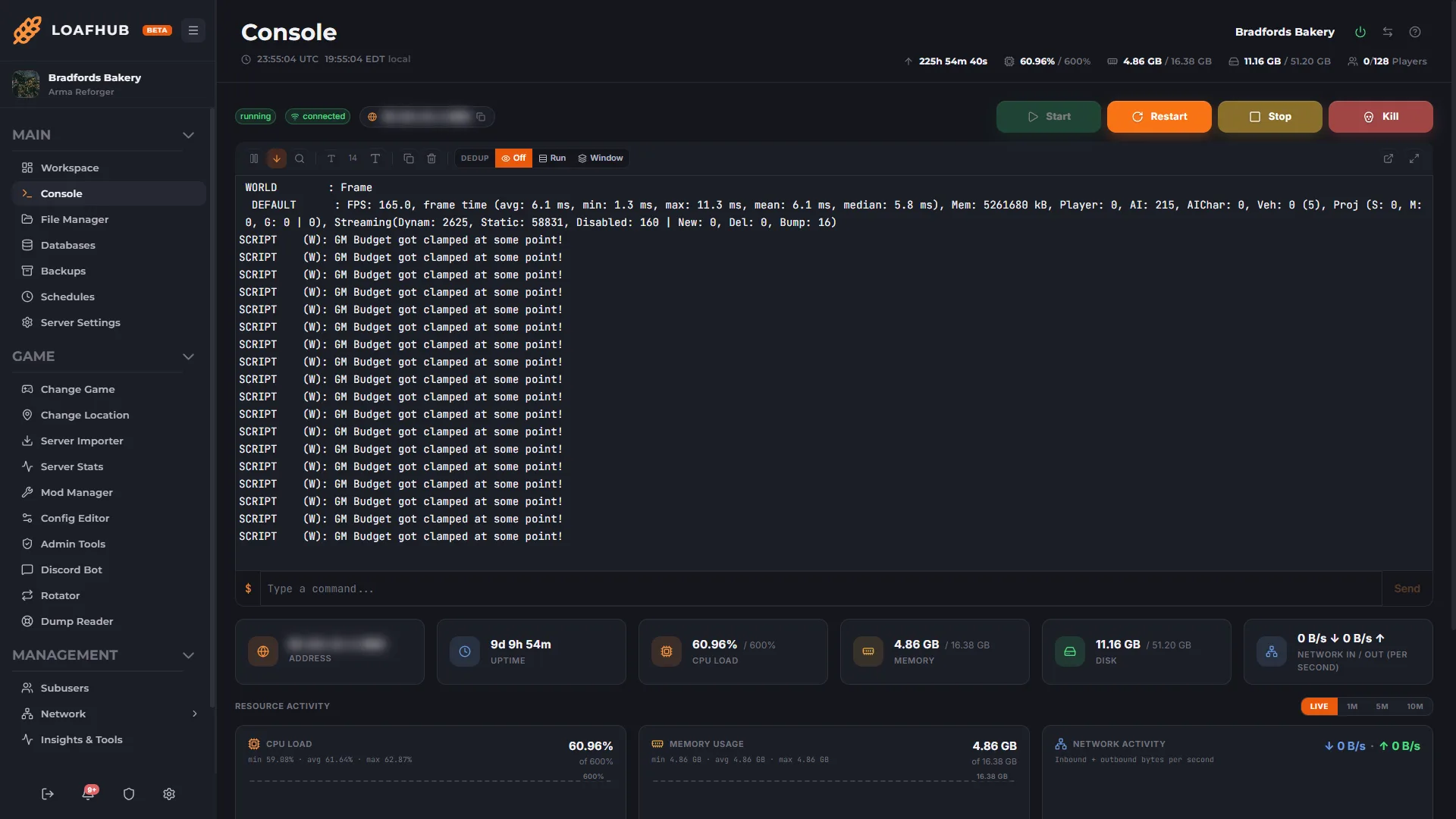
A live graph of players, CPU and memory, plus server FPS and frame time read out of the game's own output and graded into health bands, so a stutter shows up as a number instead of a complaint. A session killfeed and K/D leaderboard sit alongside it.
Map Rotations
Build a scenario playlist once at organization level and subscribe every server that should run it, so a change lands everywhere instead of on one box. Skip, go back, restart the current entry or pause the rotation while it is live, and every change writes a row to the activity log.
Discord Killfeed & Alerts
Point up to five Discord webhooks at your server and pick what each one carries: killfeed, player joins and leaves, server state, performance thresholds and traffic spikes. Delivered every 60 seconds.
Server Auto-Restarter
Schedule restarts daily, weekly, or on a trigger you choose. Crash detection and auto-recovery bring the server back when you are not watching, and every restart is logged.
Load Order and Dependencies
Resolves the full dependency closure of your mod list, dependencies of dependencies included, and sorts it into an order the engine can actually load. Missing dependencies are pulled in and named rather than left to fail at boot, and a reorder is previewed before it commits.
Config Editor
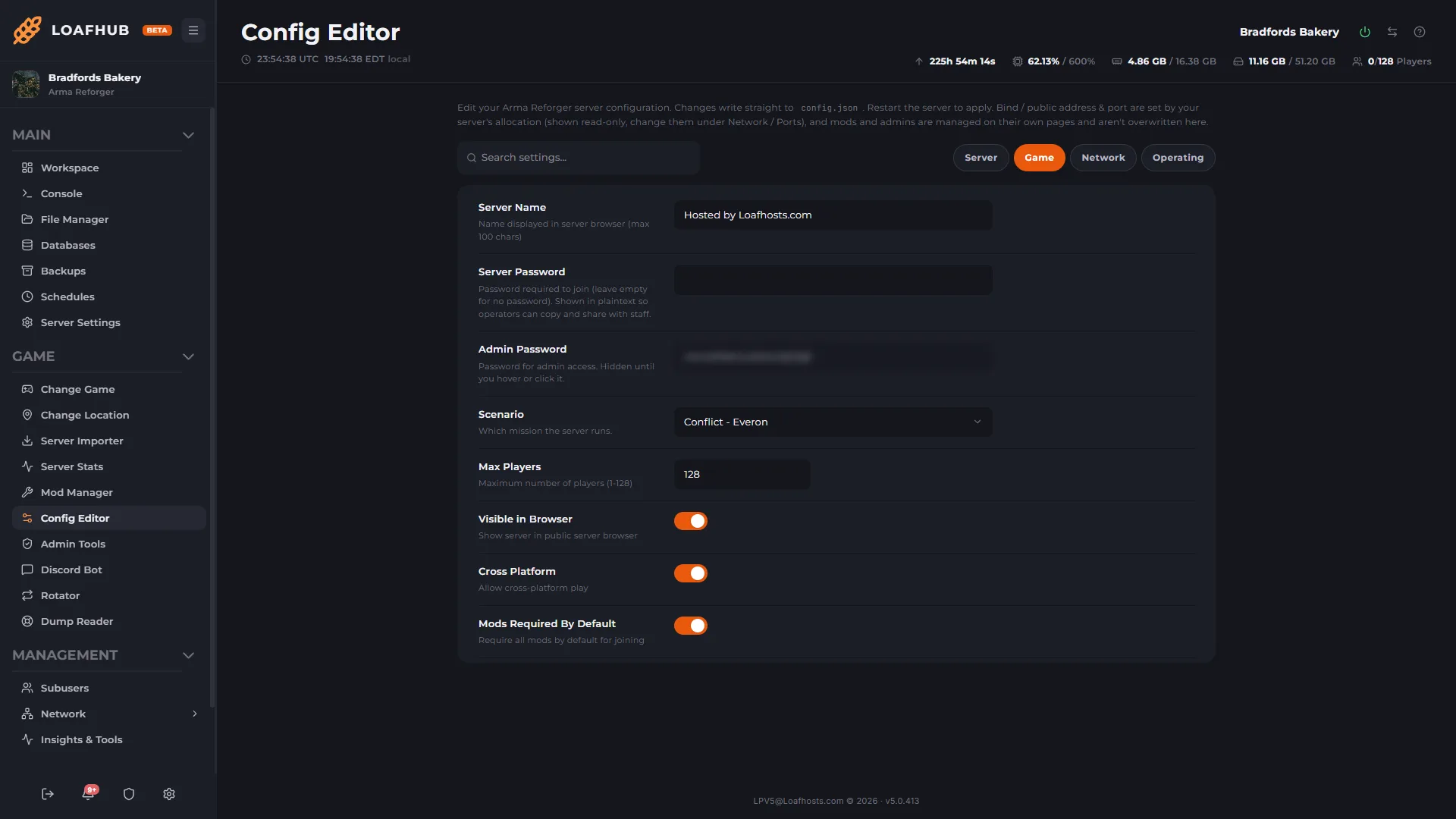
Scenario, player cap and cross-platform play as form fields rather than raw JSON, with every change written straight to the server's own config. The file is still there underneath if you would rather edit it directly.
Persistence Manager
Turning persistence on in most panels only tells the engine to LOAD the newest save, which is why so many servers appear to have it enabled and still lose everything on restart. This sets the save types that decide whether a save is ever written, and shows you the save points actually on disk.
Update Notifications
NewWatches the mods your server actually runs and tells you when one publishes a new version, with the author's own release notes where the workshop provides them. Point it at a Discord channel and the update lands there instead of being something you find out about when the server stops booting.
Mod History
A running record of every mod added, removed, reordered or version-pinned on this server, over the last 30 days. When a server that worked yesterday does not today, this is the list of what changed.
Attack History
NewA per-server record of the attacks that hit your address: when each one started, when it ended and how long it ran. Point a Discord webhook at it, or have the alert emailed, so you know it was an attack rather than your server misbehaving.
The mod tooling, as you will actually see it.
Real captures from Arma Reforger servers running in LoafHub, not mockups and not a staging skin. Click any one to open it full size.
-
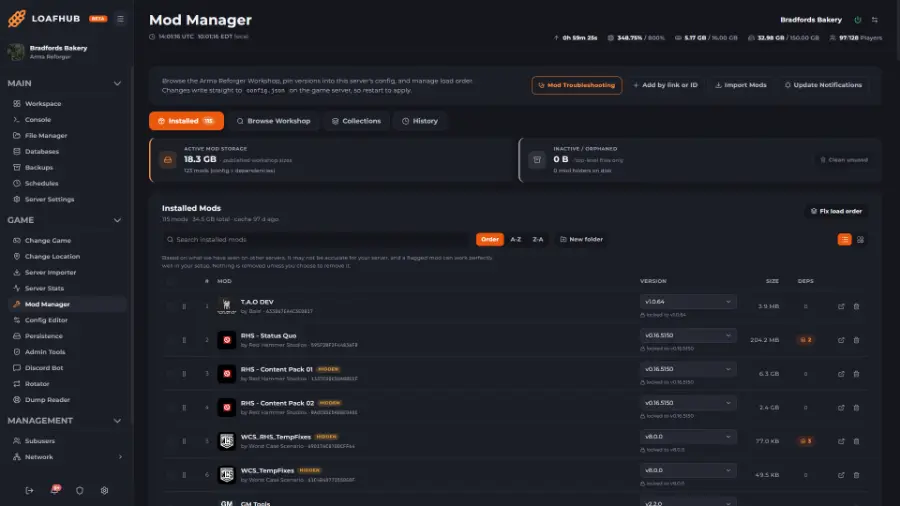
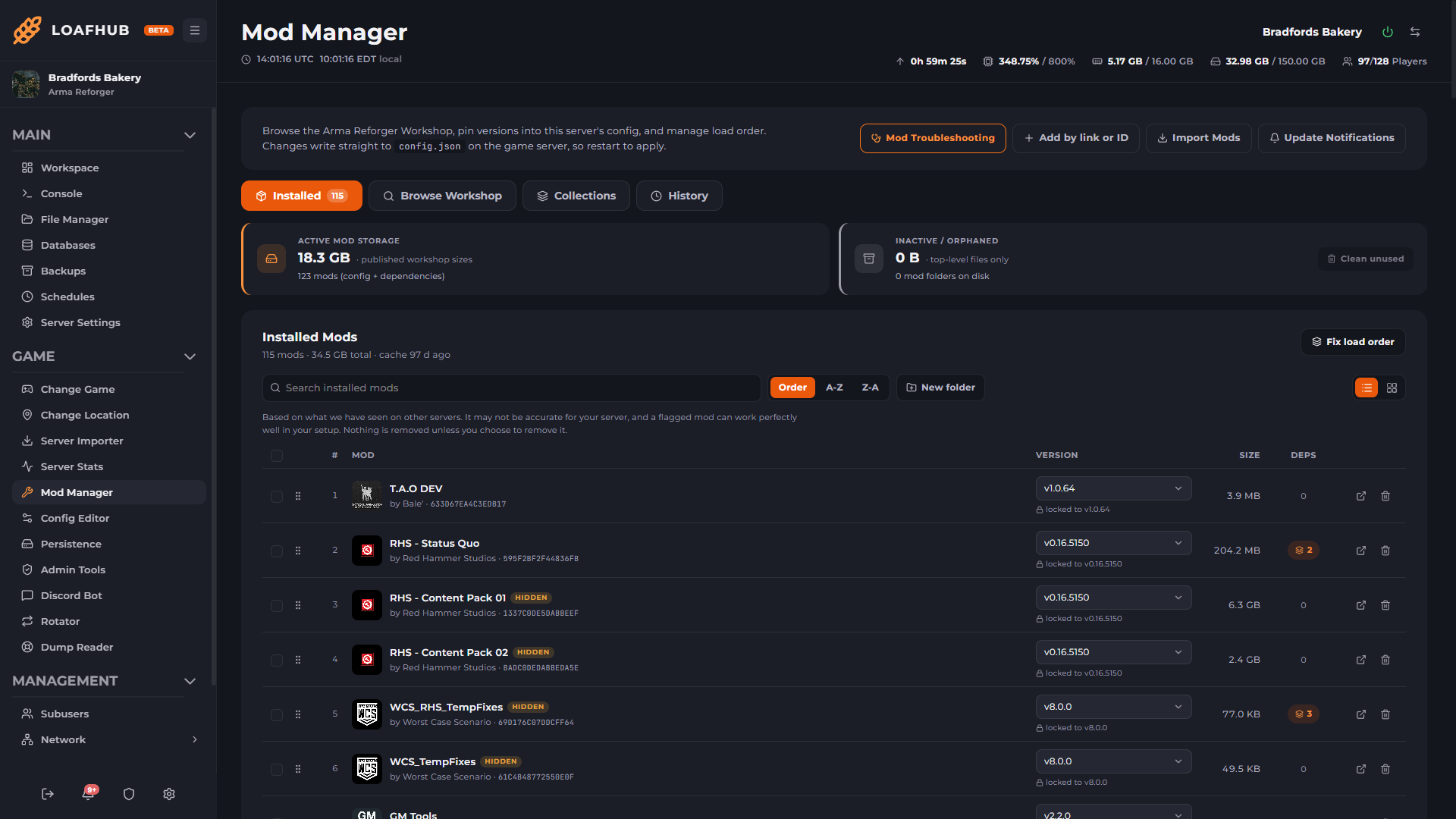
115 mods, in load order Drag to reorder, pin any mod to a version, and let Fix load order pull in the dependencies your list is missing and sort them into a loadable order. -
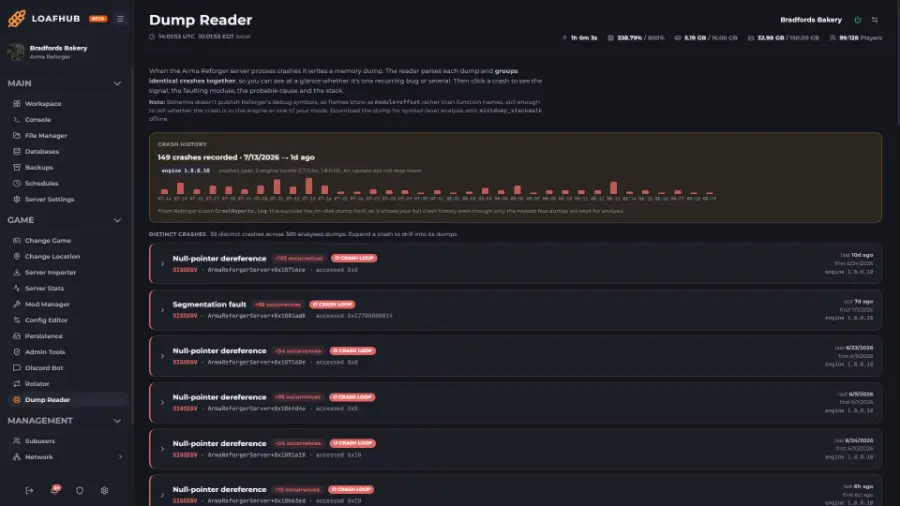
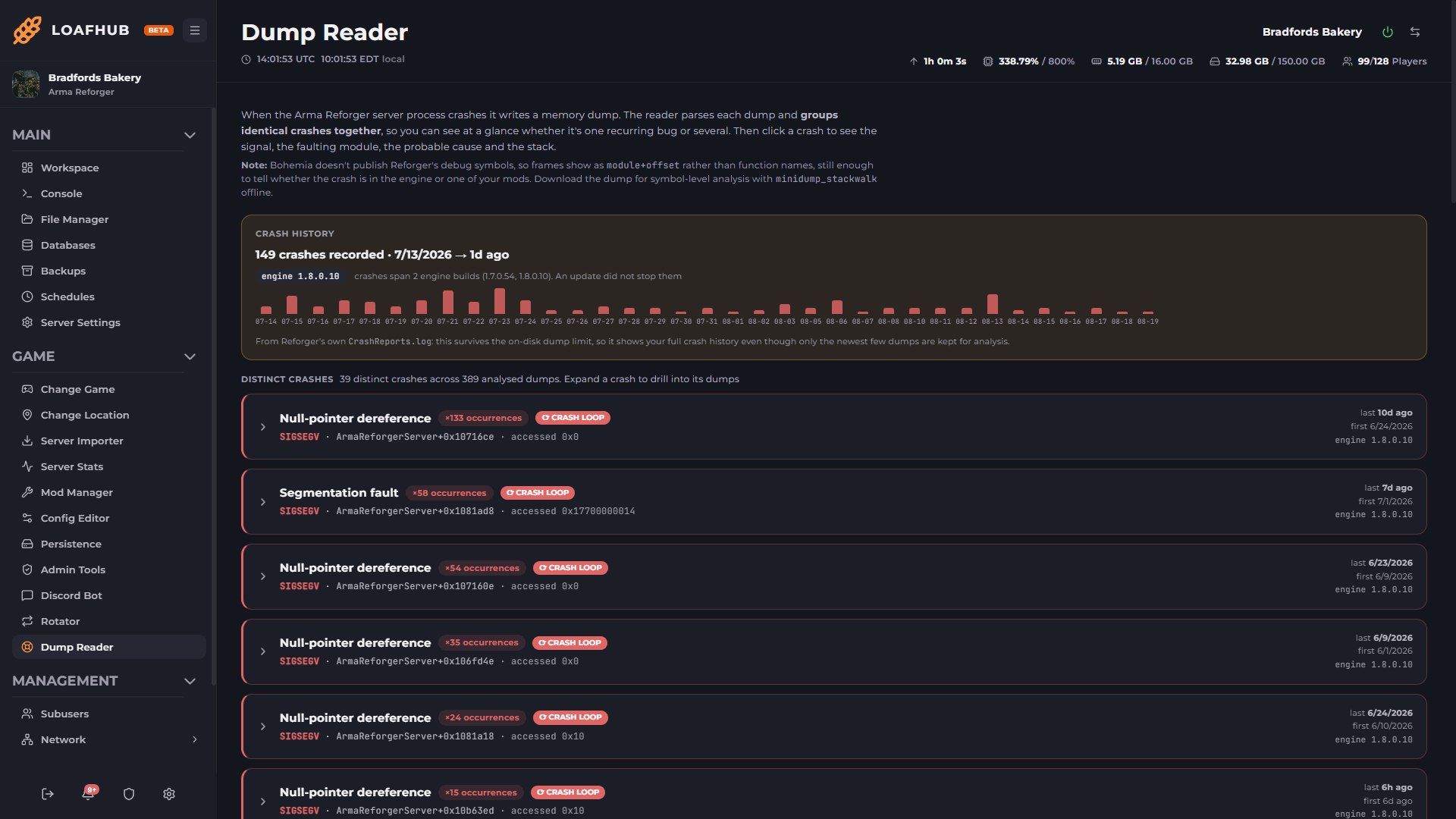
Every crash, grouped 149 crashes across two engine builds, grouped into 39 distinct faults with the signal and the faulting module named for each. -
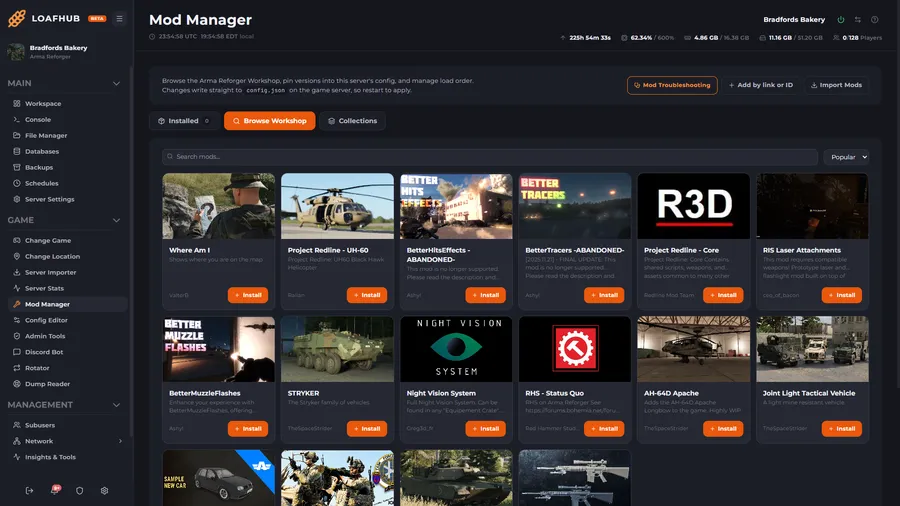
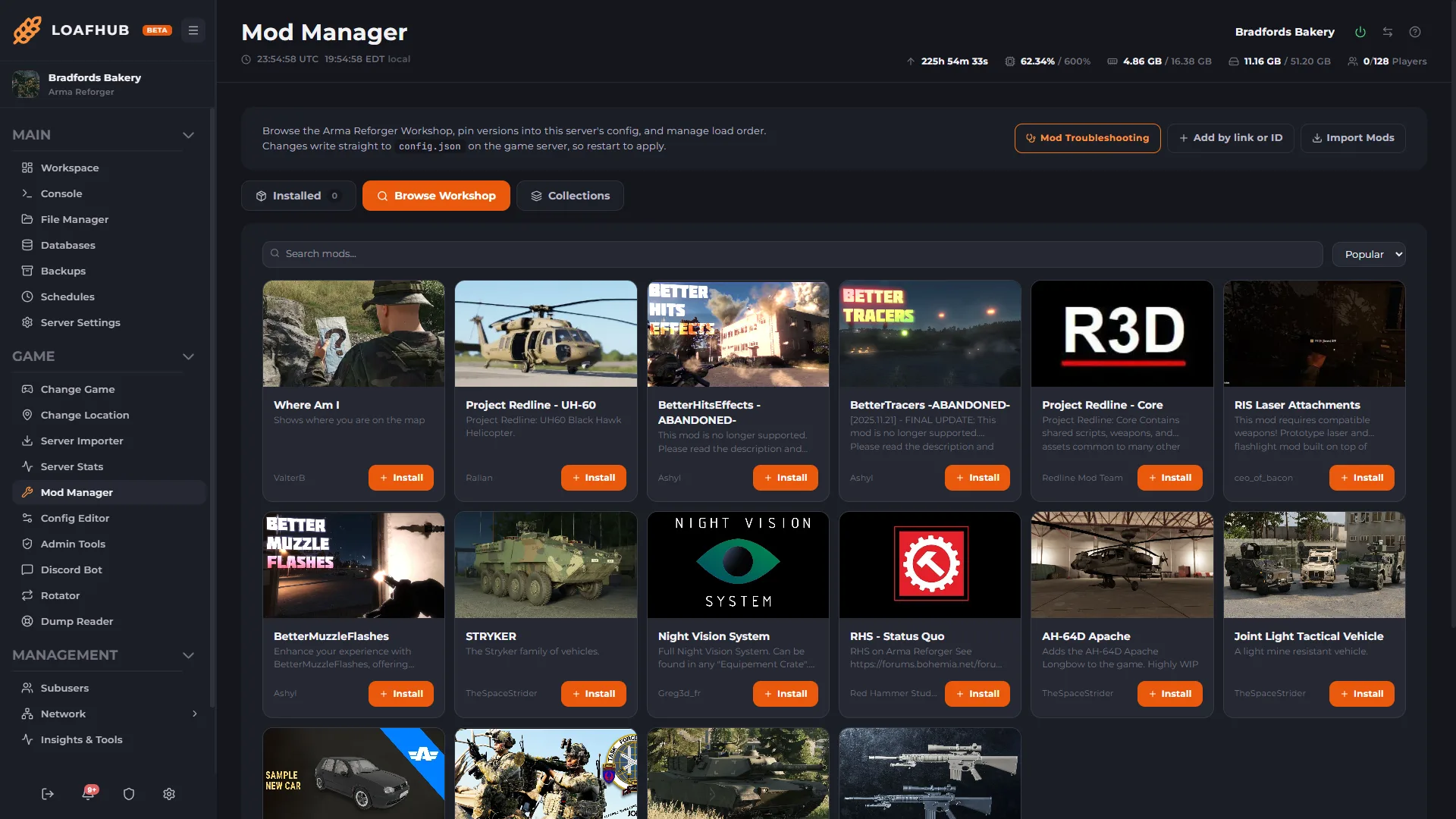
Browse the Workshop from the panel Search and install without a file transfer, a server id, or a trip back to the game client. -
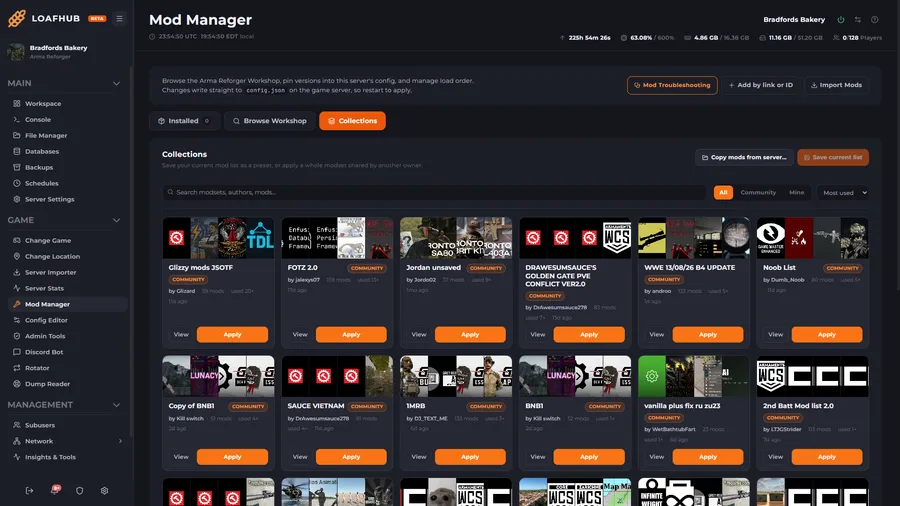
Collections and shared modsets Save your current list as a preset, or apply a whole modset another owner has published. -
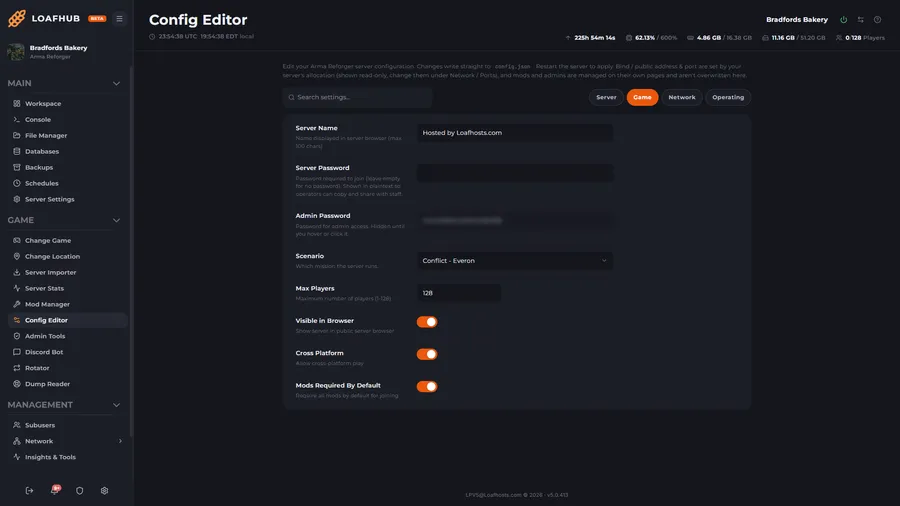
A config editor, not a config file Scenario, player cap and cross platform play as form fields. Every change writes straight to the server's own config. -
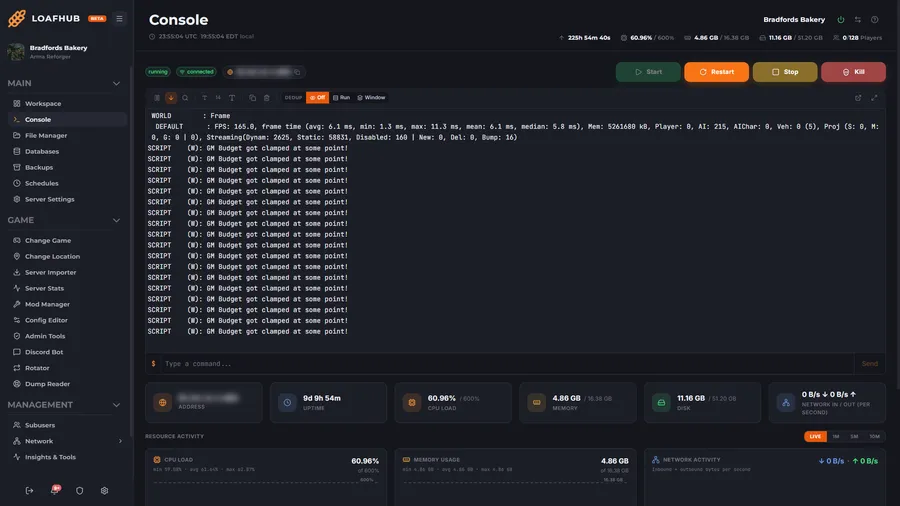
Live console and power controls Per tick FPS, frame time and streaming counts as the server reports them, with start, restart and stop on the same screen.
When the mod list stops booting.
Every major update can stop a modded server booting through no fault of your own, and 1.8 (August 2026) is no exception: Bohemia's own notes flag a breaking change to the character boots loadout class, deprecate several script APIs, and note that the new Far Hide work needs mod assets recompiled to take part. Popular mods usually take a week or two to catch up after an update like that. These are the tools that tell you which mod is holding your server down in the meantime, instead of clearing the list and starting again.
01 Mod Troubleshooting Reads the boot log, the config and the addon directory before it touches anything. Diagnoses
Reads your startup log, checks every mod against what is actually on disk, and tells you why the server will not boot before it touches anything. When the log alone is not conclusive it asks permission, names the cost in minutes, then narrows the list to the mod at fault and puts your configuration back byte for byte.
Version lag, a missing scenario mod, a config entry with nothing on disk behind it and a load-order violation all look like the same blank screen at boot.
- Restarts to run it
- 0
- Finding tiers
- Certain, likely, suspect
- Applied for you
- Certain findings only
- Proof required
- Your server's own boot log
- Config snapshot
- Taken before any write, restored on every exit
- Verification
- Boots your scenario, not a test one
02 Load Order and Dependencies The full closure, sorted, with the cycles and the gaps named before boot. Resolves
Resolves the full dependency closure of your mod list, dependencies of dependencies included, and sorts it into an order the engine can actually load. Missing dependencies are pulled in and named rather than left to fail at boot, and a reorder is previewed before it commits.
A content pack that arrives after the mod depending on it is the most common way a healthy list fails to load.
03 Mod Manager Workshop browse, version pins, drag and drop order, and the mods search will not show you. Installs
Browse, install and update mods straight from the panel, including hidden mods that are unlisted on the Arma Reforger workshop. Fix a broken load order in one click, update everything outdated in one batch, or pin a mod to a known good version when the latest one breaks you.
Cleanup never removes anything the dependency closure still needs, so reclaiming disk cannot be what breaks the next boot.
- Workshop build id
- Recovered automatically when it rotates
- Hidden mods
- Catalogued and searchable
- Version pinning
- Per mod, to a published version
- Import a list from
- A server id, a pasted list, another of your servers
- Collections
- Named lists, mod groups, shared gallery
- Disk inspector
- Clears orphaned mod directories only
04 Crash Dump Reader The minidump the engine writes when it dies, read for you. Reads
When the engine writes a crash dump, the panel parses it and hands you the answer instead of a binary file: the terminating signal, the faulting module and offset, and the full map of loaded modules. That map settles the only question that matters, whether the crash was the engine or one of your mods. Repeat crashes group by signature, so a crash loop is obvious at a glance.
The module map settles the only question that matters, whether the crash was the engine or one of your mods.
Hardware that holds up. A panel that does the work.
Every Arma Reforger server runs on current-generation Ryzen 9 desktop silicon and the LoafHub panel, the same one we run our own communities on.
- 500+ Tbps
- Plus 13+ Tbps of stateful filtering. Always on, on every build, through raid nights and event spikes.
- Ryzen 9
- 7950X and 9950X, up to 5.7 GHz, with DDR5 in every node.
- One login
- Console, files, scheduler, backups, sub-users and the game's own tools, with billing behind the same login.
- 60s
- Pick a region and your server boots in about a minute. No setup fees, cancel any time.
Build it, then just pay.
Slide memory, CPU and storage to whatever Arma Reforger needs.
Standard · 12 GB RAM · 5 cores · 40 GB NVMe
Conflict with a full roster.
- Up to 16 cores
- DDR5 + NVMe
- Unlimited slots
- Terabit DDoS Protection
- Cancel anytime
Every price is quoted live by LoafHub in the builder · longer billing cycles save up to 25%.
Terabit DDoS Protection on every build: 500+ Tbps volumetric and 13+ Tbps stateful. Refunds: 3 days on game servers. Dedicated servers are non-refundable.
Common Arma Reforger hosting questions.
How much does Arma Reforger server hosting cost?
A Arma Reforger server at Loafhosts is built to order: you slide memory from 1 to 64 GB, CPU from 1 to 16 cores, and storage from 10 to 500 GB. The Standard build most people pick for Arma Reforger is 12 GB memory with 40 GB NVMe at $34.00/month. Builds for Arma Reforger run from $26.00 to $42.00/month, every one on an AMD Ryzen 9 7950X and 9950X with DDR5 RAM, unlimited slots and the full LoafHub panel. Longer billing cycles save up to 25%.
How much memory should my Arma Reforger server have?
Every Arma Reforger server is built to order: you set memory from 1 to 64 GB, CPU from 1 to 16 cores, and storage from 10 to 500 GB with sliders, or start from a preset. The Standard build, 12 GB memory with 40 GB NVMe, is what most Arma Reforger communities pick. Smaller crews and test servers run happily on less, and heavily modded setups or high player counts want more. You pick the core count that fits, and every build runs on a Ryzen 9 7950X and 9950X with the full LoafHub panel and Arma Reforger tools.
Does Arma Reforger hosting include Mod Troubleshooting?
Yes, Reads your startup log, checks every mod against what is actually on disk, and tells you why the server will not boot before it touches anything. When the log alone is not conclusive it asks permission, names the cost in minutes, then narrows the list to the mod at fault and puts your configuration back byte for byte. It's included on every plan at no extra cost.
Can I use Org-Wide Moderation on my Arma Reforger server?
Records every player connection across all of your unit's servers and groups them by identity, so accounts sharing an IP address are obvious at a glance and VPN connections are flagged. Ban one offender across every server you manage in a single action, from a ledger that is also where you lift it later.
Where are Loafhosts Arma Reforger servers located?
You pick your region in the builder. Arma Reforger servers deploy from New York, Dallas, and Los Angeles in the United States, and Frankfurt in Germany, all at no extra cost, with Sydney, Australia available for Asia-Pacific coverage. Any region surcharge is quoted live before checkout.
Does Arma Reforger hosting include DDoS protection?
Yes. Terabit DDoS Protection is included on every Arma Reforger build at no extra cost, with 500+ Tbps of volumetric capacity and 13+ Tbps of stateful filtering, across Dallas, Los Angeles, New York, Frankfurt and Sydney. There is no tier to choose and no upsell.
Can I migrate my existing Arma Reforger server to Loafhosts?
Yes, migration is free. Open a Hub ticket and our team will move your world, configs, mods, scheduled tasks, and admin lists across with zero downtime.
What is the LoafHub panel?
LoafHub is our in-house game-server panel at hub.loafhosts.com. Console, file manager, schedules, backups, networking, sub-users, and the Arma Reforger tools all live in the same dashboard as your billing and invoices, one login, no separate portals.
Arma Reforger guides.
Setup walkthroughs and panel deep dives for your Arma Reforger server, written by the crew that runs the fleet.
How to Add Admins to an Arma Reforger Server
Add Arma Reforger admins by editing the admins array in config.json, then use #login and console commands to manage your server safely.
Arma Reforger Chat Auto-Moderation: Kick and Ban
Set up chat auto-moderation on an Arma Reforger server: triggers that kick or ban on a word or pattern, with dry-run, cooldowns and a circuit breaker.
Arma Reforger Conflict Server Settings
Tune Conflict from config.json: control points to win, starting supplies, vehicle rank rules, faction player limits, and custom base lists.
Arma Reforger Discord Killfeed and Server Alerts
Send your Arma Reforger killfeed, join and leave notices, up/down/restart alerts, and performance warnings straight to Discord with up to five per-server webhooks.
Where Arma Reforger Stores Mods, and How to Move the Folder
Find the Arma Reforger addons folder, move mods to another drive with addonDownloadDir, and stop the game re-downloading them every join.
Arma Reforger Mod Manager: Presets, Folders and Load Order
Save and swap Arma Reforger mod presets, organize mods into folders, set load order, and pin mod versions without hand-editing config.json.
More Arma Reforger guides
- Arma Reforger Org-Wide Moderation: Cross-Server Bans
- Arma Reforger Persistence and Save Games
- Arma Reforger RCON+ Console: Live BattlEye RCon and Bans
- Arma Reforger Scenario IDs (Conflict, Game Master, etc.)
- Arma Reforger Server Admin & Moderation Guide
- Arma Reforger config.json Explained
- How to Read & Fix Arma Reforger Server Crashes
- Arma Reforger Server Hosting Guide
- Where to Find Arma Reforger Server Logs
- Arma Reforger Server Performance Tuning
- Arma Reforger Server Stats: Live Graphs and Killfeed
- How to Fix Arma Reforger Thermal Profile Spam

Run Arma Reforger on Loafhosts.
Your unit's mod list, its load order, its crash dumps and its ban ledger all live in the panel, so the night a workshop update stops the server booting is a five minute job instead of an evening.
Outgrowing a shared node? Arma Reforger at 12 GB is about where a whole machine starts to make sense. Look at dedicated servers , built for you and nobody else on the box.