














Minecraft
server hosting
Vanilla, Paper, Purpur, Fabric, Forge, NeoForge, pick a flavor. Install modpacks, plugins and datapacks from inside the panel, and change build or version without rebuilding your world by hand.
- One-click modpack installer
- Mod, plugin and datapack browsers
- Switch server build and version in one click
- World manager for Overworld, Nether and End
- Player manager for ops, bans and whitelist
- Server-list MOTD that answers while offline
- Bedrock cross-play on supported Minecraft versions
- SURVIVAL
- Unlimited
- About a minute
- Ryzen 9
- 7950X and 9950X, up to 5.7 GHz, in every node.
- DDR5
- Across every build, no exceptions.
- NVMe
- SSD throughout, with daily snapshots.
- 5
- New York, Dallas, Los Angeles, Frankfurt, Sydney.
Minecraft panel features that pull weight.
Every tool LoafHub adds for Minecraft server hosting, included free, no add-ons, no upsells.
New
Modpack Installer
Pick a modpack from the panel's catalogue and the server is rebuilt on it, mods, configs and start-up flags together, so you are not matching versions by hand. Installing a pack replaces what is on the server, so take a backup first if you want the old world back.
New
MOTD Editor
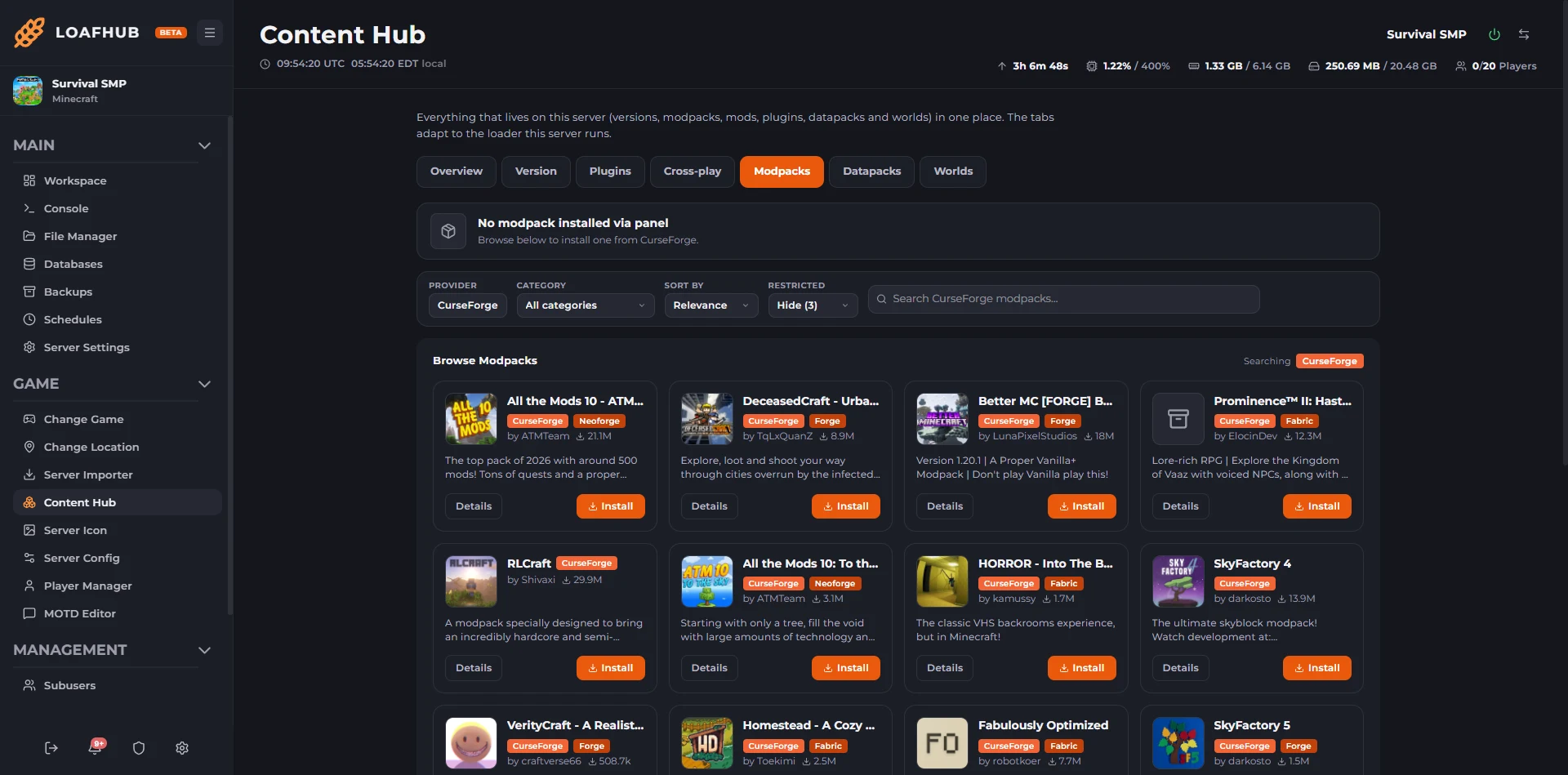
Write the lines players see in their server list, set the player count you want shown, upload an icon, and give the server its own message for when it is offline, suspended, installing or starting. A live preview shows each of those states exactly as a player sees it in the multiplayer list before you save. Offline pings are answered by our own agent, status only, so your entry in a player's server list still says something useful when the server is not running instead of going blank.
Mod, Plugin and Datapack Browser
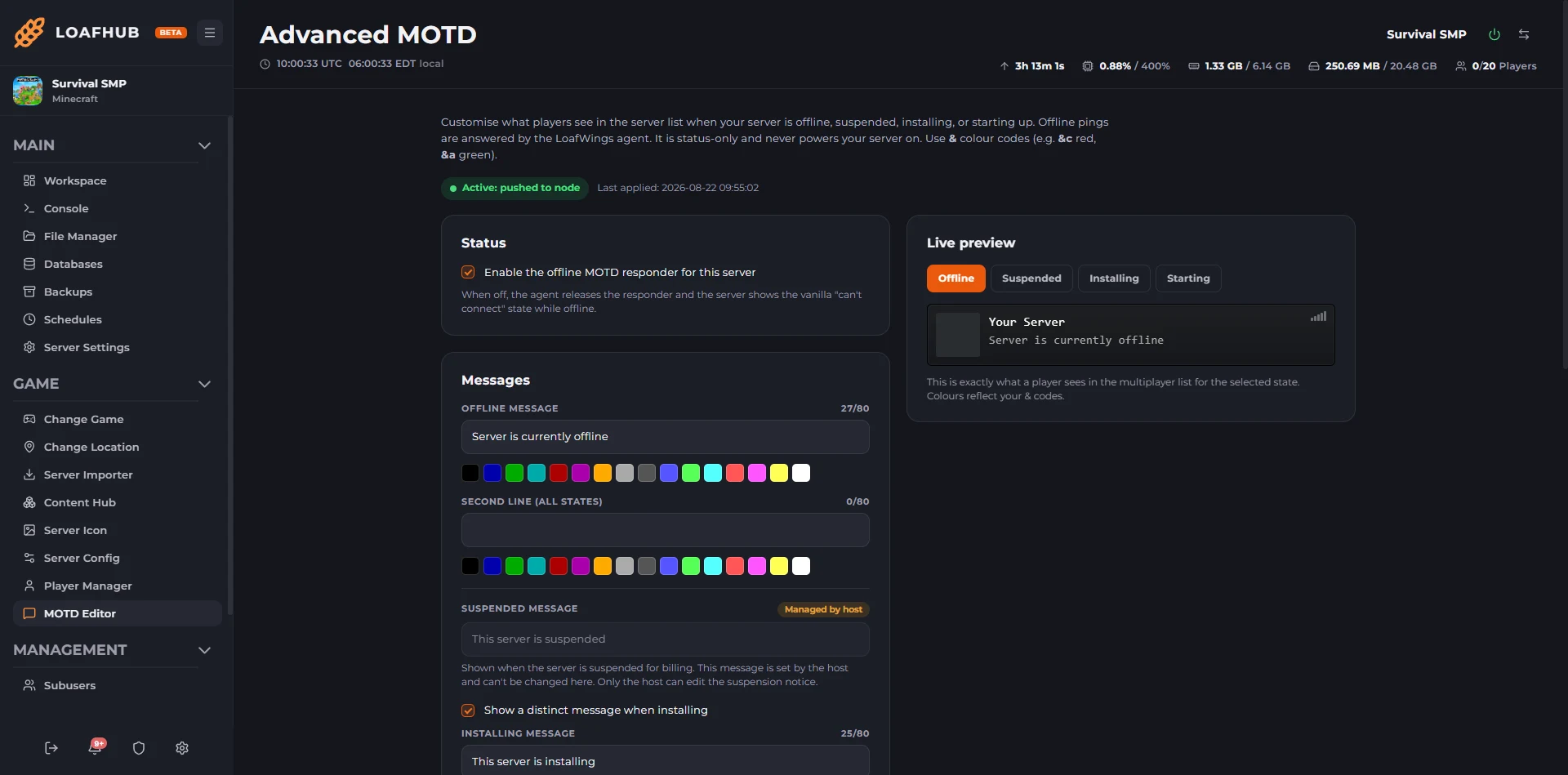
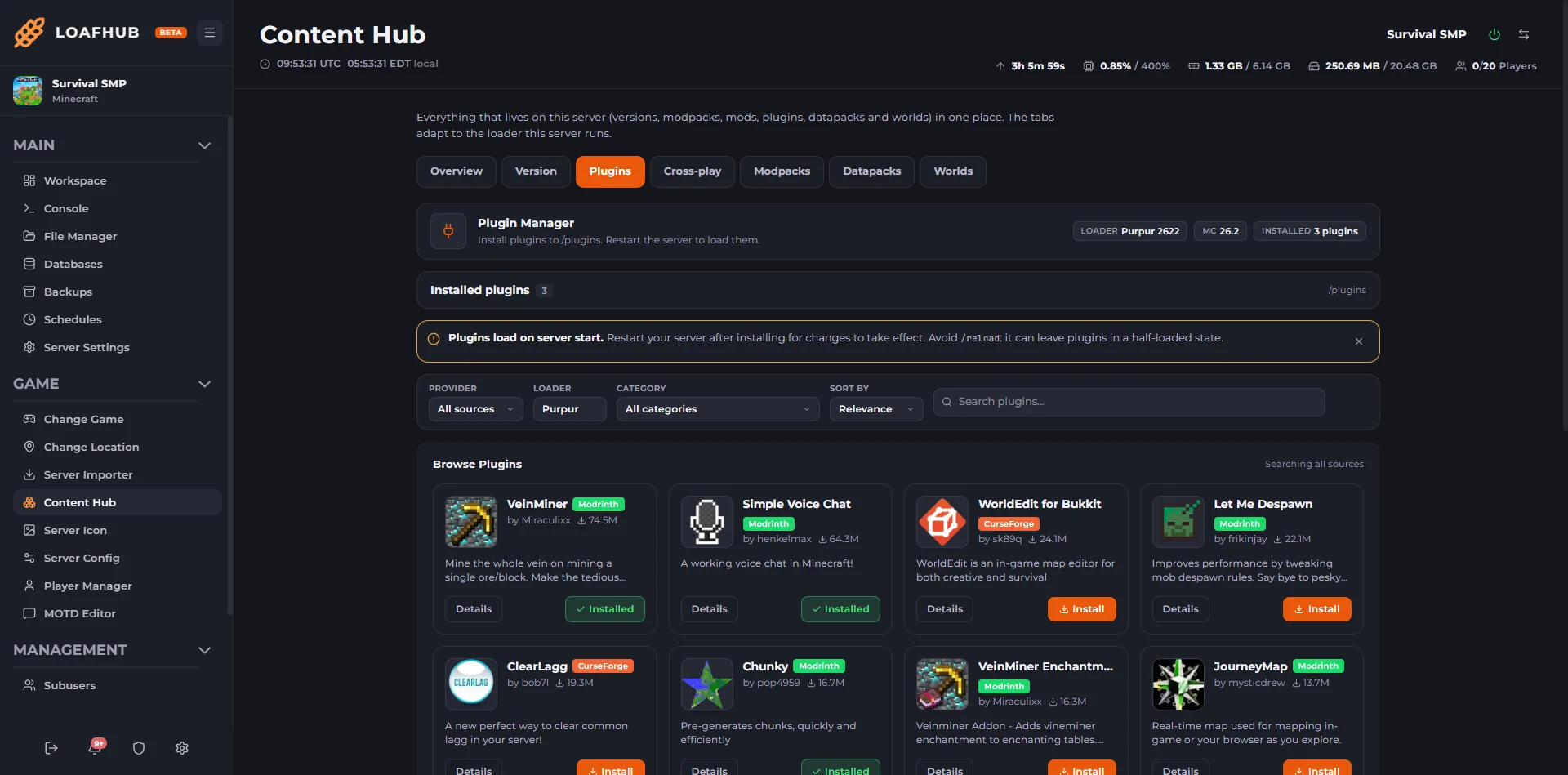
Search the mod, plugin and datapack catalogues from inside the panel and install to the right folder for the build you are running. Plugins search three catalogues at once rather than making you pick one first, every install names the version it is about to write and where it will land, and anything you uploaded yourself over SFTP shows up in the same list, so the panel does not lose track of it.
Version Switcher
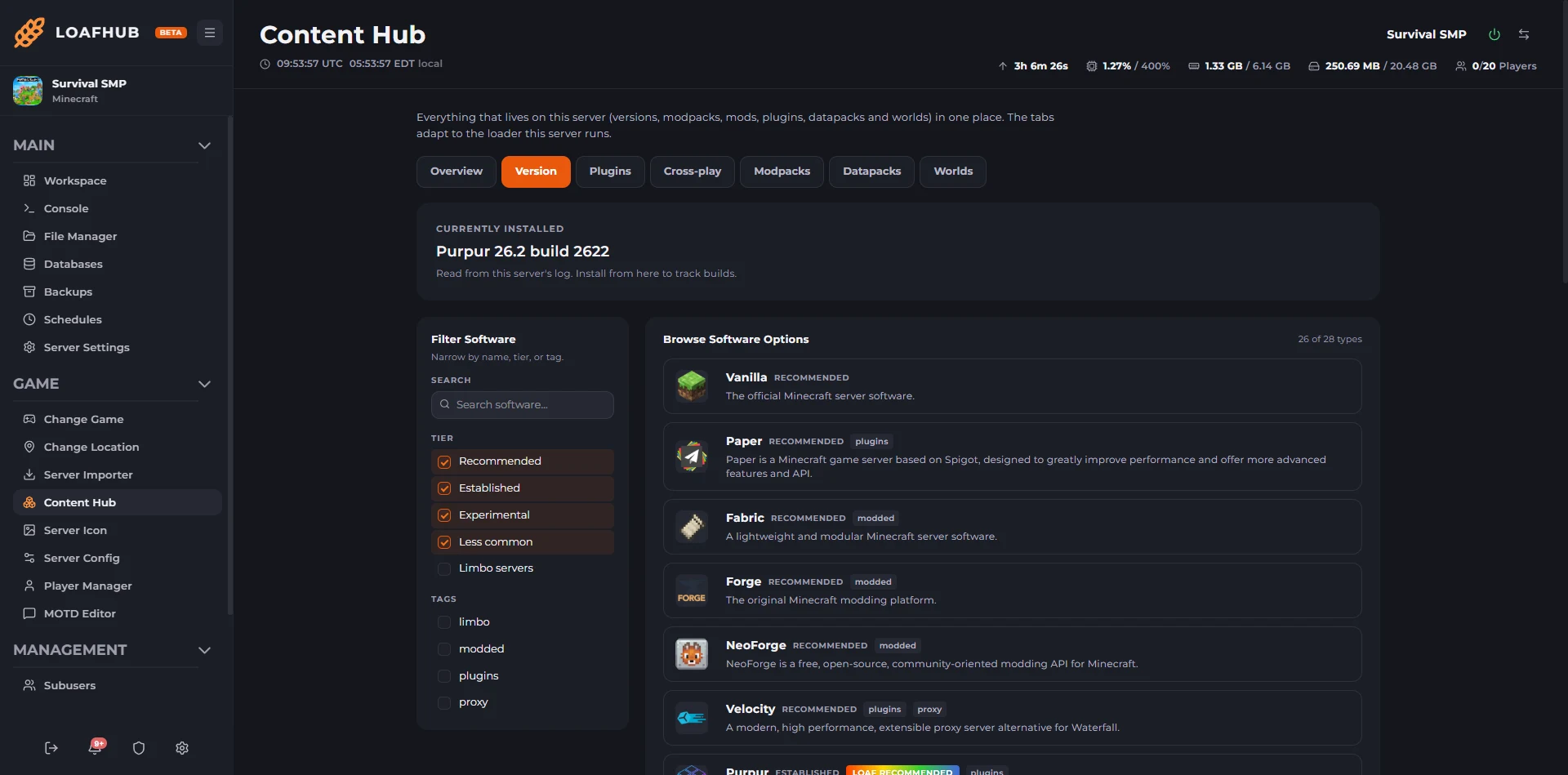
Move between Minecraft versions, and between the vanilla, plugin-capable and modded server builds, without rebuilding anything by hand. The build you are on now is read from the server's own log rather than from whatever the panel last set, so the page tells you what is actually running. Your world stays where it is.
Server Config Editor
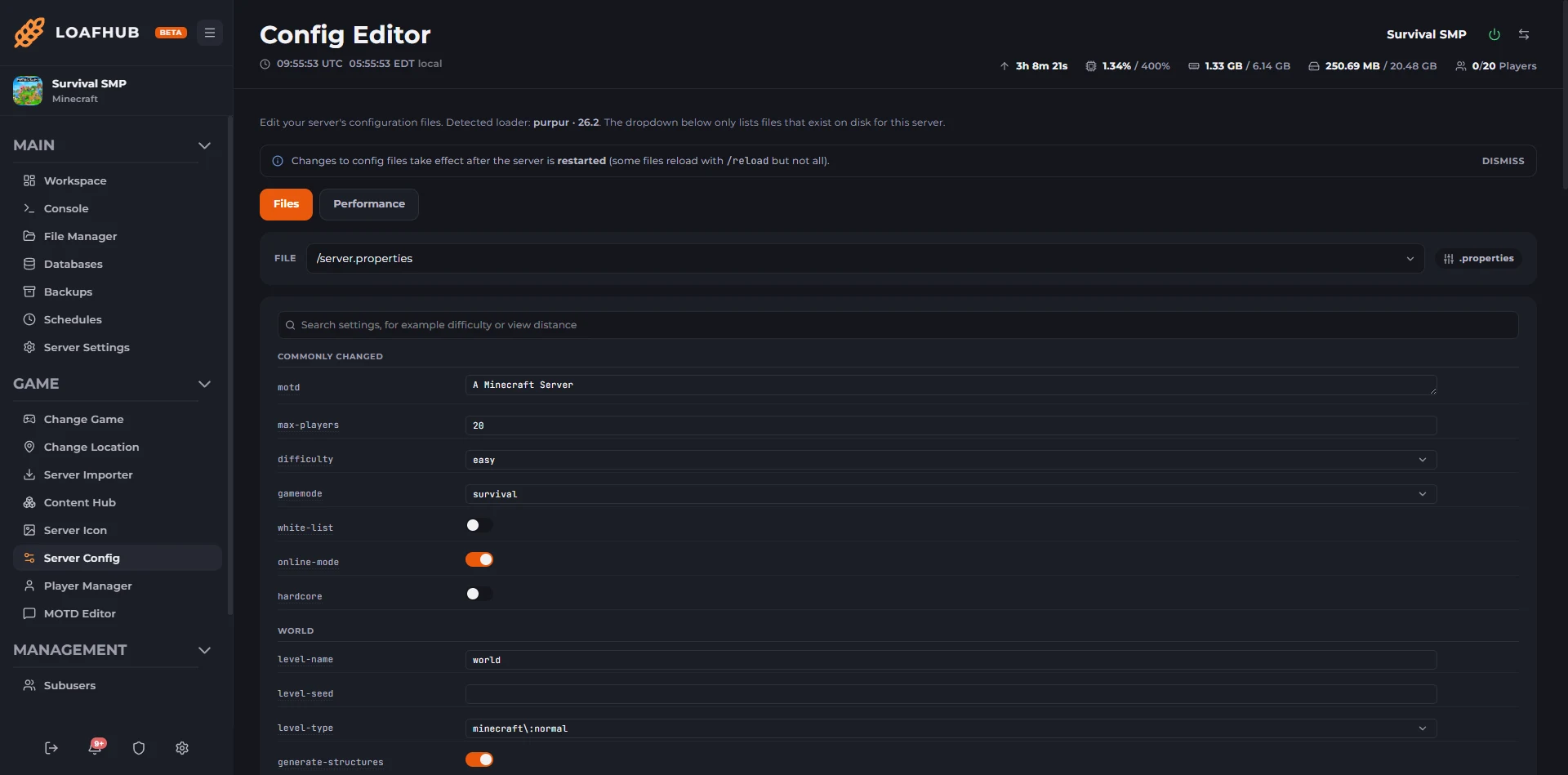
server.properties as a grouped form with real dropdowns and toggles wherever the game only accepts certain values, so difficulty and gamemode cannot be set to something the server will reject at boot. One search box finds a setting across the file, and the file picker lists only the configs that actually exist on disk for the build you are running rather than offering you files that are not there.
Performance Tuning
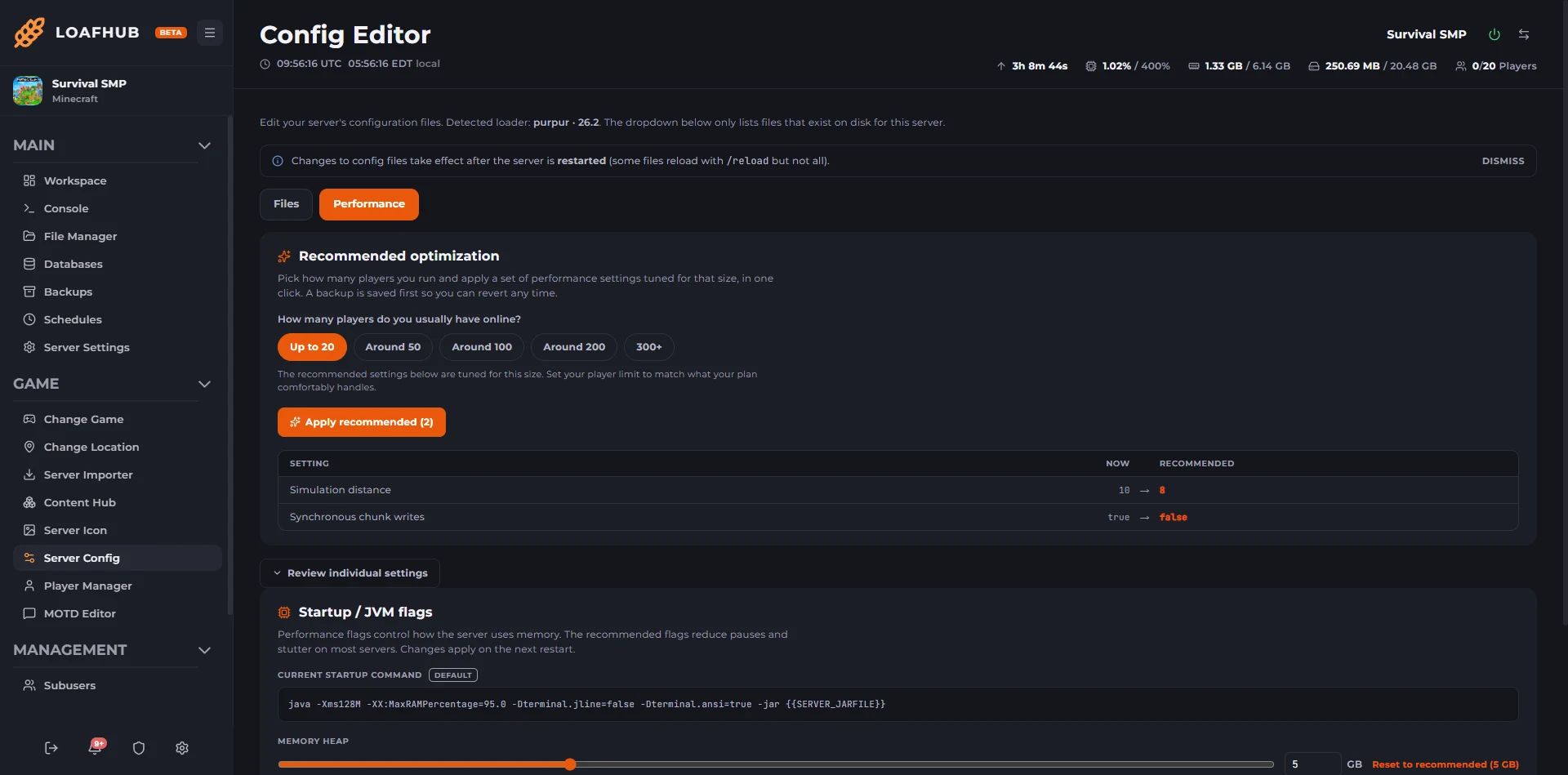
Tell the panel roughly how many players you run and it applies a set of performance settings tuned for that size in one click, showing you each value it wants to change and what it will become before you accept. A backup is taken first, so it is reversible. Memory and start-up flags are on the same screen, with the heap sized against the memory your plan actually has rather than a number you have to work out.
Player Manager
See who is online and kick, ban, op or whitelist them straight from the panel. It drives the server console, so it works without RCON, and the ban, op and whitelist files are readable from the same screen.
World Manager
List, download, upload, switch and delete worlds, with the Nether and the End handled alongside the Overworld rather than left as loose folders.
Bedrock Cross-play
Let players on console, mobile and Windows join your Java world. The panel installs and configures Geyser with Floodgate for you, so Bedrock players connect to the same address and do not need a Java account. Cross-play follows what Geyser supports: if your server is on a Minecraft version newer than that, the panel tells you which version to move to and links you to the version switcher rather than failing quietly.
The Minecraft tooling, as you will actually see it.
Real captures from a Minecraft server running in LoafHub, not mockups and not a staging skin. Click any one to open it full size.
-
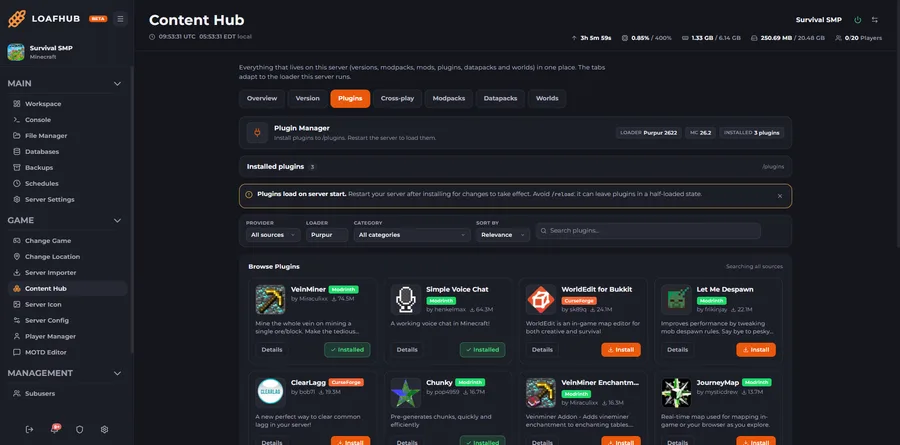
Three plugin catalogues, one search CurseForge, Modrinth and Spigot searched together rather than one at a time, filtered by category and sorted by installs, with what is already on the server marked as you browse. -
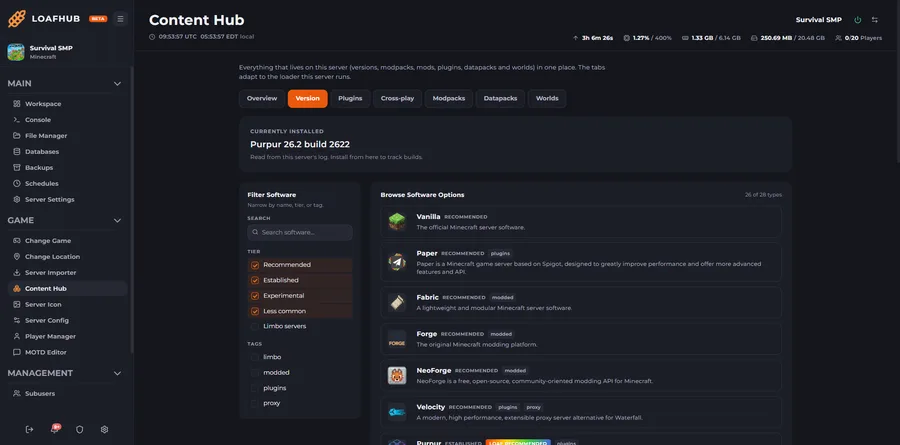
Change the server build without rebuilding Vanilla, Paper, Purpur, Fabric, Forge, NeoForge and the rest, each with its own version and build picker. What you are running now is read from the server's own log. -
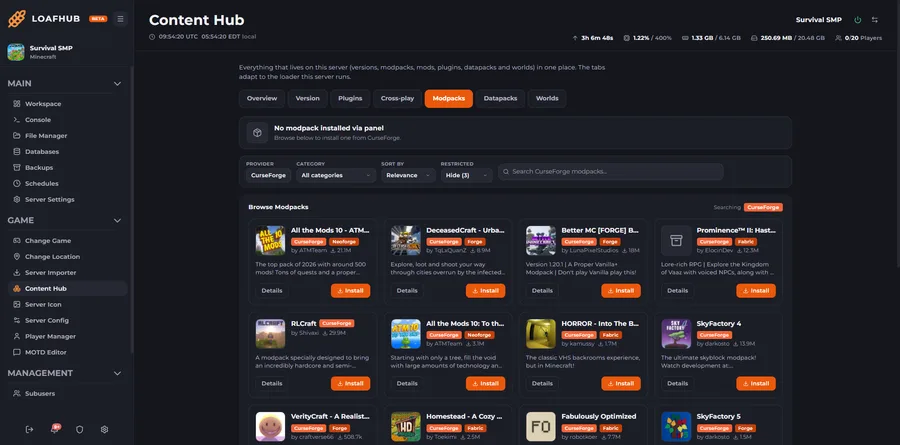
Modpacks installed for you Pick a pack and the server is rebuilt on it, mods, configs and start-up flags together. Each one names the loader it needs, so a pack cannot be installed onto a build that will not run it. -
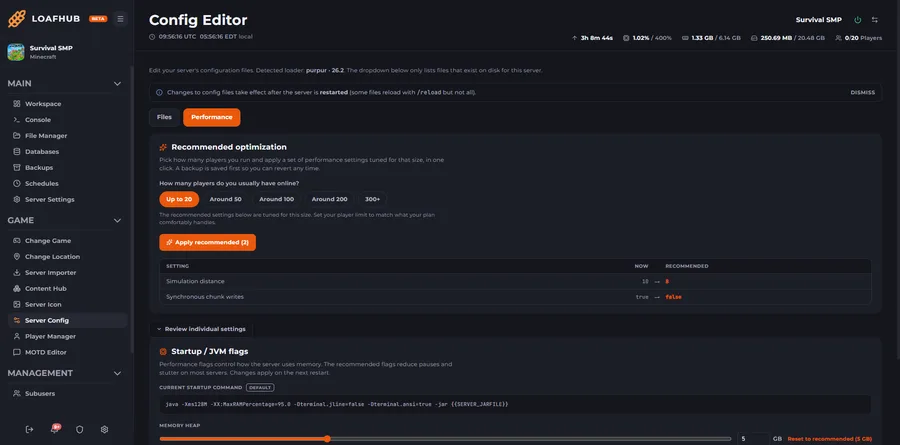
Tuning, with the change shown before it happens Choose the player count you actually run and the panel lists every setting it wants to change and what it will become, then takes a backup before applying it. Memory and start-up flags sit on the same screen. -
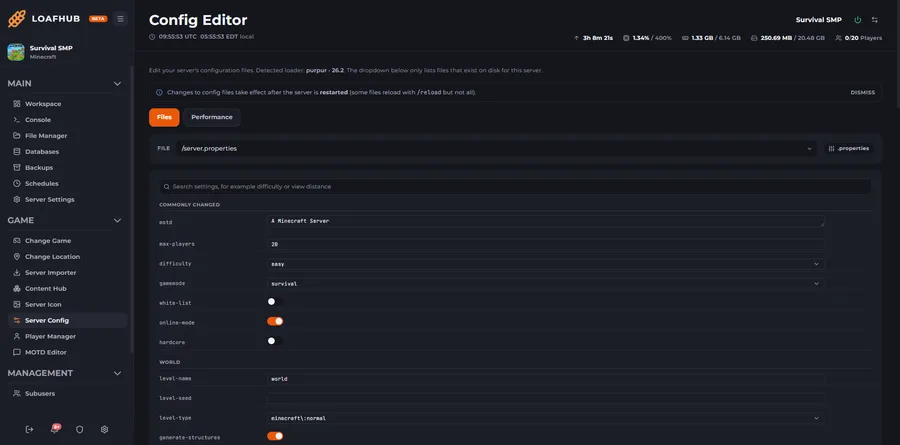
server.properties without the footguns Grouped fields with real dropdowns and toggles wherever the game only accepts certain values, and a file picker that lists only the configs that exist on disk for the build you are running. -
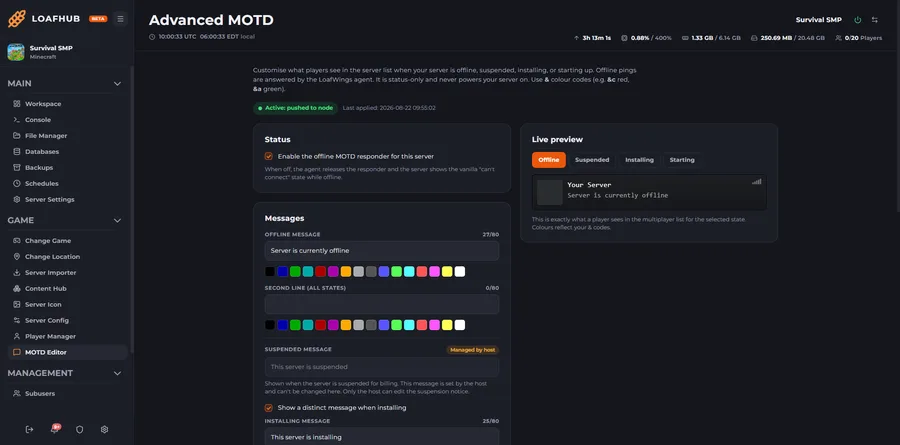
What players see when the server is not up Write the offline, installing and starting messages, then preview each state exactly as it appears in a player's multiplayer list before saving. Our own agent answers the ping, status only.
Hardware that holds up. A panel that does the work.
Every Minecraft server runs on current-generation Ryzen 9 desktop silicon and the LoafHub panel, the same one we run our own communities on.
- 500+ Tbps
- Plus 13+ Tbps of stateful filtering. Always on, on every build, through raid nights and event spikes.
- Ryzen 9
- 7950X and 9950X, up to 5.7 GHz, with DDR5 in every node.
- One login
- Console, files, scheduler, backups, sub-users and the game's own tools, with billing behind the same login.
- 60s
- Pick a region and your server boots in about a minute. No setup fees, cancel any time.
Build it, then just pay.
Slide memory, CPU and storage to whatever Minecraft needs.
Modded · 8 GB RAM · 3 cores · 40 GB NVMe
Most modpacks run happily here.
- Up to 16 cores
- DDR5 + NVMe
- Unlimited slots
- Terabit DDoS Protection
- Cancel anytime
Every price is quoted live by LoafHub in the builder · longer billing cycles save up to 25%.
Terabit DDoS Protection on every build: 500+ Tbps volumetric and 13+ Tbps stateful. Refunds: 3 days on game servers. Dedicated servers are non-refundable.
Common Minecraft hosting questions.
How much does Minecraft server hosting cost?
A Minecraft server at Loafhosts is built to order: you slide memory from 1 to 64 GB, CPU from 1 to 16 cores, and storage from 10 to 500 GB. The Modded build most people pick for Minecraft is 8 GB memory with 40 GB NVMe at $25.00/month. Builds for Minecraft run from $16.00 to $41.00/month, every one on an AMD Ryzen 9 7950X and 9950X with DDR5 RAM, unlimited slots and the full LoafHub panel. Longer billing cycles save up to 25%.
How much memory should my Minecraft server have?
Every Minecraft server is built to order: you set memory from 1 to 64 GB, CPU from 1 to 16 cores, and storage from 10 to 500 GB with sliders, or start from a preset. The Modded build, 8 GB memory with 40 GB NVMe, is what most Minecraft communities pick. Smaller crews and test servers run happily on less, and heavily modded setups or high player counts want more. You pick the core count that fits, and every build runs on a Ryzen 9 7950X and 9950X with the full LoafHub panel and Minecraft tools.
Does Minecraft hosting include Modpack Installer?
Yes, Pick a modpack from the panel's catalogue and the server is rebuilt on it, mods, configs and start-up flags together, so you are not matching versions by hand. Installing a pack replaces what is on the server, so take a backup first if you want the old world back. It's included on every plan at no extra cost.
Can I use MOTD Editor on my Minecraft server?
Write the lines players see in their server list, set the player count you want shown, upload an icon, and give the server its own message for when it is offline, suspended, installing or starting. A live preview shows each of those states exactly as a player sees it in the multiplayer list before you save. Offline pings are answered by our own agent, status only, so your entry in a player's server list still says something useful when the server is not running instead of going blank.
Where are Loafhosts Minecraft servers located?
You pick your region in the builder. Minecraft servers deploy from New York, Dallas, and Los Angeles in the United States, and Frankfurt in Germany, all at no extra cost, with Sydney, Australia available for Asia-Pacific coverage. Any region surcharge is quoted live before checkout.
Does Minecraft hosting include DDoS protection?
Yes. Terabit DDoS Protection is included on every Minecraft build at no extra cost, with 500+ Tbps of volumetric capacity and 13+ Tbps of stateful filtering, across Dallas, Los Angeles, New York, Frankfurt and Sydney. There is no tier to choose and no upsell.
Can I migrate my existing Minecraft server to Loafhosts?
Yes, migration is free. Open a Hub ticket and our team will move your world, configs, mods, scheduled tasks, and admin lists across with zero downtime.
What is the LoafHub panel?
LoafHub is our in-house game-server panel at hub.loafhosts.com. Console, file manager, schedules, backups, networking, sub-users, and the Minecraft tools all live in the same dashboard as your billing and invoices, one login, no separate portals.
Minecraft guides.
Setup walkthroughs and panel deep dives for your Minecraft server, written by the crew that runs the fleet.
Best Minecraft Plugins and How to Install Them
The best Minecraft plugins by purpose, plus how to install each on Loafhosts with the one-click Plugin Manager or a manual upload to the plugins folder.
How to Install EssentialsX on Your Minecraft Server
How to install EssentialsX on a Loafhosts Java server: homes, warps, kits, /tpa, spawn, and economy. Upload the jar to /plugins and restart.
How to Unban Someone in Minecraft
Unban a player or IP in Minecraft with the pardon command, from the LoafHub console, in-game as op, or via banned-players.json. Covers banning too.
How to Let Bedrock Players Join Your Java Minecraft Server
Turn on cross-play so Bedrock players can join a Java world. Covers Geyser and Floodgate, the port Bedrock uses, and the version limits.
Minecraft Bedrock Server Hosting Guide
Run an official Minecraft Bedrock server with crossplay across console, mobile and Windows. Sizing, settings, add-ons, and what Bedrock and Java do not share.
Minecraft Color Codes
Every Minecraft color and formatting code, the full section-sign and ampersand list, hex colors, and where to use them in your MOTD, signs, and plugins.
More Minecraft guides
- How to Install a Minecraft Datapack in LoafHub
- Why Minecraft Difficulty Resets to Peaceful
- Minecraft EULA Helper: Accept the EULA in One Click
- LuckPerms Setup: Minecraft Ranks and Permissions Explained
- How to Install a Minecraft Modpack in LoafHub
- How to Install Minecraft Mods on Your Server (Content Hub)
- Minecraft MOTD Editor: Customize Your Server-List Message
- Minecraft Player Manager: Whitelist, Ops and Bans in LoafHub
- How to Install Minecraft Plugins in LoafHub
- How to See Who Is On Your Minecraft Server
- How to Back Up a Minecraft Server (and Actually Restore It)
- Minecraft Server Commands

Run Minecraft on Loafhosts.
Vanilla, a plugin build or a kitchen sink modpack, all switched from the same panel, and your world comes across every time.