
















An Arma 3 server is ready when the Console prints Host identity created. If that line never appears, the server is stuck starting. Open the Crashes page. The newest entry shows the outcome of the start, and the log lines that explain it. The usual causes are a mod, a full disk, or a long update.
Read the Crashes entry
- Open Crashes. Each start of the server is one entry, newest first.
- Look at the outcome on the newest entry:
- Starting: the game is still working. It has not reached
Host identity created.yet. - Failed to start: the log never reached
Host identity created. - Stuck, restarted: the game stopped answering, so the panel restarted it.
- Running now: the start worked.
- Starting: the game is still working. It has not reached
- Open the entry. Read What the panel can tell first, then Exit code, Out of memory and Last lines.
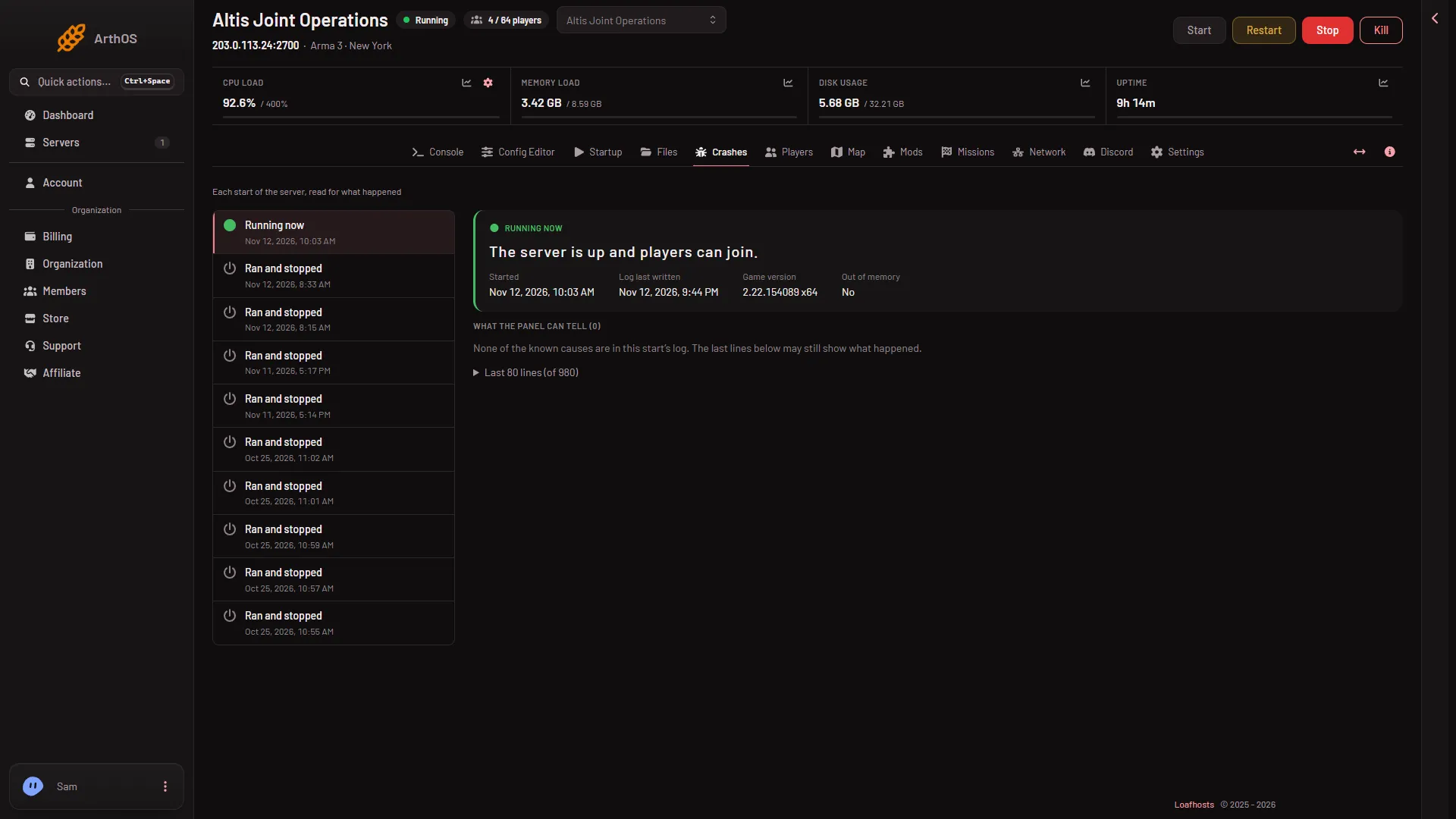
- Out of memory
The picture shows a start that worked. A start that never became ready shows Failed to start in the same place, and Out of memory (1) tells you if the game ran out of memory.
Some lines in the log look bad and are not. The game prints a long list of addons, Strange convex component lines, SteamAPI initialization failed, and SteamInternal_SetMinidumpSteamID. None of these is the problem. The panel hides most of them from Last lines.
Check, in this order
1. A finding. If What the panel can tell lists a finding, fix that first.
- A mission or mod needs content the server does not load. Add the mod on Mods, or turn on Creator DLC Server Files on Startup for a Creator DLC.
- A mod’s extension did not load. Remove the mod. See a mod’s extension did not load.
- server.cfg or basic.cfg did not read. See server.cfg did not read.
- BattlEye did not start. BattlEye is the game’s anti-cheat. Restart the server (a restart drops everyone who is on, so warn players first with A message to everyone on the Players page). If it happens again, take a backup on Backups first, then use Reinstall Server on Settings. Reinstalling stops the server, and the panel says missions and profile stay.
- The server ran out of memory. Remove a mod you do not need, or choose a bigger plan.
2. The last mod you added. A new mod is the first thing to rule out. Open Mods, tab On this server, and take off the mod you added last. Apply the change and start again. If the server then starts, add mods back one at a time.
3. Mods still downloading. After Apply or Apply and restart, the panel downloads first, then starts the server. Progress shows at the top of the page. After Apply and restart, if the server is still starting twenty minutes later, the panel says so and points you to the console.
4. Disk space. The panel refuses a download that does not fit and tells you how many GB are needed. Old mod folders that are not on the list still take space. On Mods, the section for folders not loaded offers Delete files.
5. Updates. Under Startup, Automatic Updates checks for a game update at every start. [Repair] Validate Server Files checks every game file, and starts take much longer while it is on.
If it does not work
- Starting stays for a long time with no finding. Watch the Console. If lines keep coming, the game is working. If nothing comes and the Crashes outcome is Failed to start, read Last lines for the first line that names a file or mod.
- The server is stopped and starts again by itself. Look at the start outcome on each entry: Crashed is a crash, Failed to start is a start that never became ready.
- Nothing helps. Put the mods back one by one, newest last, and note the one after which it fails to start.
More about the game: Arma 3 servers.
Sources: Bohemia wiki: Dedicated Server