








To test a mod, or to play without it for a while, turn it off. To find which mod stops a server, use the Troubleshoot tab, and see what changed at each start. A disabled mod stays on your list in its place, but it is taken out of config.json. The server does not load it and does not download it from the next start. Choose Enable to bring it back. This is for Arma Reforger servers.
Turn a mod off
- Open the server and choose the Mods tab.
- Stay on On this server.
- Choose the three dot button More for (mod name) on the mod’s row.
- Choose Disable (keep on this list).
- Restart the server when you are ready.
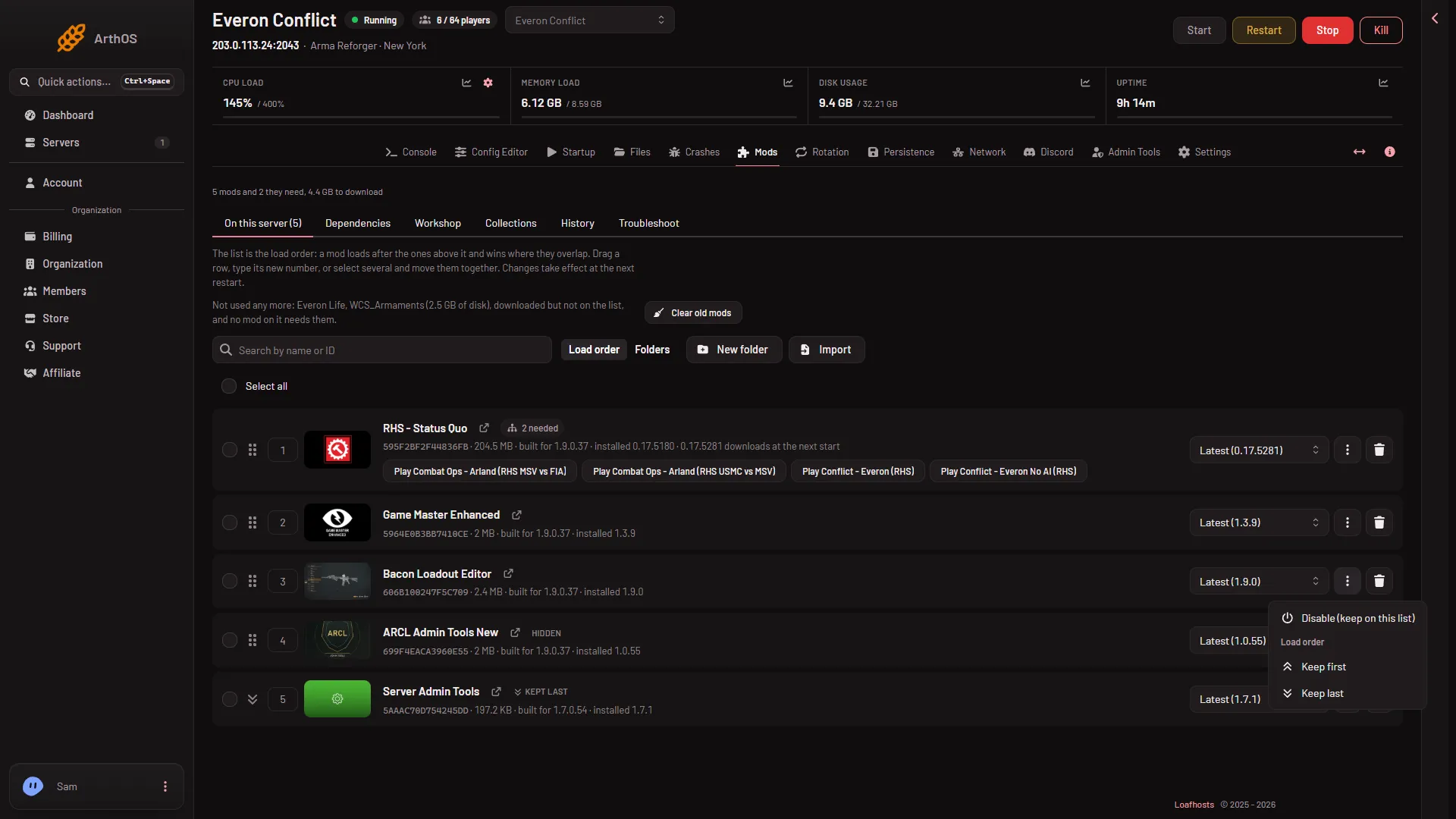
- Disable
The menu item Disable (keep on this list) (1) is at the top. You need a role that may edit the server’s files.
A toast tells you “(name) is disabled: the server does not load it from its next start. It stays on this list.”
Turn several off at once
Tick the boxes at the left of the rows, or use Select all. The bar above the list then shows Disable and/or Enable. They work on every mod you ticked, up to 400 at a time.
What you see after
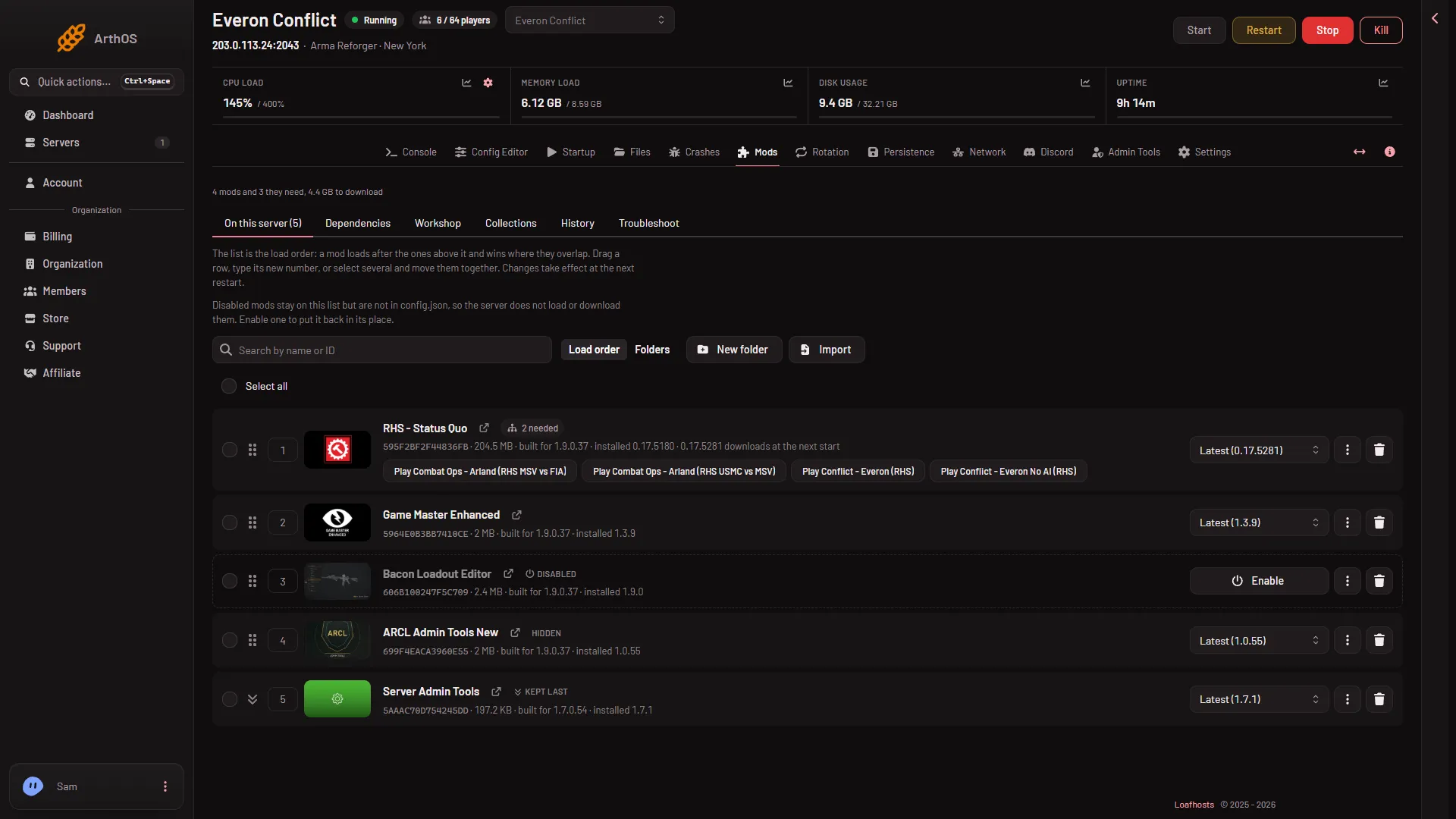
- Disabled chip
- The disabled mod
- What disabled means
The row carries the chip Disabled (1). The disabled row (2) shows an Enable button where the version menu was. A note at the top (3) says: “Disabled mods stay on this list but are not in config.json, so the server does not load or download them. Enable one to put it back in its place.”
Turn it back on
Choose Enable on the row, or tick the mod and use Enable in the bar. The mod loads again from the next start, in the same place in the load order. The panel keeps its locked version, if it had one.
What to know
- The change applies at the next start. A running server keeps its mods until you restart it.
- A disabled mod is not in the download size, and what it needs is not counted as missing.
- You cannot lock a disabled mod to a version, and you cannot choose Keep first or Keep last for it. Enable it first.
- A disabled mod is never offered for clearing. Its folder stays on disk. See clear old mods for the files that are not used.
- If you add, import or use a collection that holds the same mod, it is no longer disabled.
- Each config instance has its own disabled mods. When the server uses another instance, a note on the Mods page says “These are the mods of (name), the config instance in use.”
- To drop a mod for good, see remove a mod.
If it does not work
- No More menu or no tick boxes. Your role may not edit the server’s files. Ask the owner.
- No Disable in the menu. On a disabled mod the menu shows Enable in that place.
- “config.json is not valid JSON; fix it in the file editor first”. The file has a mistake. Fix it in Files, then try again.
- “the server is starting or stopping; try again once it has finished”. Wait and try again. The buttons work while the server runs, and the change applies at the next start.
- “too many changes at once”. Disable up to 400 mods in one go.
- The mod still loads. Restart the server. The change does not touch a running game.