
















Open World and look for the list Set aside by the panel. Each world in it has a Delete button. Deleting it frees the disk it used.
The panel sets a world aside when you choose Start a new world or Put back. It keeps the old world so you can return to it. Their file names are game_0_panel- then the reason (before-new-world or before-put-back), a time stamp and .db. Those worlds stay until you delete them.
What can be deleted here
Only worlds the panel set aside. If you try anything else, the panel says: “only a world the panel set aside can be deleted here; the game keeps its own backups”.
The game’s own backups are in the list Backups, just above. The game makes one as the server starts and every 5 minutes while it runs. Each has a Put back button and no Delete button.
Delete a set-aside world
- Open the World page.
- Find the list Set aside by the panel (1). The number in brackets is how many there are.
- Check the name and time on the row. Be sure it is the one you no longer need.
- Choose Delete (2).
- A box asks “Delete the world set aside at (name)?” and says “It is deleted for good.” Choose Delete.
- The panel says “Deleted.”
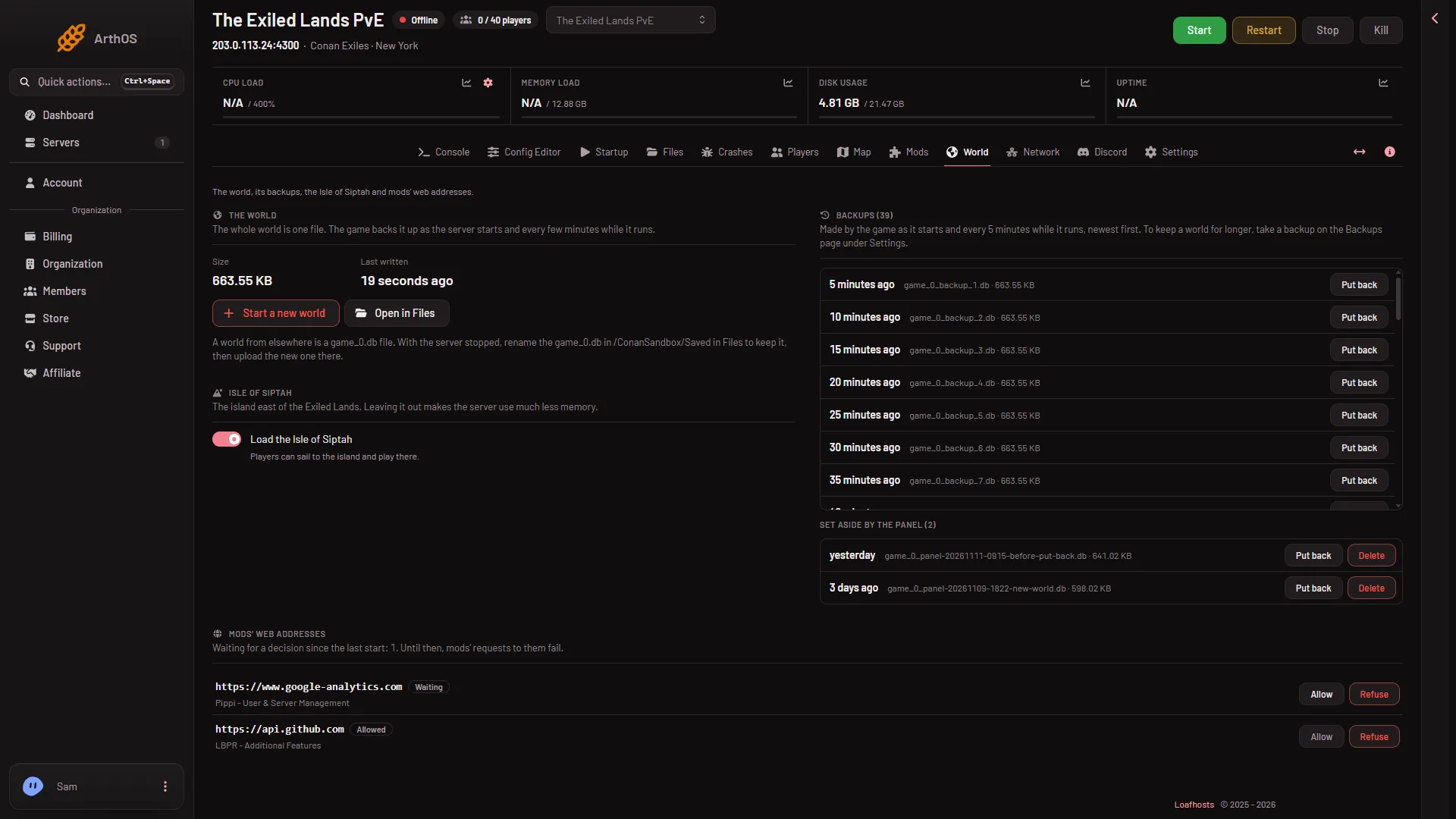
- Set aside list
- Delete
You can do this while the server is running. Putting a world back and starting a new one need the server stopped, but deleting a set-aside world does not.
When to do it
- The server is short of disk. The Crashes page finding The server ran out of disk space lists this as the first fix: old worlds the panel set aside, unused mods, old backups.
- You started a new world, played on it, and are sure you will never go back to the old one.
Keep a world you might want. If you only want a copy for later, a panel backup may be safer, though a backup on a full disk may itself fail (not checked). See panel backups and schedules.
If it does not work
- There is no Delete button. The world is one of the game’s own backups, not one the panel set aside.
- The list is missing. Nothing has been set aside yet. It appears after Start a new world or Put back.
- The page does not open, or Delete does nothing. Your role may not be allowed to change files on this server.
- The disk is still full. The game’s own backups are not deleted here. They are
game_0_backupfiles inConanSandbox/Saved: open them with Open in Files and delete the oldest, keeping the newest few as restore points. A file deleted in Files goes to the Trash and may still use disk until it is removed there. See game backups explained and disk full.
More about the game: Conan Exiles servers.