
















Start with the row of the mod on the Mods page. Its note says whether the game loaded the mod at the last start. If the note says the game did not load it, check whether the mod was made for the old game, then read the start’s log.
Read the row note
Open the Mods page, tab On this server. Each row has a note:
- Loaded at the last start. The game loaded it.
- Loads at the next start. It was added or changed after the last start. Restart the server.
- Made for the old Conan Exiles: it never loads on Enhanced. The mod is for the old game. Take it off the list. See mods made for the old game.
- On the list, but the game did not load it at its last start. The game started, and it did not load this mod. A link follows: Its log from that start may say why.
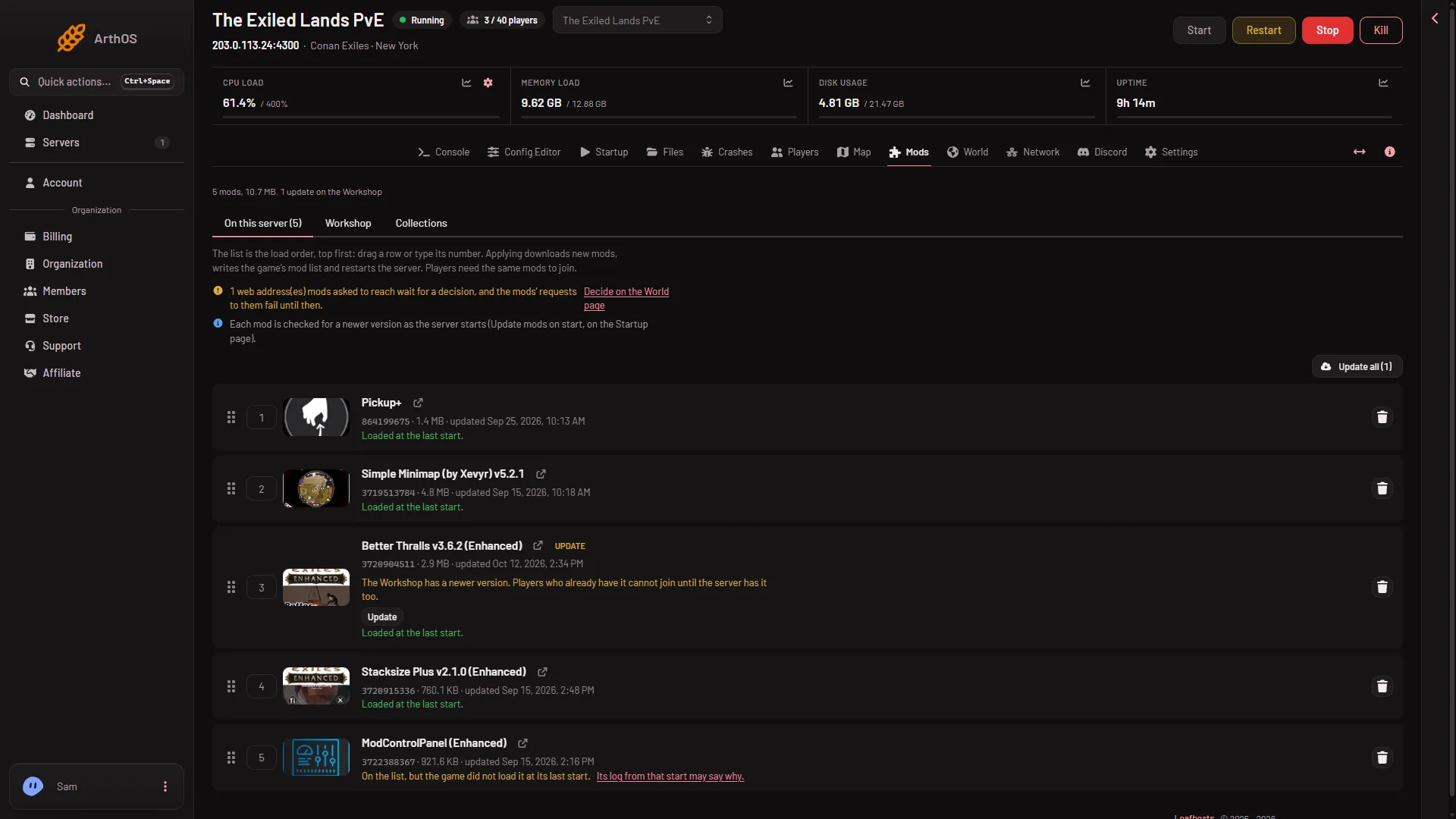
A mod made for the old game may leave no line in the log at all. For that reason, the row note and the line above the list are the first place to look. The line reads, for example, “Made for the old Conan Exiles, so they never load on Enhanced: (names). Take them off the list.”
Check the Crashes page
- Open the Crashes page. Each row is one start of the server.
- Open the start after you added the mod.
- Under What the panel can tell, look for A mod did not load. It says: “The line names the mod. Update it from the Mods page, or take it off the list; a mod made for the old game (Legacy) never loads on this one.”
The panel finds this finding from lines such as “failed to mount mod” or “mod pak file not found” in the game’s log. Then press Open on the Workshop on the mod’s row to see if it has a newer version, and update it. See update the mods on your server.
Things to check
- Is the mod downloaded? A row with the chip Not downloaded is on the list but not on the server. Press Apply to download it.
- Is it for the right game? A row with the chip Wrong game is a mod for another game.
- Was the pak file renamed? Never rename a mod’s
.pakfile. The game fails to load a mod whose pak file was renamed. - Do other mods need it first? The list is the load order, top first. Drag the row, or type its number, then Apply.
- Did you restart after the last Apply? Applying restarts the server, so the note describes the start after it. A restart drops everyone who is on; to warn them first, use Restart with a warning on the Players page (it works only while the game answers the panel).
If nothing helps
Take the newest mod off the list first and restart. If the server then runs, add the mods back one at a time. See remove a mod.
If it does not work
- The note still says it did not load after an update. Open the log from that start in Files:
ConanSandbox/Saved/Logs/ConanSandbox.log. Older starts are kept asConanSandbox-backupfiles in the same folder. - The Crashes page shows nothing about the mod. A mod that does not load does not always cause a crash. Trust the row note.
- A mod needs to reach the internet. Its requests are refused until you allow them. See mod web requests.
More about the game: Conan Exiles servers.