
















Open the Crashes page. It lists each start of your Conan Exiles server and reads its log for you. Open the newest start first. Read how it ended, then the findings, then the last lines.
The list of starts
The page is subtitled “Each start of the server, read for what happened”. The game keeps only the newest ten logs, so the page shows the last ten starts at most.
Each start has an outcome:
- Running now: the server is up and players can join.
- Starting: the server is still starting.
- Ran and stopped: the server started, ran and stopped normally.
- Failed to start: “The server never got as far as letting players in.” The log has no ready line and no exit line.
- Crashed: “The game stopped without being asked to.” This includes a server the machine ended because it used all its memory.
- Ended early: “The log ends without saying how the server stopped.” The server was ready, then the log ends with no clean exit line and no crash line, for example after a kill.
Open a start
Choose a start to open it. You see:
- Started: when it began.
- Log last written: when the log last changed.
- Game version: the server build, when the log names it.
- Exit code: the number the game stopped with.
- Out of memory: Yes or No.
Below these come What the panel can tell and the last lines of the log.
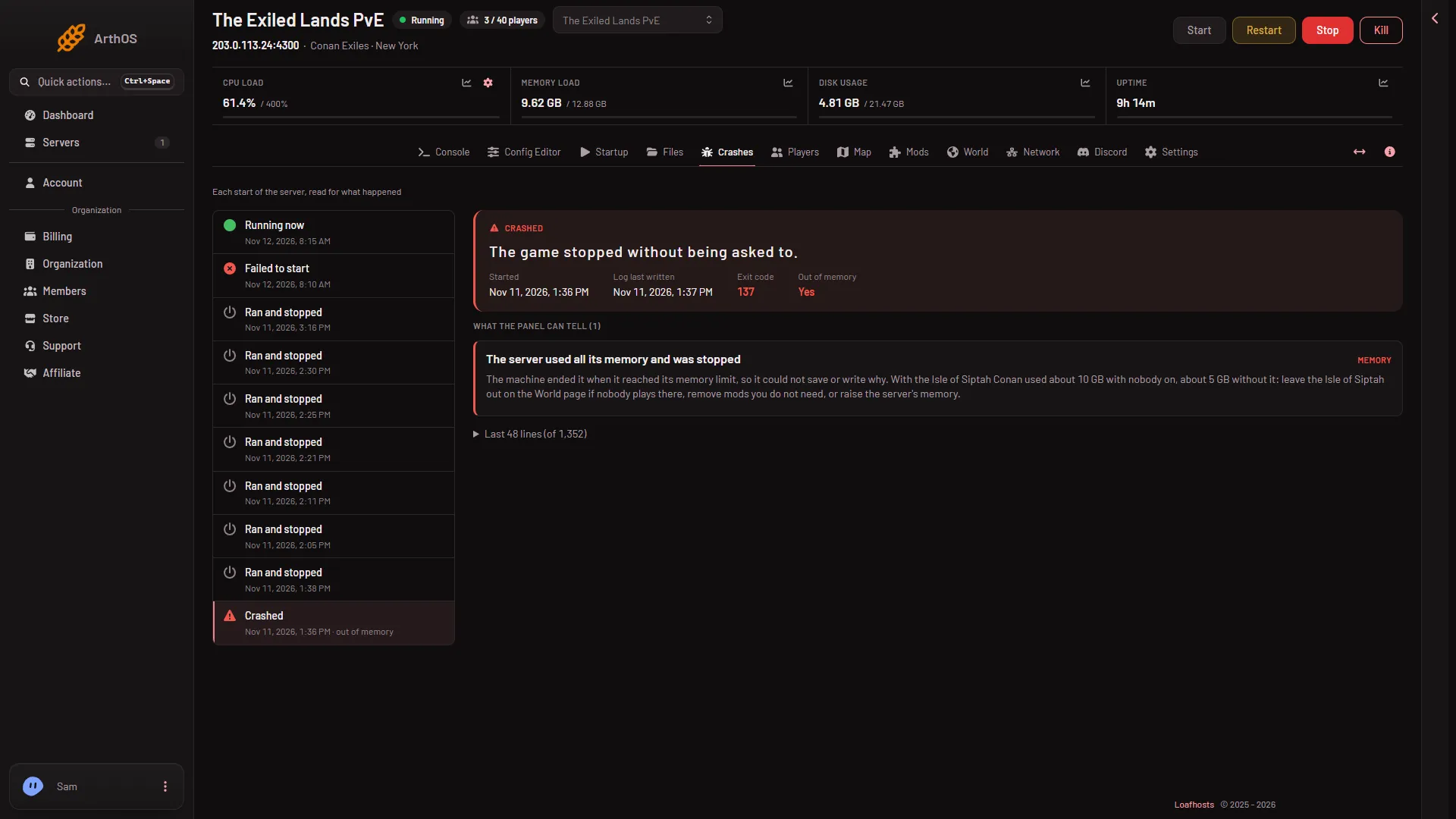
- A crashed start
- Out of memory
The crashed start in the list (1) is the one opened. Its Out of memory field (2) reads Yes: the machine ended the server.
Compare Game version between starts. It tells you whether the server build changed between a good start and a bad one.
What the panel can tell
The heading What the panel can tell lists findings. Each has a title and one fix. These are the ones Conan can show:
- The world file could not be read or written. See the database is malformed and the world will not load.
- The server ran out of disk space. Free space, then start again.
- A mod asked to reach the internet and was refused. See this fix.
- A mod did not load. Update it, or take it off the list.
- The server ran out of memory. Leave the Isle of Siptah out on the World page if nobody plays there, remove mods, or raise the memory.
- The server used all its memory and was stopped. The machine ended it, so it could not save or write why. For this one the log stops mid-line: read Out of memory and this finding first, not the last line. See out of memory.
- A port the game needs was in use. Restart the server.
- The game crashed inside its engine. Restart it. If it repeats at the same moment, take the last mod you added off the list.
- The engine wrote a crash report. The engine’s own report is in the crash folder described below.
If no known cause matches, the page says “None of the known causes are in this start’s log. The last lines below may still show what happened.”
The last lines
At the end you see “Last (number) lines (of (total))”. The full log is in Files.
For other stops, the last error line before the server stopped is a place to start, but the page hides routine start-up noise, so it may not be the cause.
Logs in Files
Open Files and go to ConanSandbox/Saved/Logs.
ConanSandbox.logis the log of the current start.ConanSandbox-backup-(date and time).logfiles are older starts. The newest ten are kept.RconCommandLog.logrecords the commands the panel sent to the game.
The engine’s crash report
When the engine crashes hard it writes a folder in ConanSandbox/Saved/Crashes. The folder is named crashinfo-ConanSandbox-pid-(number)-(code). Inside, CrashContext.runtime-xml holds the engine’s own report. It is the file to share if you ask for help. Whether the Crashes page quotes this report was not checked on Enhanced, server build 25792439 as of 13 November 2026.
If it does not work
- The page says “The server has not started yet, so there is nothing to read.” Start the server once.
- An old crash is missing. The game keeps only the newest ten starts.
- The server was stopped with no crash and no error. It may have been stopped on purpose, or put into standby. Check Activity under Settings.
More about the game: Conan Exiles servers.