












A resource server is a public Enshrouded dedicated server that someone has stocked with materials, weapons, armor and building items in chests. Players join, fill their backpack, and go back to their own world. It is the nearest thing Enshrouded has to a creative mode.
What a resource server is
Players on Steam’s community forums describe it the same way: a server with the game’s materials waiting in chests, open to anyone, and reset on a timer so the chests are full again. One host explains the reset as a script that ends the server every hour, deletes the save files and puts the original back, so it is as if nobody had visited.
It works because of how Enshrouded stores things. Keen’s FAQ says the world is stored on the dedicated server and the character, with its progress, only on the player’s own computer. A player joins with the character from their own world, takes what they need, and leaves with the same character.
Find and join one
- In Enshrouded, choose Join and turn on Show dedicated server in the filter. Dedicated servers are hidden until you do.
- Look for servers whose names say what they are. Players on the forums search the list for the word
depot. - Select a server. If it asks for a password, it is not open to everyone. Servers meant for visitors have no password, and players join them by leaving the password empty.
Resource servers come and go, and we cannot say which ones are running today. If a server is gone, search again. See connect to an Enshrouded server if the list does not show a server you know.
Host your own on Loafhosts
A resource server is an ordinary server with one group left open and set to take only what you allow. On Loafhosts the groups are Admin, Friend, Guest and Visitor, and the password a player types picks their group. The panel offers Let anyone join for Guest and Visitor only, never for Admin or Friend, so strangers can never be handed the right to build in bases or kick players.
- Open the Players page of your server and find Groups and passwords.
- On the Visitor card, switch Open storage in bases on. Leave Change the world outside bases, Build in bases, Kick and ban and Place and upgrade Flame Altars off.
- Choose Let anyone join on the Visitor card. The page then says “Anyone can join without a password, as Visitor.”
- Choose Save groups. Then restart the server, because groups are read when it starts.
- Keep strong passwords on Admin and Friend. Give them only to people you trust. See user groups and permissions.
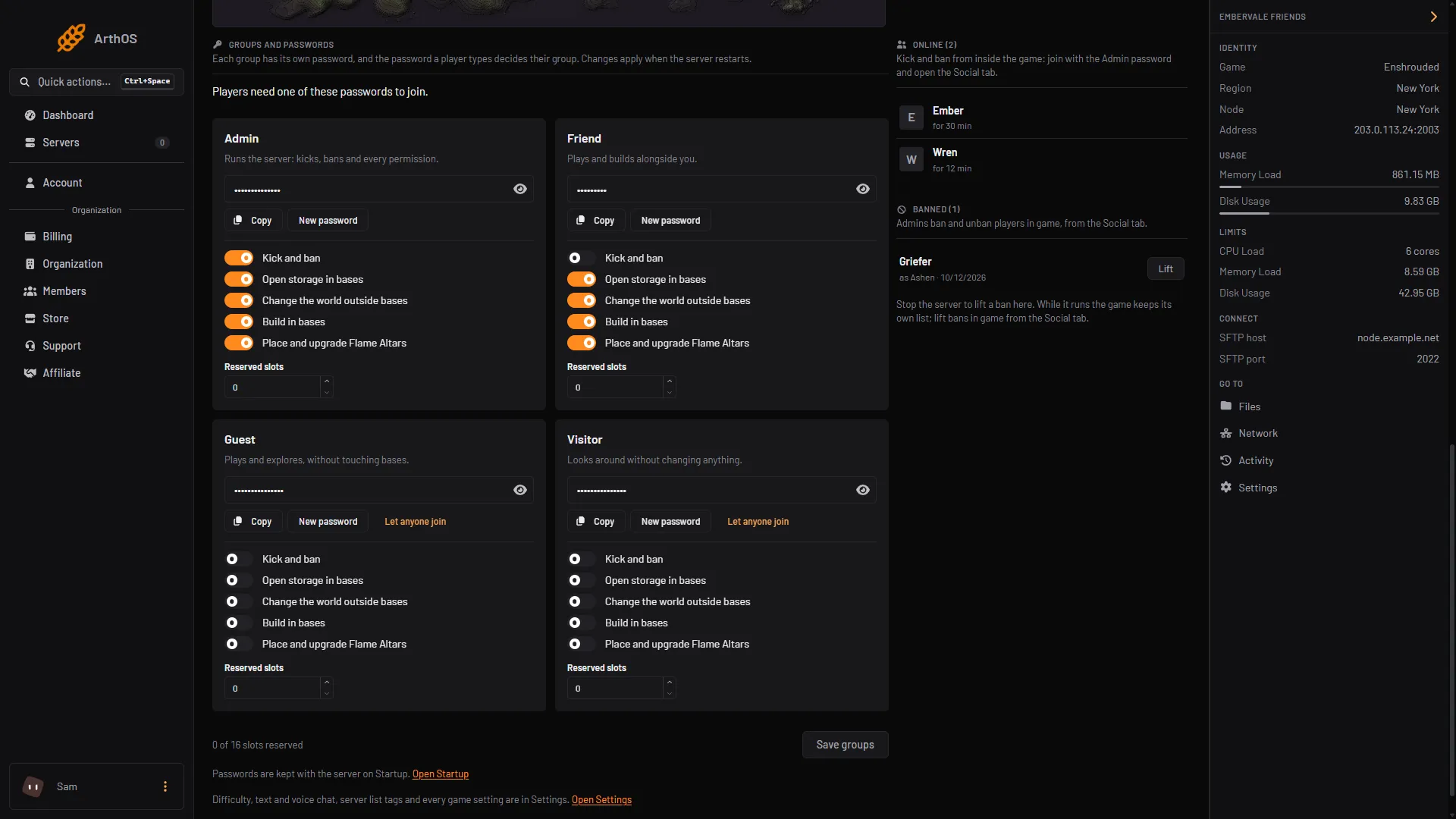
- The five switches of a group
- Save groups
The five switches of each group sit on its card (box 1). Save groups (box 2) saves only the switches and Reserved slots. The picture shows the Admin card, and the Visitor card has the same switches.
Then stock the world. Fill chests with what players should be able to take, using a world of your own on the server. Choose how many players the server takes with Player slots on Startup, at most 16. See player slots.
Fill the chests again
Visitors can empty every chest, so decide how the server gets full again. The simple way is a panel backup of the stocked world:
- Make a backup of the server when the chests are full. Choose Lock on it so it is never removed to make room.
- When the chests are empty, open Settings, then Backups, and choose Restore on that backup. The restore stops the server itself, so pick a quiet moment and start it again afterwards.
A schedule can restart the server on a timer, as described in restart an Enshrouded server. An automatic reset from a backup has not been set up or tested here. See back up and restore an Enshrouded world for the backup steps.
If it does not work
- Players are asked for a password. No group is open. Choose Let anyone join on Visitor or Guest, save, and restart.
- Players join but cannot open chests. Their group has Open storage in bases off. Switch it on for Visitor, save, and restart.
- Players can build or dig. They joined with a group that allows it. Check which group is open and that Admin and Friend have passwords.
- The server is full. Raise Player slots on Startup, at most 16, or check whether reserved slots are using them up.
More about the game: Enshrouded servers.
Sources: steamcommunity.com: 596268676750032881, enshrouded.zendesk.com: 16056312924957 Dedicated Server FAQ, enshrouded.zendesk.com: 19191581489309 Server Roles Configuration