

















A SteamID64 is the number that identifies a Steam account. It is 17 digits and starts with 7656119. If the player has been on your server, the Players page shows it under their name. Click it and it is copied.
The server’s lists use this number, not the player’s name. That goes for Admins, Bans and Reserved slots. The game keeps them as Administrators, Banned and Reserved.
From the Players page
- Open the Players page.
- Look under On now for someone who is on the server. Under Everyone the world knows you find everyone who has played in the world.
- The 17-digit number sits under each name. Click it to copy it.
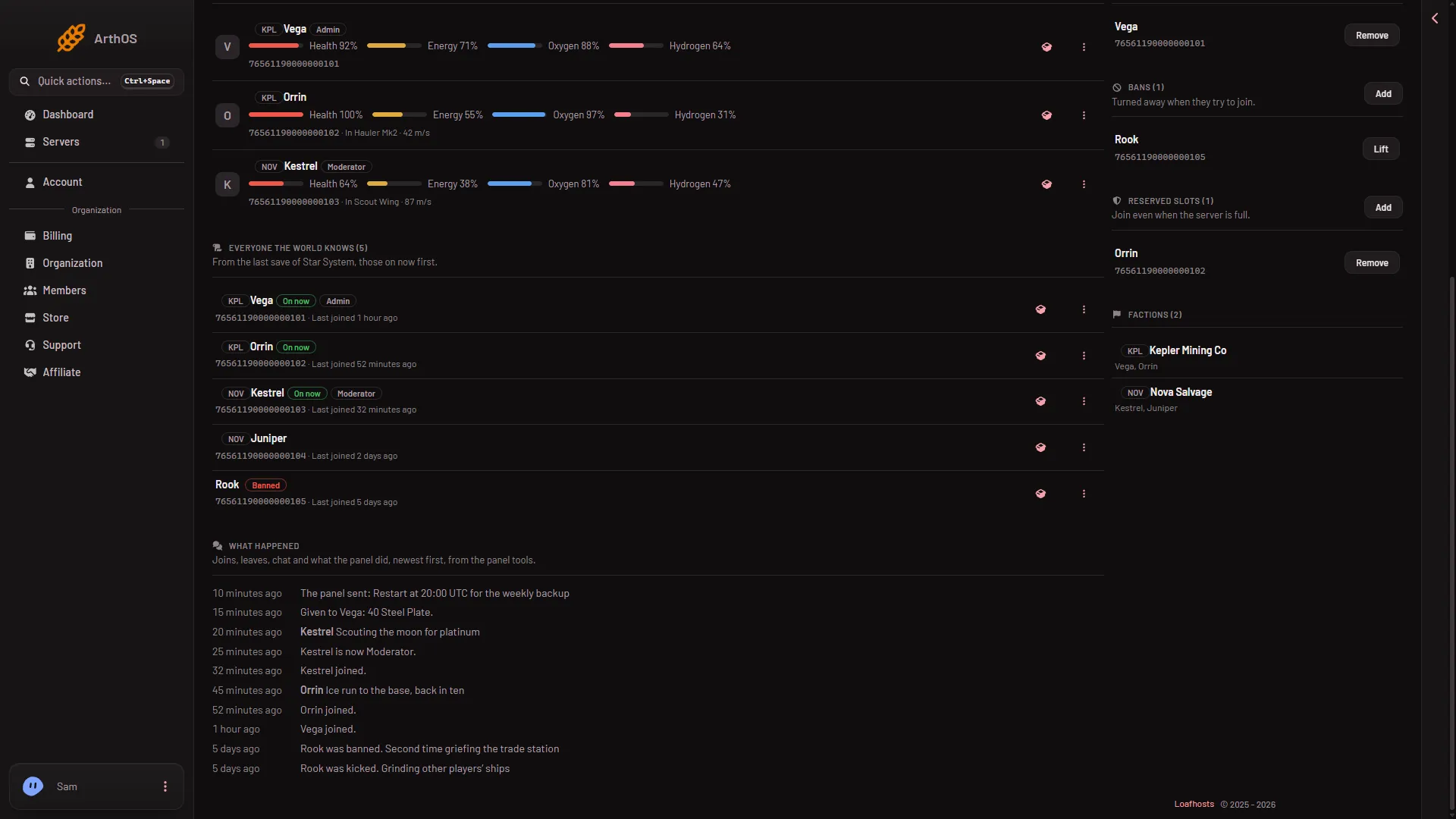
- Everyone the world knows
- On now tag
- Banned tag
That list comes from the world’s last save. Someone who joined a moment ago may not be in it yet, unless they are on now. If the panel tools are on, press Save now at the top of the page and wait a few seconds to catch the list up. The panel tools are a plugin (an add-on the server loads) that Loafhosts makes. With them off, On now lists names only, with no number. See the panel tools.
The Players page needs a person to have played. For someone who has not joined yet, use the Steam profile.
From a Steam profile
- Open the player’s Steam profile in a web browser.
- Look at the address in the bar. If it ends in
/profiles/followed by 17 digits, such as/profiles/76561190000000101, those digits are the SteamID64. - If it ends in
/id/and a name, the player chose a custom address, and the number is not in it. Ask the player for the number, or wait until they have played in the world and read it from the Players page.
Not checked as of 15 November 2026: a way to read the number from a custom address.
Where the number goes
- To ban someone: Add next to Bans. See how to ban a player.
- To lift a ban: Lift next to the name, see how to unban a player.
- To make someone admin: Add next to Admins. See make yourself admin.
- To keep a slot for someone: Add next to Reserved slots.
Each box says “17 digits starting 7656119, from their Steam profile.” and the Add button stays grey until the number fits that shape.
If it does not work
- The Add button is grey. Check you pasted all 17 digits and no spaces. The number must start with 7656119.
- You have the player’s name, not the number. A name does not work in the lists. Use the steps above.
- The number differs from the one in the game. Steam accounts have other forms, such as
STEAM_0:0:12345. Use the 17-digit one. - The player is not under Everyone the world knows. They have not played in this world, or the last save does not have them yet. Use their Steam profile.
More about the game: Space Engineers servers.
Sources: developer.valvesoftware.com: SteamID