

















Open the player’s box button on the Players page, press Give an item, pick an item, set the amount and press the button at the bottom, which names what it gives, for example “Give 100 Steel Plate”. The item goes into the player’s inventory. The player must be on the server and alive, and the panel tools must be running.
Before you start
- The panel tools are on and running. With them off the panel cannot act in the game. See the panel tools.
- The player is on the server now.
- Your role has the permission
players.game, which lets it act in the game. The owner has every permission. Roles are changed on the organization page: Settings, Access, Manage roles. Without the permission the button is not there.
Give an item
- Open the Players page.
- On the player’s row, press the box button. The window What (name) carries opens. See see what a player carries.
- Press Give an item (1). The window Give (name) an item opens.
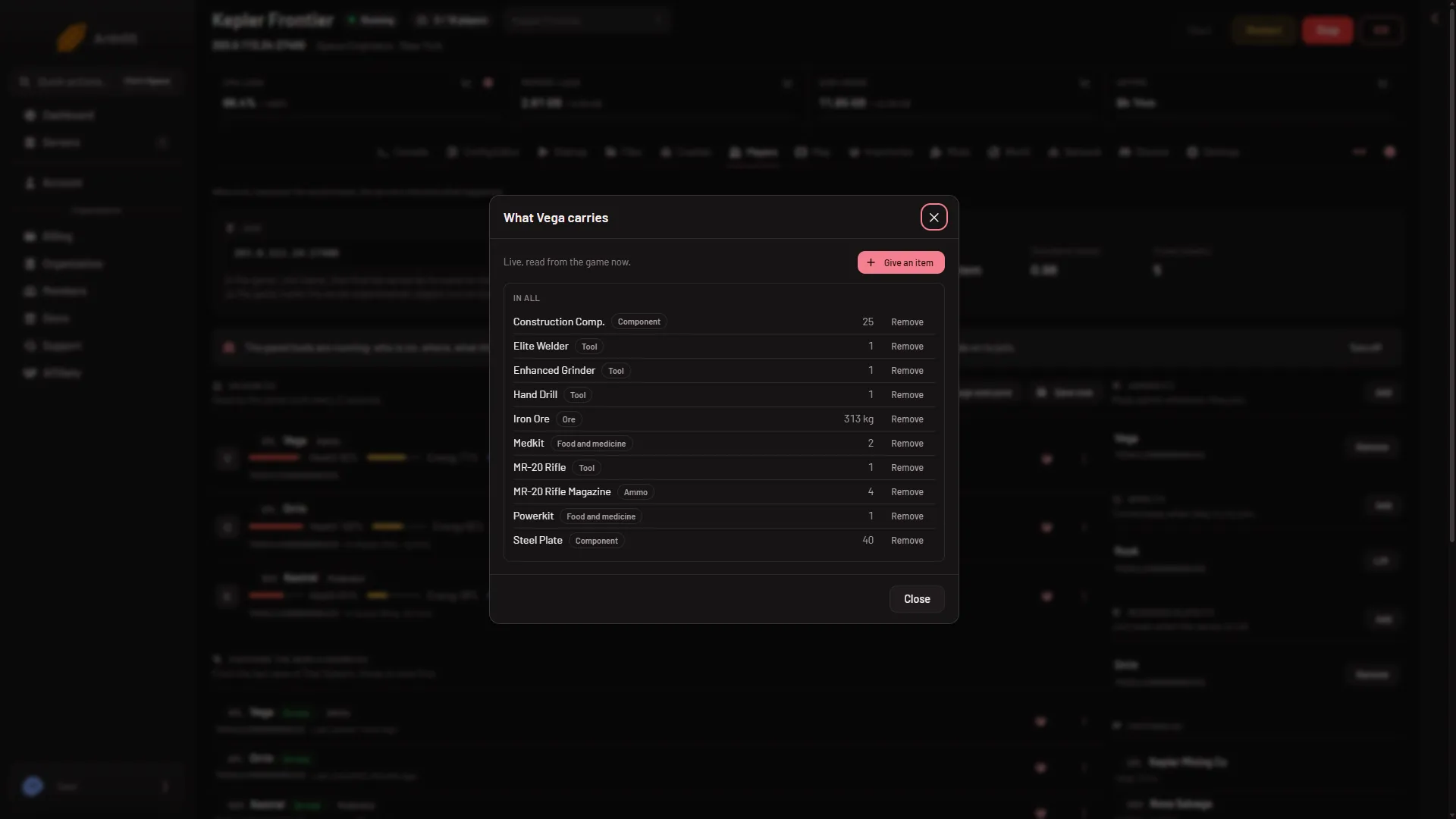
- Give an item
- Pick the item. Type in Find an item to search by name (1 in the second picture), or choose a Category: All items, Ore, Ingot, Component, Tool, Ammo, Bottle, Food and medicine or Other.
- Set the amount (2 in the second picture). The box reads How many for most items. For ore and ingots it reads How much (kg) and takes up to two decimals. The amount is from 1 to 1,000,000.
- Press the button at the bottom. It reads Give an item and stays disabled until an item and a valid amount are set. Then it names the gift, such as “Give 250.5 kg of Iron Ore”.
A green message confirms what was given. The line “Given to (name): (amount and item).” also shows under What happened on the Players page.
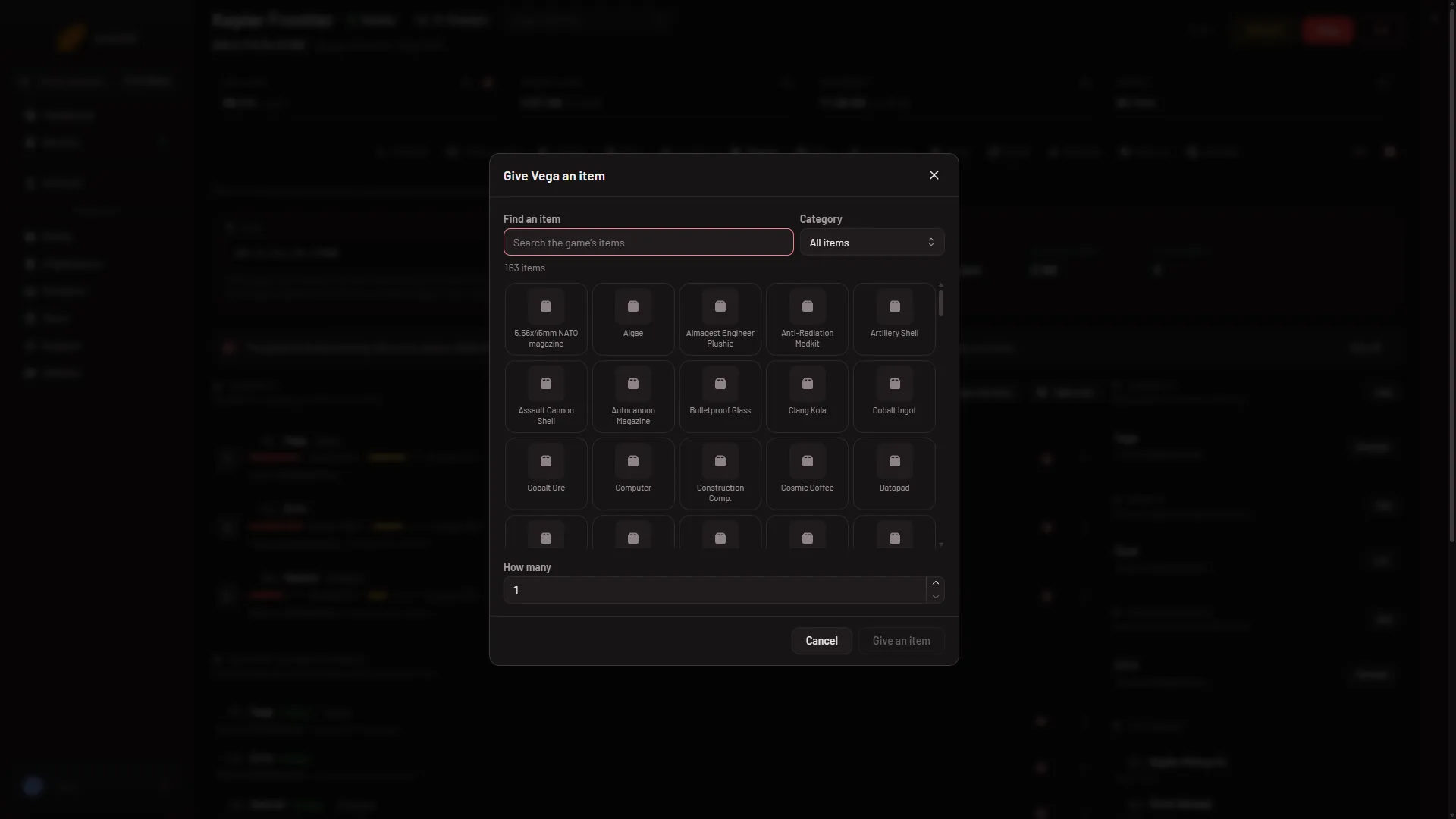
- Search
- How many
The list is the game’s own
The picker lists the items the game itself offers, plus items from the mods on the world’s list. The picture shows 163 items; your count depends on your world’s mods. The panel reads the list from the game once the panel tools have run, so mods’ items appear after a start where the tools have run. Before that the window says the game’s list arrives once the panel tools have run on this server.
Only the first 300 items are drawn. If there are more, search or pick a category to find the rest.
What it refuses
A red message tells you why. The common ones:
- “(item) comes in whole items.” You asked for half an item. Use a whole number. Only ore and ingots take a decimal, in kilograms.
- “(name) has no room for that much.” The game checks volume and mass. Give less.
- “that player is not on the server.” They left. Open the window again once they are back.
- “(name) has no body to carry it until they respawn.” They are dead or at the respawn screen.
- “the game has no such item.” Pick from the list instead of typing a name from memory.
If it does not work
- There is no Give an item button. The list is from the last save, the tools are off or not loaded yet, or your role lacks
players.game. - The panel tools line says newer tools are in place for the next start. The older tools still run, but the page reads the save and offers no Give an item. Restart the server once.
- “the game did not answer; it may be busy saving, so try again in a moment.” Wait a few seconds and press the button again.
- “the world is still loading.” Try again once the world has loaded.
More about the game: Space Engineers servers.