

















Open Inventories, choose a ship or station, press Give an item, then pick the block in Into, the item, and How many. The items appear in that block at once. This needs the panel tools and the private map.
The panel tools are the panel’s own plugin (an add-on the server loads). Without them the page only reads the last save, and there is no Give an item button. To give items to a person instead, see give items to a player.
Before you start
- The server must be running and the panel tools must be on and loaded. See the panel tools. The page says Live, read from the game now. above the contents when it is live.
- Your role needs permission to act in the game,
players.game, and to see the private map,live-map.private, both under Game server access in the role. If you do not see Give an item, one of these is missing. The owner has every permission. Roles are changed on the organization page: Settings, Access, Manage roles.
Give an item into a block
- Open the Inventories page of your Space Engineers server.
- Press a ship or station in Ships and stations.
- Press Give an item above its contents.
- In Into (1), choose the block. The list holds the blocks that can store things, with cargo containers first. You can type to search it.
- In Find an item (2), type a name, or use Category: All items, Ore, Ingot, Component, Tool, Ammo, Bottle, Food and medicine, Other. Press the item’s tile. The picker lists the game’s own items, and a mod’s items too.
- In How many (3), type the amount, from 1 to 1,000,000. For ore and ingots the box reads How much (kg) and takes up to two decimals.
- Press the button at the bottom. It reads Give an item until you pick an item, then it names your choice, for example “Give 100 Steel Plate”.
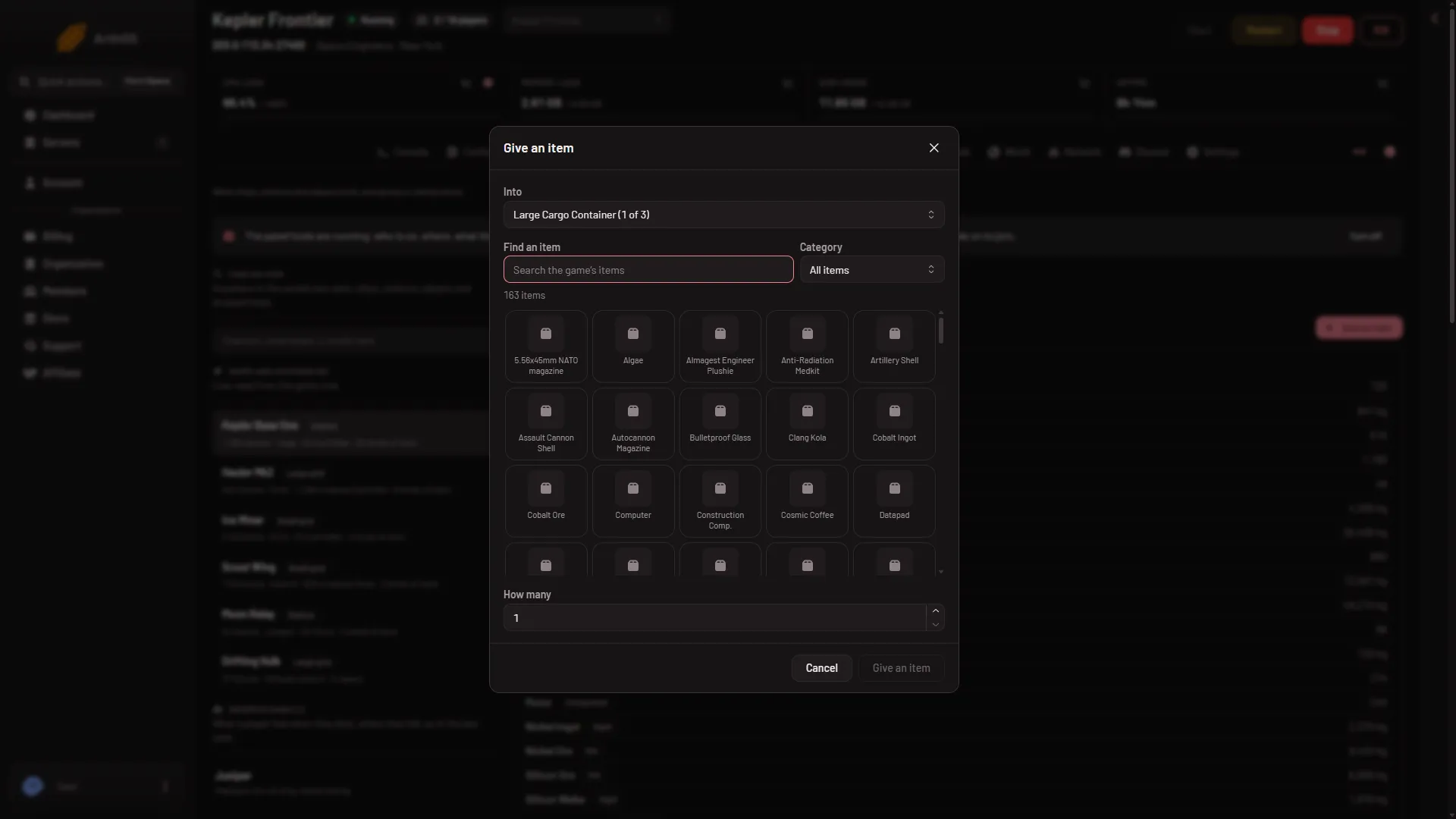
- Into
- Find an item
- How many
The panel answers “Put (amount) in (block).” Nothing is restarted. The block’s contents show the new amount at the next read, a few seconds later.
What the game decides
The game does the adding, so its rules apply:
- Items other than ore and ingots go in whole items. Half a Steel Plate is refused.
- The block must have room. If it does not, the panel says there is no room for that much. Choose another block or a smaller amount.
- The item goes into the block’s first inventory. A refinery or assembler takes it into its input side, not its output.
If it does not work
- There is no Give an item button. The panel tools are off or not loaded yet, the server is stopped, or your role lacks the permission. The page may say “As of the world’s last save”. If the tools line says newer panel tools are in place for the next start, restart the server once: the older tools only read the save.
- “The game’s list of items arrives once the panel tools have run on this server.” The item list is written once per start after the world loads. Wait, then reopen the window.
- “that block is not in the world any more.” Someone deleted it, or the list on screen is older than the game. Reload the page.
- “the game did not answer; it may be busy saving, so try again in a moment.” Wait a few seconds and press the button again.
- A red message about the world loading. The world has not finished loading. Try again when the page says it is live.
To take items out again, see remove items from a block.