












Yes, you can run mods on a Loafhosts Palworld server. Open the Mods page and choose Turn on server mods. Then add mods from the Steam Workshop. Only mods made to run on servers will work. Turning mods on has a cost: players start new characters.
What Pocketpair supports
Pocketpair has official mod support for dedicated servers. Mods are Steam Workshop items. The server loads the ones named in its Mods/PalModSettings.ini file and sets them up when it starts. Pocketpair says server-side mods run only on one version of its dedicated server, the version of the server that runs mods. It also warns: “Only mods that are built to run on servers will work on the server.” And: “Use mods at your own risk. They may cause save-data corruption or crashes.”
You do not have to edit that file on Loafhosts. The Mods page writes it when you apply.
Turn on server mods
Because mods need that other version of the server, the panel has to switch your server to it.
- Open the Mods page. It shows Server mods are off.
- Read the card about characters:
- If it says “Characters on this world now: (number)”, those characters do not carry over. Each player starts a new character.
- If it says nobody has played on this world yet, nothing is lost.
- To keep your characters, start a new world first. Do this on the World page before you switch. Your current world and its characters stay as they are.
- Choose Turn on server mods.
- In the box Turn on server mods?, read what it says. Then confirm.
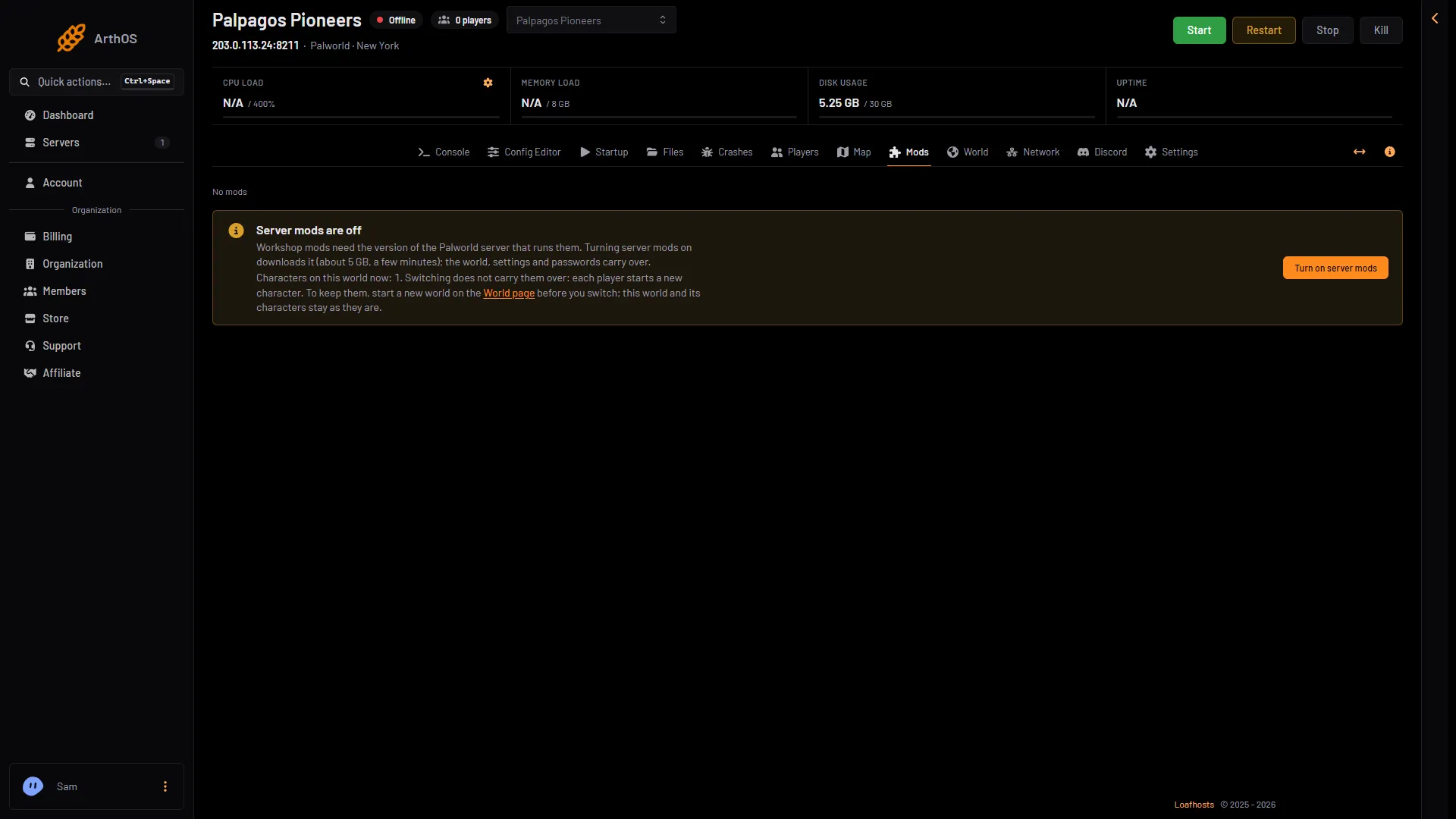
- Server mods are off
- Characters that do not carry over
- Turn on server mods
In this picture, read the characters line (2) first, then choose Turn on server mods (3).
The server stops. The panel downloads the other version of the server. That is about 5 GB and takes a few minutes. Your world, settings and passwords carry over. The server stays offline until you start it. The box also says whether a backup is taken first. Read that line. If it says no backup can be taken, the switch goes ahead without one.
Turning server mods on or off needs the permission settings.change-game. The Mods page itself needs startup.read. If the page says “Server mods are not offered for this server yet.”, ask support.
After the switch
The page now says Server mods are on. It has two tabs: On this server and Workshop.
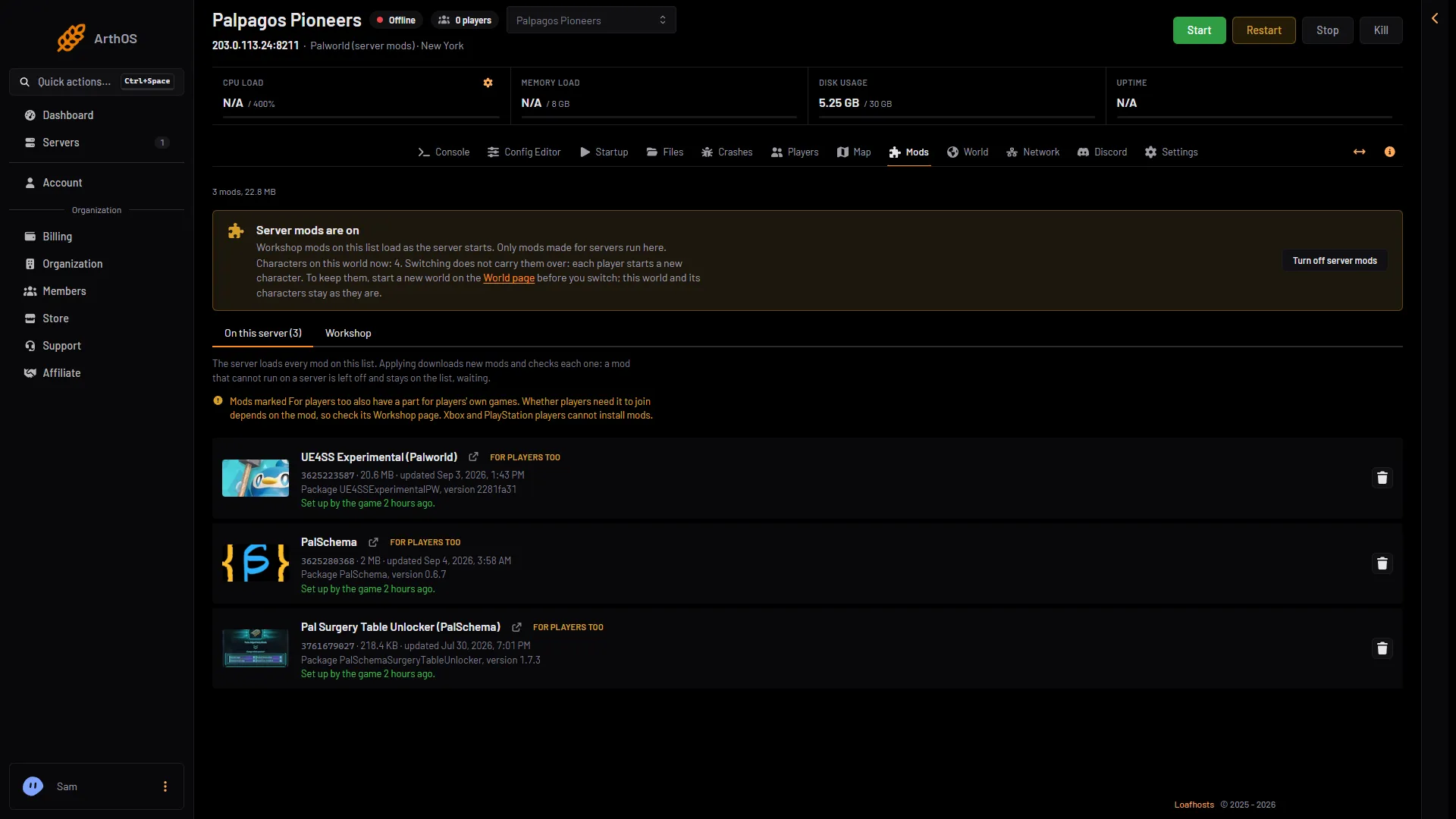
- Server mods are on
- On this server
- What the game did
In this picture, Server mods are on (1) shows at the top, the On this server tab (2) lists the mods, and the line under a mod (3) says what the game did at its last start.
The Workshop is Palworld’s own Steam Workshop. Loafhosts downloads the mods for the server with its own Steam account, so you give it no Steam login. You can have up to 100 mods. Mods from other sites are not offered.
To add one, follow install Palworld server mods.
Only mods made for servers run
A mod must be built to run on a server. A mod made only for players’ own games cannot run there. The page marks each mod with a chip: Server only (the mod declares no part for players’ own games), For players too or Not for servers.
The panel leaves a mod off only when the mod declares that it cannot run: it is for players only, it needs a mod that is missing, or it needs a newer game build. The mod stays on your list, waiting. The rest still loads. A mod that loads and then breaks on a new game build is not caught. Pocketpair says mods “may cause save-data corruption or crashes”.
Most server mods need a helper mod. Many need UE4SS Experimental (Palworld). Mods made for PalSchema need PalSchema. Both are Workshop items. When a mod needs one, its row says “Needs (name), which is not on the list.” with an Add (name) button. See UE4SS and PalSchema.
Players and mods
Some mods also have a part for players’ own games, shown by For players too. Whether players need it to join depends on the mod. Check its Workshop page. Pocketpair does not say whether a player without a mod can join.
Xbox and PlayStation players cannot install mods. A mod with a part for players may keep them out. After you turn server mods on, the Players page says this on the joining card. See mods for players.
Not checked on 1.0.5 as of 4 November 2026: whether an Xbox or PlayStation 5 player can join a server that runs UE4SS Experimental (Palworld) or PalSchema.
Turn them off again
Turn off server mods stops the server, downloads the standard version and deletes the mod files. The world, settings and passwords carry over. Characters made while mods were on do not carry back. See turn off server mods.
By hand
This is Pocketpair’s way, for a server you run yourself. Mods/PalModSettings.ini is made after the server has run once:
[PalModSettings]
bGlobalEnableMod=true
ActiveModList=GamingCattiva
ActiveModList=FarmingQuivern
Use one ActiveModList line per mod, by its PackageName from the mod’s Info.json, not the folder name. -NoMods turns every mod off. At the next start the game writes Mods/ManagedMods/(PackageName)/InstallManifest.json and puts the files where the mod’s InstallRules say. The Set up by the game line on a Mods row comes from that folder. On Loafhosts the Mods page writes the file when you apply. Not checked on 1.0.5 as of 4 November 2026: whether an edit by hand survives the next apply.
If it does not work
- The Turn on server mods button is missing or refused. You need the permission
settings.change-game. - A mod is on the list but not running. It may be made for players only, missing a mod it needs, or built for a newer game version. Read its row. See mods not loading.
- Players with mods cannot join. The setting Players may use mods may be Off. See mods not allowed on this server.
More about the game: Palworld servers.
Sources: docs.palworldgame.com: Mod, steamcommunity.com: Filedetails, steamcommunity.com: Filedetails