






Raidable Bases (by nivex) spawns ready-made bases on your map. NPCs guard each base and its boxes hold loot, so players can raid it without raiding each other. It does not come with any bases. You must install the Copy Paste plugin, add your own base files, then tell Raidable Bases how many to keep on the map.
This is one of the harder plugins to set up. Its uMod page says it is “simply too complicated” to use without reading its documentation. Your server needs Oxide or Carbon first (see install Oxide or Carbon).
Free or paid
The uMod page says the plugin is split into two versions.
| Free (uMod) | Paid | |
|---|---|---|
| Price | Free | Sold by the author, who sets the price |
| Difficulties | One, called normal | All five: easy, medium, hard, expert, nightmare |
| Also in the paid version | Player lockouts, buyable events (/buyraid), an improved ranked system, NPCs inside bases, a chance setting for each loot item |
The author sells the paid version only on two sites, which the uMod page names: lone.design and codefling.com. You download it from the site where you bought it. The author warns that copies on other sites are not his. The author also sells packages that hold bases, profiles and loot files, with no plugin in them.
The free version is enough to see how it works. This guide covers it.
The uMod page says the plugin, free or paid, is not compatible with the server.pve convar. If your server uses that setting, see PvE server.
What you need first
- Copy Paste. Raidable Bases pastes its bases with this plugin. Install Copy Paste from the Plugins page.
- Base files. These are Copy Paste files. The plugin has none. The uMod page lists where to get them: Fortify on Steam, a tier package from the author, a base package from another seller, or your own bases. If you make your own, copy the base from the centre foundation of the base. The page warns that some sellers put items inside their Copy Paste files.
In the ArthOS panel
- Open your server and choose Plugins. Under Find plugins, type
copy pastein Search uMod and choose Install on Copy Paste. The panel offered version 4.3.0 on 11 October 2026. - Search
raidable bases(1) and choose Install (3) on the Raidable Bases card (2) by nivex. The panel offered version 3.2.2 on 11 October 2026. Check both rows say LOADED. If one says NOT LOADED, see plugins not loading.
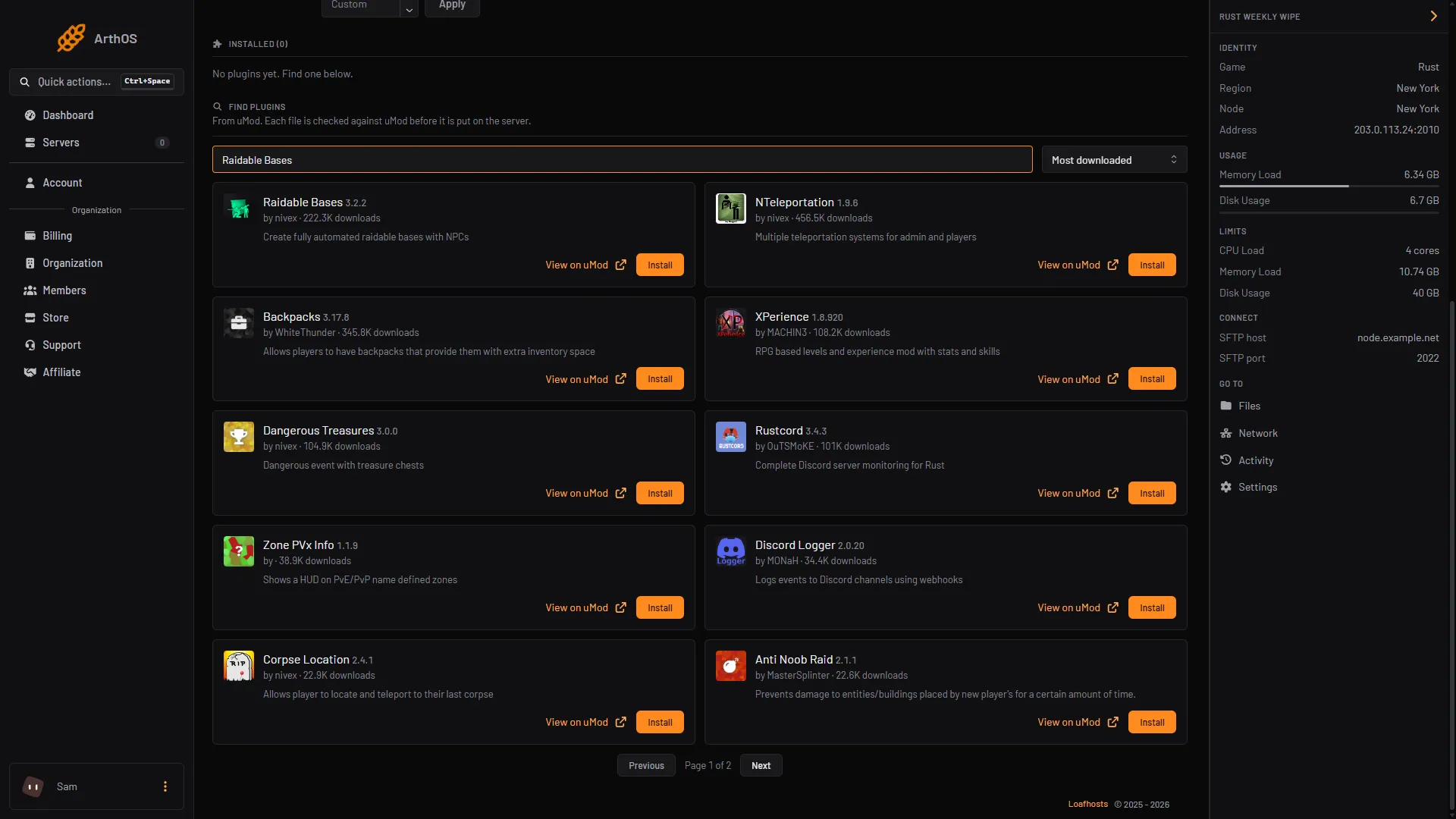
- Search uMod
- Raidable Bases card
- Install
- Open the Files tab. Upload your base files to
oxide/data/copypaste/. The folder name must be all lower case. On Carbon, the folders sit undercarboninstead ofoxide. - Tell the plugin the names of your bases. In the Console tab, type, with no slash:
rb.config add "RaidBases" RaidBase1 RaidBase2 RaidBase3Change RaidBase1, RaidBase2 and RaidBase3 to the names of your Copy Paste files. Not checked as of 11 October 2026: whether the name is the file name with or without .json. The uMod page says you must use straight double quotes, not curly ones, and that profile names and file names are case sensitive. The profile is a file in oxide/data/RaidableBases/Profiles/.
- Press Config on Raidable Bases. It opens
RaidableBases.json. Find the maintained-events settings (not checked as of 11 October 2026: the exact name of the section that holds them; search the file for the setting names below) and set:
| Setting | Set it to |
|---|---|
Always Maintain Max Events | true |
Max Maintained Events | The number of bases you want on the map at once. |
Minimum Required Players Online | 0 if bases should spawn when nobody is online. The page’s default is 1. |
- Save the file and press Reload on the plugin. Bases start to spawn by themselves. The page says they use the default loot table,
oxide/data/RaidableBases/Default_Loot.json, which only holds a few demo items.
Loot
The plugin has no useful loot until you make some. The page’s advice is to run rb.populate all in the console. It writes a list of every item in the game to the Editable_Lists folder, with each amount at 0. Edit the file, give the items you want an amount, delete the rest, and copy the contents into a loot table such as Difficulty_Loot/Normal.json. An item with an amount of 0 does not spawn.
Commands
Admins use these in game chat, with a slash. The uMod page says players can also type rb to see the ladder.
| Command | What it does |
|---|---|
/rb | For players, the ladder. For admins, the status of each raid. |
/rb grid | Draws the spawn grid and the monument names. |
/rb debug | Shows why a maintained or scheduled event is not spawning. |
/rbe | Spawns a base where you are looking. |
/rbe despawn | Removes the base near you. |
/rbe despawnall | Removes every base. |
rb.reloadconfig | Typed in the Console tab. Reloads the settings without reloading the plugin. Bases already out keep the old settings. |
These need the permission raidablebases.allow, which the page says is not recommended for players. Grant it in the Console tab:
| Framework | Command |
|---|---|
| Oxide | oxide.grant user YourName raidablebases.allow |
| Carbon | c.grant user YourName raidablebases.allow |
Other permissions on the page include raidablebases.config (use rb.config in game), raidablebases.mapteleport and raidablebases.banned. Do not give raidablebases.banned to the default group: it bans everyone from raids.
Rewards and other plugins
In the settings, Economics Money and ServerRewards Points under Rewards pay players after a raid. See Economics and Server Rewards. The page also says it works with Clans, Friends, Zone Manager and Rust Kits.
What it costs your server
The page gives no figure for the cost. It does name settings that help when a server struggles:
Prevent Fire From Spreadingistrueby default. The page says it helps performance.Flame Turrets Ignore NPCsisfalseby default. The page says turning it on can help on some servers.- Fewer bases at once means fewer NPCs.
Max Maintained Eventssets that.
If your server lags once bases spawn, lower Max Maintained Events first. See Rust server lag.
If it does not work
- No bases spawn. Run
rb debugin game. The page says it shows why. Check that Copy Paste is loaded, the files are inoxide/data/copypaste/in lower case, and the names in the profile match. - Most bases land on water. The page says this means the map has too little flat land, and the fix is a better map. It also gives these settings:
Allow Bases To Float Above Waterset tofalse,Prevent Bases From Floating Above Water By Also Checking Surrounding Areaset totrue, and a smallMaximum Water Depth Level Used For Float Above Water Option, for example0.01. - Bases stop spawning on Linux with
DllNotFoundException: libgdiplus.so.0. The page says the system librarylibgdiplusis missing. Not checked whether Loafhosts servers are affected as of 11 October 2026. - Few spawn points, or every try says a manual spawn was already requested. The page says this is likely from how Zone Manager is set up: too many zones, or zones that are too large. Raidable Bases will not spawn in them unless the zone ID is in
Allowed Zone Manager Zones.
Not checked in game as of 11 October 2026. Check each step on your own server.
Hosting Rust? See the Rust page.
Sources: umod.org: Raidable bases, umod.org: Permissions, umod.org: Configuration