











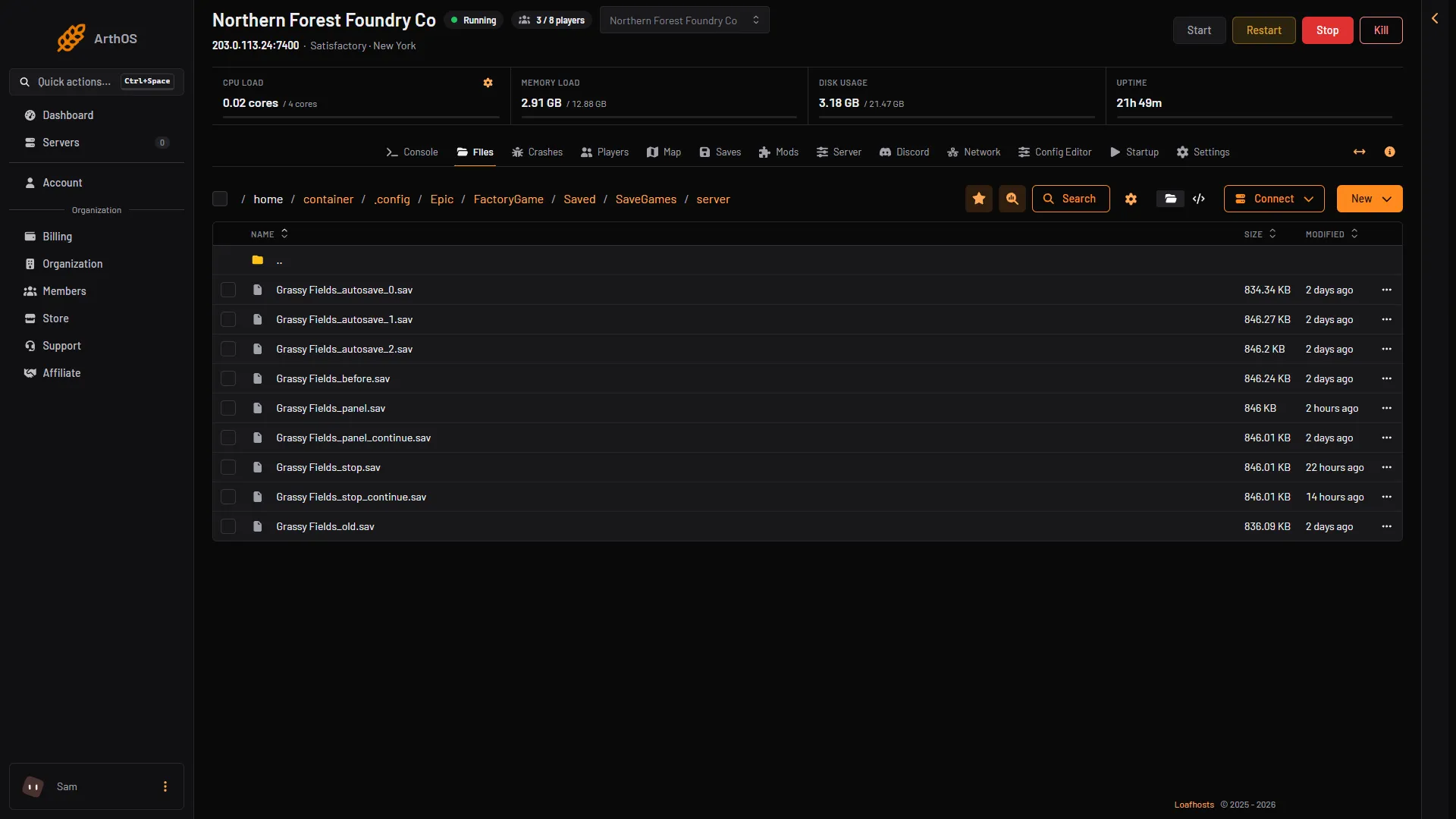
On a Loafhosts server, Satisfactory saves are in .config/Epic/FactoryGame/Saved/SaveGames/server. On a Linux server you run yourself, the same folder is ~/.config/Epic/FactoryGame/Saved/SaveGames/server. On a Windows PC they are in %LOCALAPPDATA%\FactoryGame\Saved\SaveGames, in a folder named after your account id. Every save ends in .sav.
On your server
- Open Files.
- Go to
.config/Epic/FactoryGame/Saved/SaveGames/server. The folder name starts with a dot, so it can look hidden in some tools. Type the path if you cannot see it. - The
.savfiles in this folder are your saves.
You do not need to open this folder to use saves. The Saves page lists them by session, and lets you load, download, upload and delete them. A session is one factory and all its saves. See upload a save and download a save.
- A save
What the file names mean
Every save starts with the session name.
(session)_autosave_0,(session)_autosave_1and so on: the game’s own autosaves. The game makes one every 300 seconds by default and keeps 3. Both numbers can be changed. See autosave settings.(session)_panel: made by the panel when you choose Save now with the name left empty. Refresh now on the Map page, and the save before a load, a new game or an upload, write the same file. It is replaced each time. For a save you want to keep, use Save now with a name of your own.(session)_stop: made by the panel just before a stop or a restart. The game saves nothing by itself when it is stopped, so the panel does it first.- Any other name is one that a player or an admin typed when saving.
For a session called Base, the files look like Base_autosave_0.sav, Base_panel.sav and Base_stop.sav.
Other files nearby
blueprints: a folder next toserver. Each session has its own folder inside, with the blueprints made on the server. The path is.config/Epic/FactoryGame/Saved/SaveGames/blueprints/(session). See server blueprints.ServerSettings.(port).sav: next to theserverfolder. The number is the game port, for exampleServerSettings.7400.sav. It holds the server name, the join password, the session that loads at start and the admin claim. Do not delete it to fix a save. If you want to claim the server again, use Reset the claim on the Server page while the server is stopped.
On a server you run yourself
The wiki gives these folders. ServerSettings.(port).sav and blueprints sit one level up from server, in the same SaveGames folder.
| How the server runs | Save folder |
|---|---|
| Linux | ~/.config/Epic/FactoryGame/Saved/SaveGames/server |
| Windows, as a user | %LocalAppData%\FactoryGame\Saved\SaveGames\server |
| Windows, with NSSM | %WINDIR%\System32\config\systemprofile\AppData\Local\FactoryGame\Saved\SaveGames\server |
| Windows Server, as a service | %WINDIR%\ServiceProfiles\NetworkService\AppData\Local\FactoryGame\Saved\SaveGames\server |
On your PC
Steam and Epic Games Store both use the same place on Windows:
%LOCALAPPDATA%\FactoryGame\Saved\SaveGames\(your id)
Paste that into the Windows Explorer address bar. It opens C:\Users\(your Windows name)\AppData\Local\FactoryGame\Saved\SaveGames. Your saves are inside the folder named with your id.
The wiki adds one tip: if you bought the game on Steam after owning it on Epic, start a new game on Steam and save it. The Steam folder then appears beside the Epic one. The Steam id is usually the shorter one.
Blueprints you made in single player are in %LOCALAPPDATA%\FactoryGame\Saved\SaveGames\blueprints\(session name). They are not in the same place as the saves, and the game does not copy them to the cloud for you. Keep your own copy.
The game also makes a backup of the old file when you save over a save by hand. These are in %LOCALAPPDATA%\FactoryGame\Saved\SaveGames\SaveGames_backup.
Linux and Steam Deck players
This section is about the game on a player’s own Linux PC or Steam Deck, not a server. The wiki lists those paths on its Save files page. They are long, and they sit inside a hidden folder.
If it does not work
- The
serverfolder is empty. No game has been started yet. Open Saves and choose New game, or upload a save. - You cannot find the
.configfolder. Type the full path into the path bar of Files. - Your PC save folder is empty. Check the other id folder. Epic and Steam keep separate ones.
- A save you uploaded does not show. It must end in
.sav. A save from a newer game version than the server cannot be loaded.
More about the game: Satisfactory servers.
Sources: satisfactory.wiki.gg: Save files, satisfactory.wiki.gg: Dedicated servers, satisfactory.wiki.gg: Blueprint