

















With the panel tools off, the Map page still shows the planets, the game’s trading stations, and the ships and stations players built. But the ships are placed as of the world’s last save, and no players show at all. Turn the panel tools on to see players and moving ships.
The panel tools are a small plugin (an add-on the server loads) of the panel’s own. A new server starts with them off.
What you see
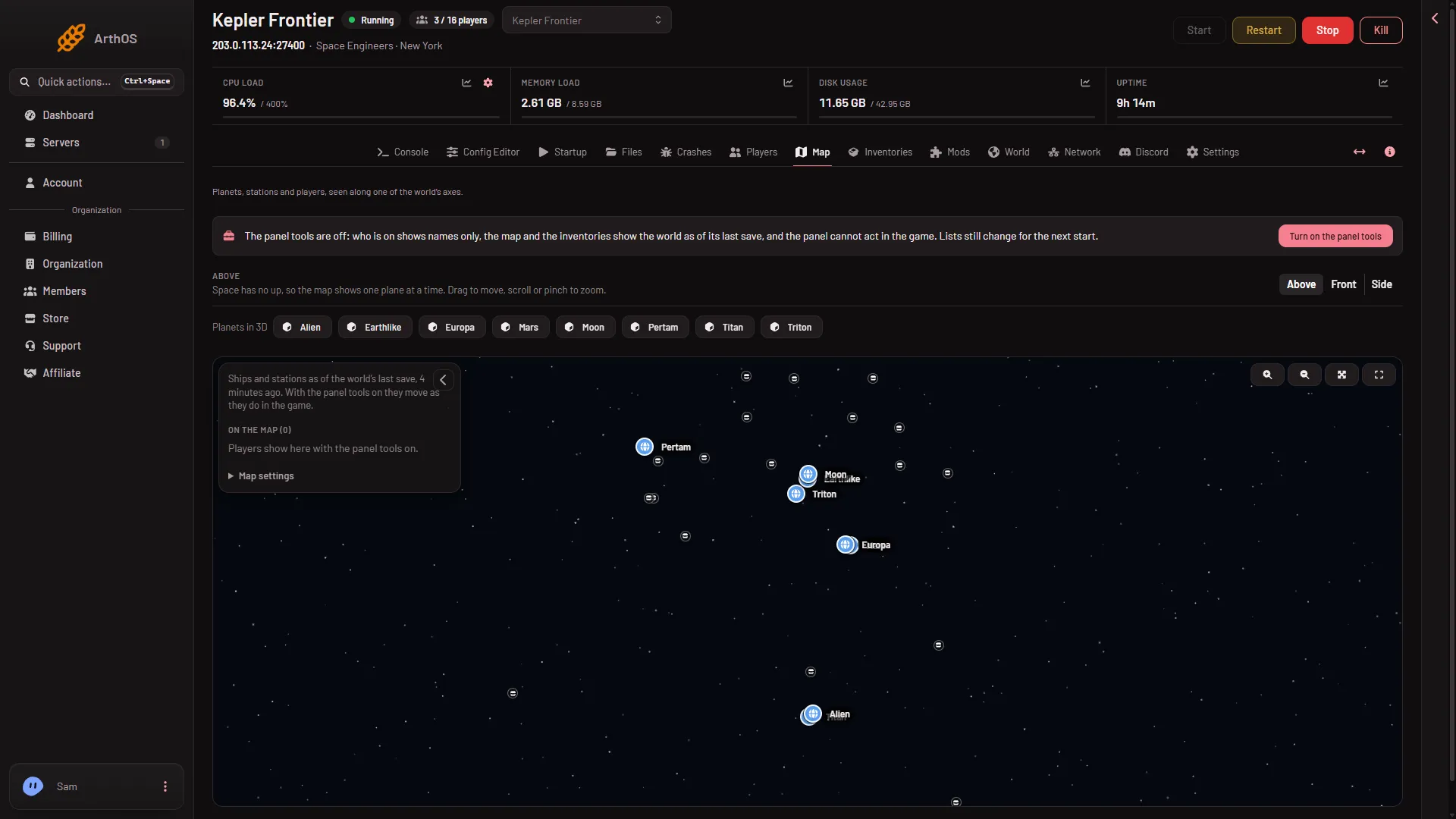
- As of the last save
- Turn on the panel tools
- Players need the tools
- Planets. Read from the world’s last save, so they show even with the server stopped. They are drawn to scale with their air. You can still open each one in 3D with Planets in 3D.
- Trading stations. The game’s own outposts and stations, read from the same save. They are not ships, and they stay where they are.
- Ships and stations. Only for people with the private map permission. They are read from the last save, so they sit where they were at that save and do not move. The note on the left says “Ships and stations as of the world’s last save” and how long ago (1). From a save the panel knows the block count but not the PCU or the speed.
- Players. None. The list reads “Players show here with the panel tools on.” (3) There are no markers, no health, no Follow.
A world that has never been saved and never run shows nothing at all.
The game saves on its own timetable. With the tools off you cannot ask for a save from the panel, so the map catches up when the game next saves, or when you stop the server, which saves.
Get players and moving ships
- Press Turn on the panel tools (2) in the strip at the top of the page. Only a role that can change the startup sees the button.
- Read the box that opens, then confirm. It warns that players need Experimental mode on in their game (Options, Game) to join. Players without it cannot join. A new server already needs it for another reason, so for its players the tools change nothing.
- Restart the server. The switch changes nothing in a running game. The plugin loads at the next start.
- When the strip says the panel tools are running, the map shows players and the ships move.
You can turn the tools off again. From the next start the map goes back to the last save. That alone does not make the server joinable without Experimental mode.
How often it updates
With the server running the page asks about every 10 seconds, but a save is only as new as the game’s last save. With the server stopped it asks every 30 seconds and shows the same save.
If it does not work
- The ships are in the wrong place. The map shows the last save. They did not move because the tools are off.
- No ships at all. You need the private map permission. The list on the left says that players’ ships show for those who can see the private map.
- No planets. The world has not been saved yet. Start the server once and let it save.
- The tools are on but nobody shows. They load at the next start. Until then the strip says they load at the next restart.
More about the game: Space Engineers servers.