

















Trash removal (TrashRemovalEnabled) is the game’s way of deleting small abandoned things so a server does not slow down. The panel’s help line says it “takes away small abandoned grids and floating objects, which slow the server most.” If ships or wrecks vanish on your server, this is the first place to look. You change it in the Config Editor, with the server stopped.
A grid is a ship, a station or any set of connected blocks. The keys below are in the world’s Sandbox_config.sbc file, under <Settings>.
Find the rows
- Stop the server from the header. The game writes the world’s settings file when it stops, so the rows can only be saved while it is stopped.
- Open the Config Editor and choose the World settings tab.
- Scroll to Saving and clean-up (1).
- Change the rows below, press Save in the bottom bar, then start the server. The new values are read at the next start.
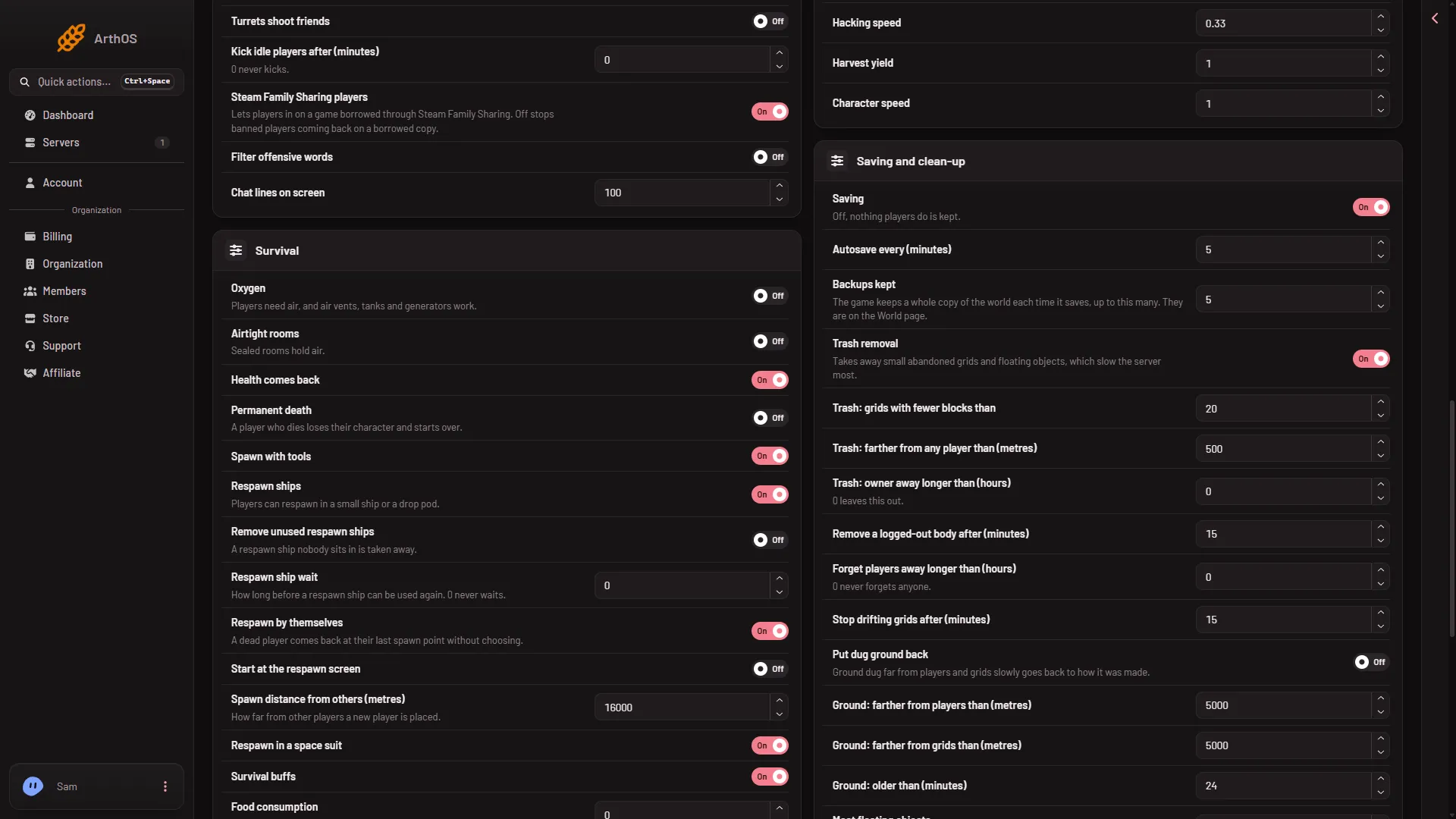
- Saving and clean-up group
A new server shows only Passwords and Server settings until it has started twice: the first start makes the world, the next start names it as the world that loads. Start it again (or restart it), then stop it to change world settings. The same happens after Make it at the next start on the World page.
The rows
Trash removal is the main switch. Off, the grid rows below do nothing. The game’s trash flags (TrashFlagsValue) decide which of the checks are used. They are not a named row. If your world’s file has them, Advanced, Show them lists them; the row’s exact name was not checked. A grid is removed only when it passes the checks the game has turned on.
- Trash: grids with fewer blocks than (
BlockCountThreshold). A whole number from 0 to 100000. Grids smaller than this are candidates. A lower number is gentler. - Trash: farther from any player than (metres) (
PlayerDistanceThreshold). A whole number from 0 to 1000000. Grids farther from every player than this are candidates. A higher number is gentler. - Trash: owner away longer than (hours) (
PlayerInactivityThreshold). A whole number from 0 to 100000. The panel says “0 leaves this out.” A higher number is gentler. - Remove a logged-out body after (minutes) (
PlayerCharacterRemovalThreshold). A whole number from 0 to 100000. The game’s text says a player’s character who has left is deleted after this long, and 0 turns it off. - Forget players away longer than (hours) (
RemoveOldIdentitiesH). A whole number from 0 to 100000. The panel says “0 never forgets anyone.” What happens to a forgotten player’s grids was not checked. Back up first. - Stop drifting grids after (minutes) (
StopGridsPeriodMin). A whole number from 0 to 100000. The game’s text says grids far from players are stopped, and 0 turns it off. Stopped grids are not deleted. - Put dug ground back (
VoxelTrashRemovalEnabled). The panel says “Ground dug far from players and grids slowly goes back to how it was made.” It has three rows of its own: Ground: farther from players than (metres), Ground: farther from grids than (metres) and Ground: older than (minutes). - Most floating objects (
MaxFloatingObjects). A whole number from 0 to 1024: the most loose items in the world. More costs the server. The game’s text says the oldest are removed when newer ones need to appear. See the floating objects guide. - Most cargo bags (
MaxCargoBags). A whole number from 0 to 1000. Keen Software House, the game’s makers, say it is the most Temporary Containers at once (100 by default, since update 1.204): a destroyed or ground-down block’s cargo is packed into one instead of dropping loose.
Why ships vanish
Keen’s wiki says that when wrecks and half-built grids disappear, the usual cause is trash settings that are too aggressive. A small ship parked away from every player is exactly what the block count and distance rows target. To catch fewer ships, lower the block count and raise the distance, or switch Trash removal off. For more causes, see ships disappearing.
Setting it in the game instead
An admin has a Trash removal section in the game’s Admin Screen (Alt+F10). Keen’s wiki says changes there reach the next save, not the server’s config, so set it here to be sure it survives.
If it does not work
- The Save button is greyed out. The server is not stopped. Stop it, then change the rows.
- No World settings tab. See the note under the picture: start the server again, then stop it.
- Ships still vanish with Trash removal off. Check the tab shows the world that loads. The in-game Admin Screen can also remove grids by hand, so ask your admins. For other causes, see ships disappearing.
- The server runs out of memory. The Crashes tab suggests turning trash removal on. See out of memory.
More about the game: Space Engineers servers on Loafhosts.
Sources: spaceengineers.wiki.gg: SessionSettings, spaceengineers.wiki.gg: Admin Screen, spaceengineers.wiki.gg: World Settings