

















Five World settings shape the space and the ground: World size (km) (WorldSizeKm), Asteroid density (ProceduralDensity), Voxel destruction (EnableVoxelDestruction), Destructible blocks (DestructibleBlocks) and Trees and plants (FloraDensityMultiplier). You change them in the Config Editor, on the World settings tab, with the server stopped. They apply at the next start.
A voxel is a piece of ground: an asteroid or a planet is made of voxels. Digging, drilling and explosions remove them. If you run the game yourself, these keys are in the world’s Sandbox_config.sbc, under <Settings>.
What each setting does
- World size (km). A whole number. 0 has no edge. Any other number is an edge in kilometres. Keen Software House, the game’s makers, says everything that leaves the area “will be deleted from the game, and characters that leave will die”. Do not set an edge smaller than where your players already are.
- Asteroid density. A number from 0.0 to 1.0. It sets how many asteroids are made in empty space, and 0 makes none. The game’s wiki warns that large view distances are not recommended in worlds with a high asteroid density, so keep this low if you also raise View distance (metres).
- Voxel destruction. Explosions and crashes dig into asteroids and planets. Keen says that turning it off “prevents Voxels from being carved, this includes drills/mining too!” Switch it off and players cannot mine ore by drilling.
- Destructible blocks. A switch with no help line. Its name says it controls whether blocks can be destroyed. Not checked with a player on 1.210 as of 15 November 2026.
- Trees and plants. A number from 0.0 to 10.0. It sets how much grows on planets, and 1 is the game’s own. Use 0 for bare planets and a bigger number for more growth.
Change them
- Stop the server. A normal stop saves the world. World settings are saved only while the server is stopped, because the game writes this file itself when it stops.
- Open Config Editor and choose the World settings tab (1). Its name ends with your world’s name.
- In the World group, change the rows you want. The picture shows the rows from World size (km) down.
- If you do not see a row, type its name in the Search box at the top right.
- Press Save in the bar at the bottom, then start the server.
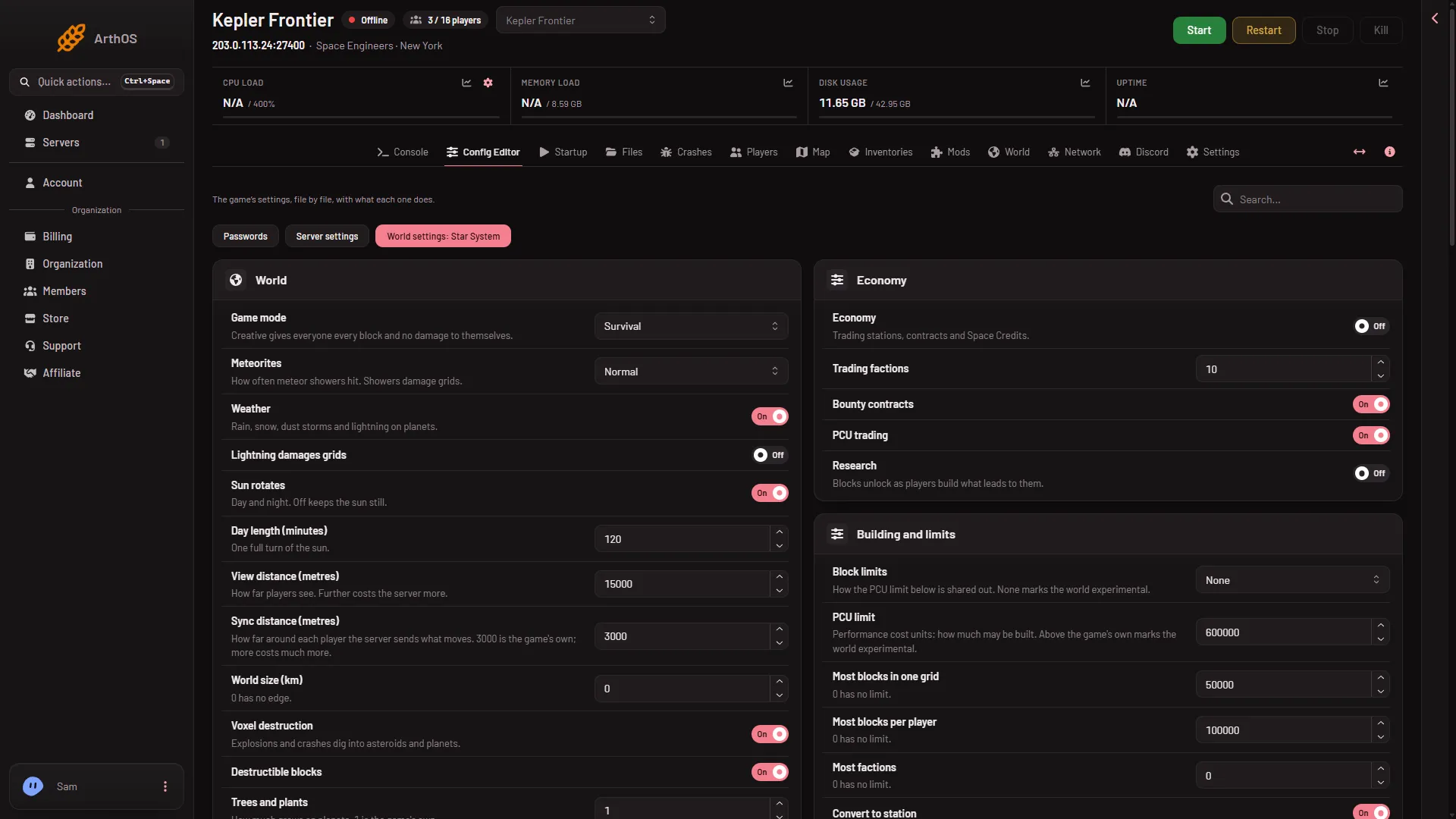
- World settings tab
Changing an existing world
Keen’s reference says asteroid density “cannot be changed retroactively” on an existing world, so set it before the world is made. Not checked on a Loafhosts server. For World size (km) it is not checked whether a new edge changes what already exists. Planets and the asteroids placed by a premade world are files in the world’s folder, and this row does not touch them. The World page can put a planet’s ground back. See the World page guide.
If it does not work
- The Save button is greyed out. The server is not offline. Stop it first.
- There is no World settings tab. A new server shows only Passwords and Server settings until it has started twice: the first start makes the world, the next start names it as the world that loads. Start it again (or restart it), then stop it to change world settings. The same happens after Make it at the next start on the World page. Use this world shows the tab at once.
- Characters died or ships vanished. An edge was set smaller than where they were. Set World size (km) to 0 or a bigger number. What was already deleted does not come back, so restore a backup if you need it.
- Miners cannot dig. Voxel destruction is off.
More about the game: Space Engineers servers on Loafhosts.
Sources: spaceengineers.wiki.gg: World Settings, spaceengineers.wiki.gg: SessionSettings