
















On TShock and tModLoader, the Map page shows who is in the world and where, plus any boss with its health. Choose a player to open a card with their health and a few actions. On Vanilla the map shows no players, because Vanilla gives the panel no positions.
What you need
- TShock or tModLoader. The panel puts its own tools inside these two. The tools write where everyone is every 2 seconds. Vanilla runs none of them. On Vanilla the Map says “Vanilla runs nothing of the panel’s, so players are not shown.” and links to the World page, where you change the server software. See the three programs.
- Someone on the server. An empty Terraria server is paused. The map says “Nobody is on.” and the markers wait.
- A running server. When it is offline the page says “The server is offline. Players show while it runs.”
- A fresh start after a switch. If you just changed the software, the page says “The panel’s tools load at the server’s next start.” Restart the server once. A restart disconnects everyone who is on, so choose a quiet moment or use Message everyone on the Players page first.
Read the map
- Open the Map page.
- Players appear as markers on the map, and the list On the map names each one with their health, written “(health) / (most health) health”. Follow keeps the view on a player.
- Open Map settings to choose what the map shows. Under Show, Bosses lists each boss by name with its health, written “(name), (health) / (most health)”.
- The page also tells the time in the world, and “Hardmode.” when the world is in Hardmode.
The page asks the panel every 2 seconds while it is open.
The player card
Choose a player, on the map or in the list. The card shows:
- Health, written “(health) / (most health) health”.
- Position, written “At (x), (y).”
- The item in hand, written “Holding (item).”
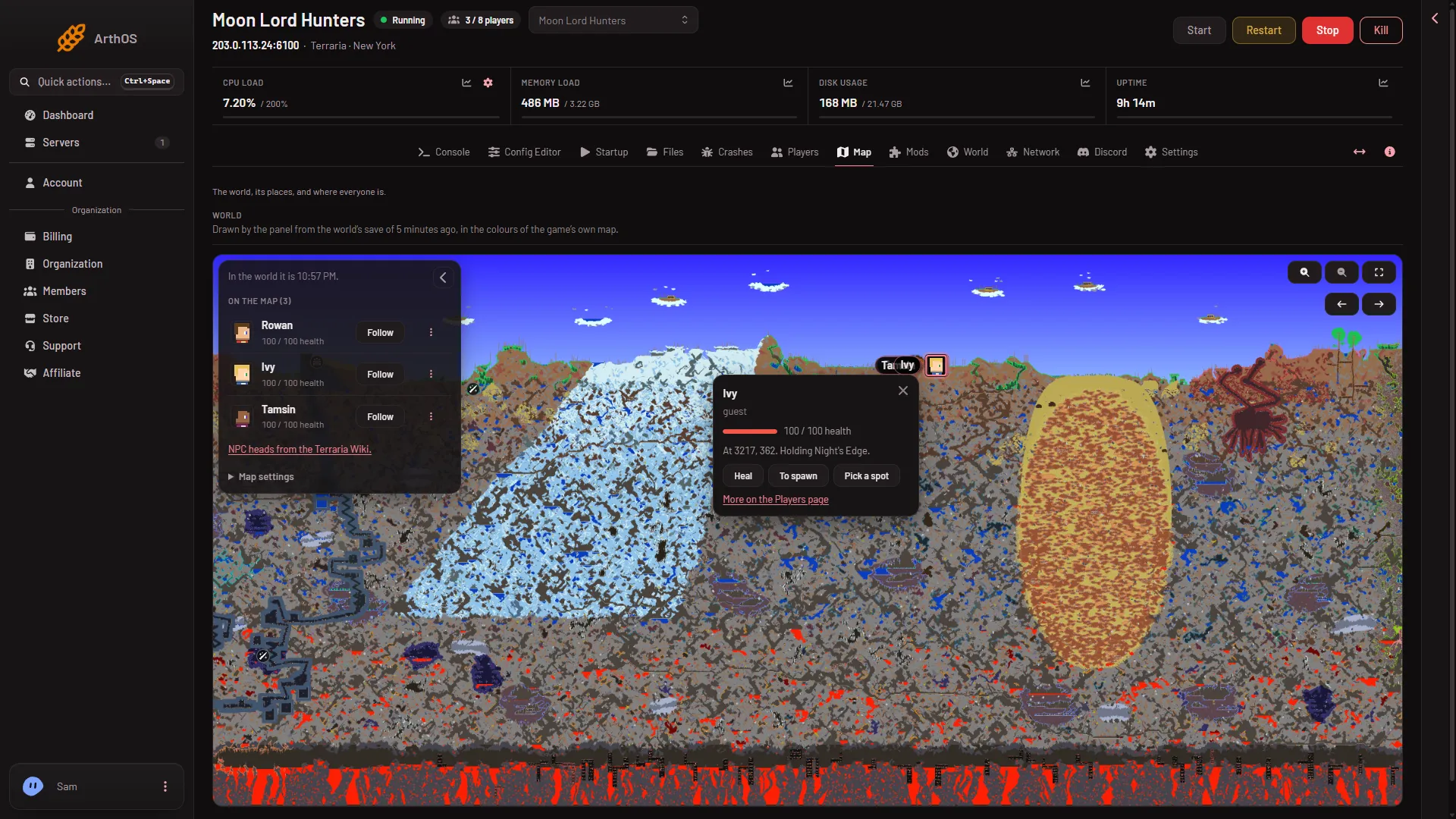
The buttons:
- Heal heals the player to full health.
- To spawn sends the player to the world’s spawn point.
- Pick a spot asks “Click where to send (name).” Click the map and the player goes there.
- More on the Players page opens that player on the Players page.
The buttons need a role that allows game actions. Without it you can read the card but not use the buttons. Roles are changed on the organization page: Settings, Access, Manage roles.
If it does not work
- No markers on a TShock or tModLoader server. Check that someone is online, and that the server was restarted after you switched the software.
- A button says nobody is on. The world is paused until a player joins. Actions wait for a player.
- The buttons are missing. Your role does not allow game actions.
More about the game on Loafhosts: Terraria servers.