







The Map part of the wipe plan decides which map the server starts on after each wipe. You can keep the same map, take a new random seed every time, or play a list of maps in turn. The list can hold procedural maps with a size and seed, and custom maps people download.
This is one part of the plan on the Wipes tab. To make the plan first, see schedule automatic wipes. To look at a seed before you pick it, see Rust map size and seed. More about the game: Rust servers.
The three choices
Scroll to Map on the Wipes tab. Choose one of three:
- Same map. The same size and seed, or the same custom map, created again. Nothing about the map changes. The world files are still deleted.
- New seed. A new random seed at every wipe, at the server’s current size. On a server that runs a custom map this changes nothing. The server stays on its map and the history says so.
- Rotation. Each wipe takes the next map in the list.
At each wipe the panel writes the map it picks into Map size and Map seed on Startup. For a custom map it also writes Custom map URL. For a procedural map (one the game generates from a number, the seed) it clears Custom map URL. Saving the plan changes nothing on Startup.
Build a rotation
- Choose Rotation (1).
- Under the list, choose Size and seed (4) or Custom map (5).
- For Size and seed, enter a Size (1000 to 6000) and a Seed (1 to 2147483647). Leave the seed empty for a new seed each time.
- For Custom map, enter a Name (up to 60 characters) and the Download address. Choose Check. The button Add to the rotation stays grey until the check passes.
- Choose Add to the rotation. The map joins the list. Use Move up and Move down to put it where you want.
- Choose Save in the bar at the bottom.
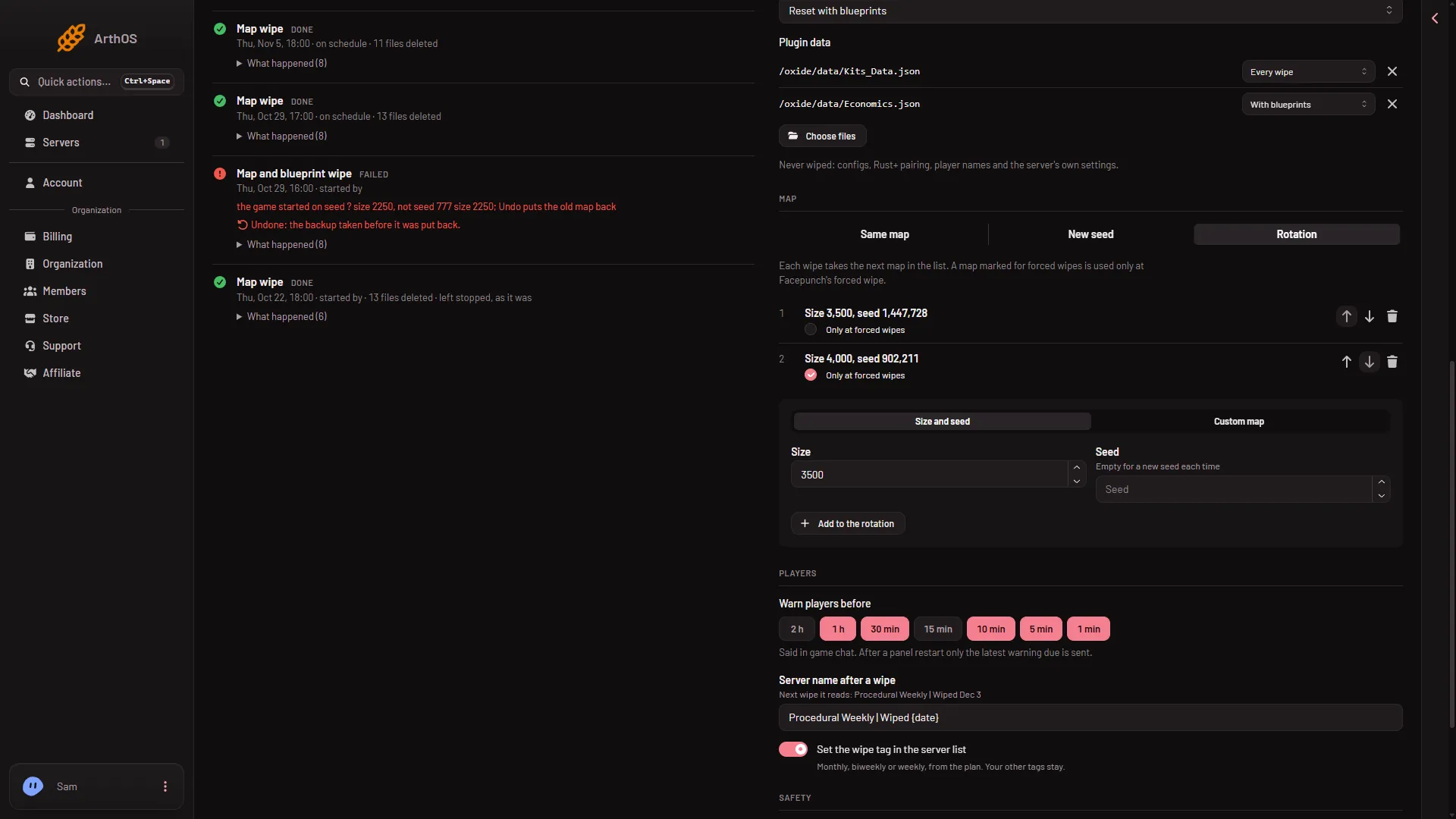
- Rotation
- A map in the rotation
- Only at forced wipes
- Size and seed
- Custom map
Each row of the list (2) shows its number and either its size and seed, “new seed”, or the custom map’s name and address. At the right of each row are the buttons Move up, Move down and Remove from the rotation. The list holds at most 30 maps.
Maps for forced wipes only
Tick Only at forced wipes (3) on one row to keep it for Facepunch’s monthly forced wipe. Only one row can have it. Ticking another clears the first.
- A forced wipe takes the marked map first.
- Every other wipe takes the next map from where the rotation stands, and goes back to the first map after the last.
- The rotation only moves on when a map that is not forced-only was used.
- The list needs at least one map that is not forced-only.
Custom maps
The Download address must be one players can download from, because Rust players fetch the map from it. Use a web address that starts with https://. It cannot hold spaces, quotes, a user name or a password. Check asks the host for the first byte of the file. The result says “Players can download it” and the size, or the reason it failed.
The panel checks the address again before each wipe. A custom map that fails is skipped, the next map in the list is used, and the history says “Passed over the custom map”. If none can be used, the server keeps its map.
A wipe deletes the old .map file, a custom map’s file too. The server downloads it again at the start.
What to know
- A change applies when you save. Saving a rotation that changed puts the rotation back at the first map.
- Wipe now. The dialog’s Starts on line shows the map the saved plan would take next.
- Who may do it. Changing the plan takes Change startup and Delete files.
- Memory. A rotation can hold sizes up to 6000. A bigger map needs more memory. See fix a Rust server running out of memory.
- Seeds you like. The Map tab of the server can preview a seed. Rotation seeds are entered here.
If it does not work
- Add to the rotation stays grey. For a custom map, choose Check and wait for “Players can download it”.
- “The map host did not answer within 10 seconds”. The panel’s check could not reach the address in time. Players may not be able to download it either.
- The panel says a map address must start with https. Use an address that begins with
https://. - “A rotation needs at least one map that is not only for forced wipes”. Untick Only at forced wipes on one row.
- “A map size is from 1000 to 6000” or “a seed is from 1 to 2147483647”. Change the number.
- The server did not start on the map you expected. Open History. The wipe steps say which map it took and whether it passed over a custom map. See read your Rust wipe history and fix a failed wipe.