

















The Economy switch (EnableEconomy) in the world settings turns trading on. With it on, the world gets trading stations and bases where players can buy, sell and take contracts, paid in Space Credits. Keen Software House, the game’s makers, say in their wiki that it is off by default. You change it in the Config Editor, with the server stopped, and it takes effect at the next start.
This is a setting of the world, not of the server. It sits in the world’s Sandbox_config.sbc file, under <Settings>, so each world keeps its own.
Turn the economy on or off
- Stop the server from the header. The game writes the world’s settings file when it stops, over anything changed while it runs, so these settings can only be saved with the server stopped.
- Open the Config Editor and choose the World settings tab. It carries the world’s folder name, for example World settings: Star System.
- Find the Economy group (1). Switch Economy (2) on or off.
- Press Save in the bar at the bottom, then start the server.
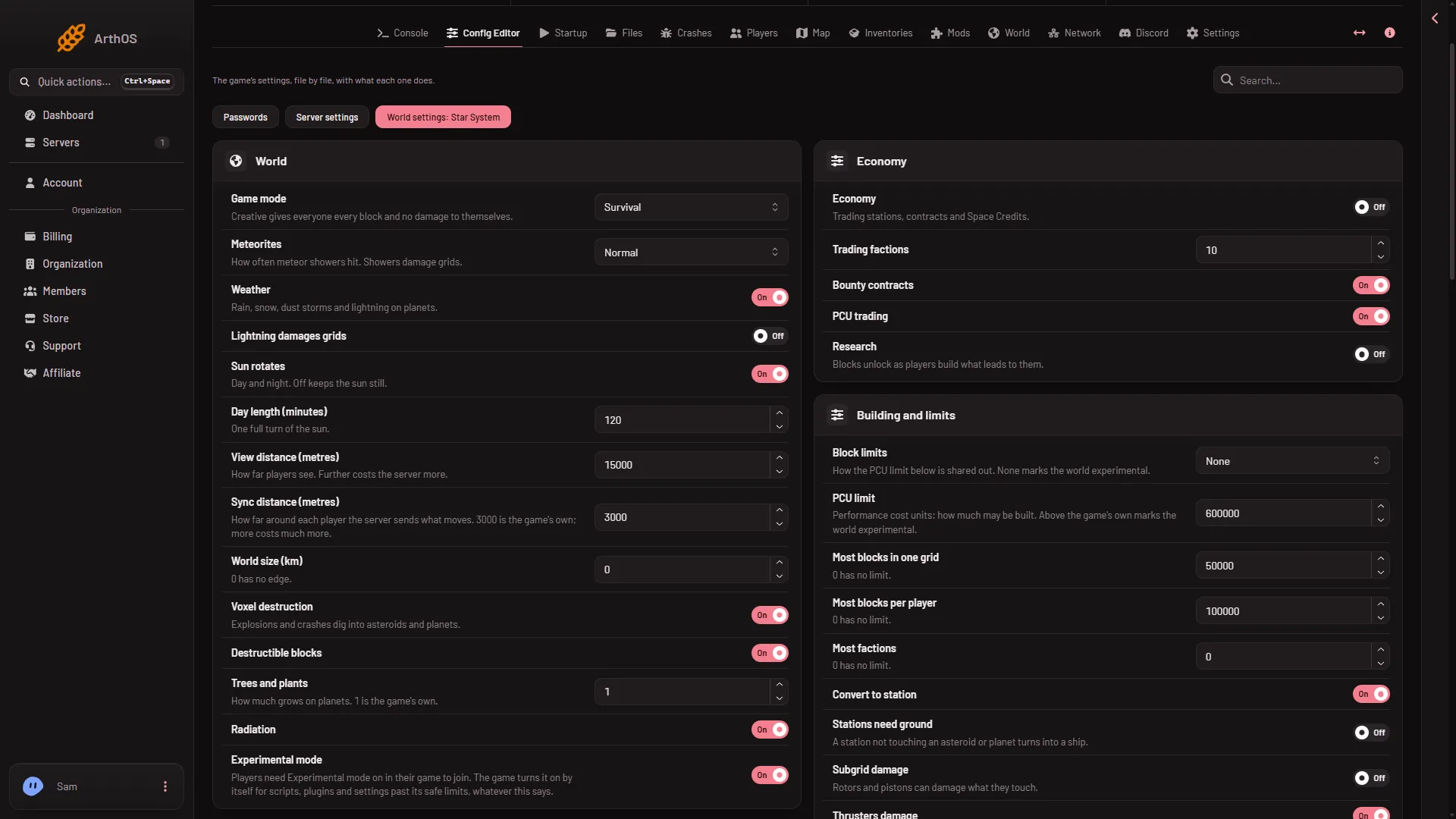
- Economy group
- Economy switch
A new server shows only Passwords and Server settings until it has started twice: the first start makes the world, the next start names it as the world that loads. Start it again (or restart it), then stop it to change world settings. The same happens after Make it at the next start on the World page.
The panel’s help line under Economy reads “Trading stations, contracts and Space Credits.”
The other four rows
These are in the same group. Which of them need Economy on is not checked on 1.210 as of 15 November 2026, so set Economy first.
- Trading factions (
TradeFactionsCount). A whole number from 0 to 1000. Keen’s reference calls it the number of NPC factions made when the world is generated, 10 by default, and its own server tool takes 8 to 100. So it matters for a world that has not been generated yet, and 0 is outside the game’s range. What a change does to a world that has already run is not checked on 1.210 as of 15 November 2026. - Bounty contracts (
EnableBountyContracts). A switch for bounty contracts, one kind of contract players can take. - PCU trading (
EnablePcuTrading). A switch that lets players sell PCU to each other. PCU is the Performance Cost Unit: each placed block costs some, and the world has a limit. With Block limits on None there is no PCU limit at all, so not checked what trading PCU does then. See the PCU limit. - Research (
EnableResearch). A switch. The panel says “Blocks unlock as players build what leads to them.” The game’s own name for this setting is Enable Progression.
Turning it off does not stop everything
Keen’s wiki says that turning Economy off alone does not stop factions and trading stations from being generated. Cargo ships, Encounters in space and Encounters on planets also play a part. See pirates and encounters for those rows.
Keen’s reference also says Assembler speed, Assembler efficiency and Refinery speed change the prices of items in trade stations.
When you are in the game as an admin
The game’s Admin Screen (Alt+F10 in a running game) has an Economy section. There an admin can change a player’s credits and a faction’s reputation, and press the Regenerate Stations button to place the trading stations again after planets were added or removed. Keen’s wiki says these only work when the economy is enabled in the world settings.
Since update 1.210 the game also has a Services Terminal where players store and retrieve grids (a grid is a ship or a station). Its settings only matter with the economy on, and the panel does not list them.
If it does not work
- The Save button is greyed out. The server is not stopped. Stop it, then change the setting.
- No World settings tab. See the note under the picture: start the server again, then stop it.
- You switched Economy on and see no stations. The setting is read at the next start, and it applies to the world you edited. Check the tab name shows the world that loads. The World page shows which one that is, see the World page.
- Players cannot sell PCU. Check that PCU trading is on. With Block limits on None there is no PCU limit, as above.
- You turned Economy off and the save is still large. The store data stays in the save, as above.
More about the game: Space Engineers servers on Loafhosts.
Sources: spaceengineers.wiki.gg: World Settings, spaceengineers.wiki.gg: SessionSettings, spaceengineers.wiki.gg: Admin Screen