

















When a Space Engineers server goes back to an earlier point, it loaded its last save. Anything built after that save is gone. A normal stop saves the world first, so the loss is almost always one of five things: a kill, a crash, a stop that took too long, the wrong world loading, or the clean-up rules removing objects.
The game also keeps its own backups of the world. Most lost work can be brought back from them.
Do this first: bring work back from a backup
The game keeps only a limited number of backups, so a later save may push the oldest one out of the list. Put one back before you change anything. Put back makes a separate world folder, so the copy stays.
- Open the World page.
- Find Backups and read the times. The newest is first.
- Press Put back (1) on the time you want.
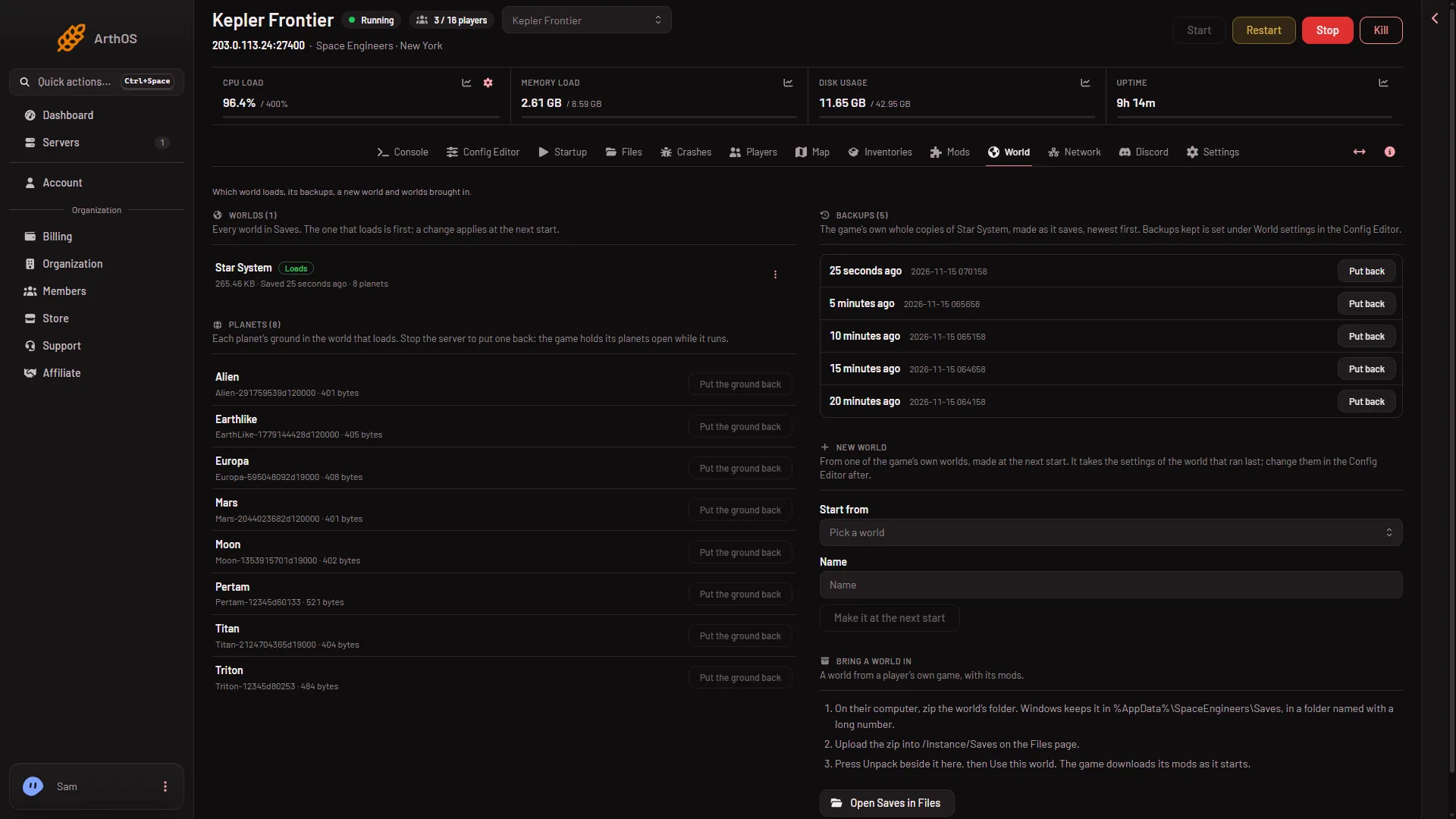
- Put back
Put back copies that backup into a new world of its own and loads it from the next start. Your current world and the other backups stay as they are. It works while the server runs, but the world changes only at the next start. Press it once per backup: a second press for the same backup says the world is on the server already.
If the work is newer than every backup, it is not in them. Backups only go back as far as Backups kept and the autosave timer allow.
Why progress goes missing
- A kill. Kill does not save. The server goes back to the last autosave. The game autosaves on a timer, and the wiki gives 5 minutes as the default for Autosave every (minutes) (
AutoSaveInMinutes). - A crash. The server stopped without saving. The same rule applies: the last autosave. To see whether the server stopped by itself, open Crashes. A start marked Crashed says “The game stopped without being asked to.”
- A stop that took too long. Stop asks the game to save and shut down. On Loafhosts a stop saves in 1 to 3 seconds and the process ends 3 to 9 seconds after. If it is still running when Seconds until auto-kill runs out (30 for a new server), it is killed. Not checked with a big world on 1.210 as of 15 November 2026.
- Another world loaded. If the server loaded a different world, your base is not lost: it is still in its own folder. See the guide on a new world after restart.
- Trash removal. The clean-up rules delete small abandoned grids. See the guide on ships disappearing.
Check how the server saves
You only need to stop the server to change these rows, not to read them.
- Stop the server. World settings are saved only while it is stopped.
- Open the Config Editor, then World settings.
- Find the Saving and clean-up group (1).
- Leave Saving (
EnableSaving) on. The autosave guide explains what is and is not checked about it. - Look at Autosave every (minutes). A smaller number means less is lost after a kill or crash, but the game saves more often.
- Look at Backups kept (
MaxBackupSaves). The game keeps a whole copy of the world each time it saves, up to this many. More backups mean more to go back to, and they use disk space. - Press Save, then start the server. The change applies from the next start.
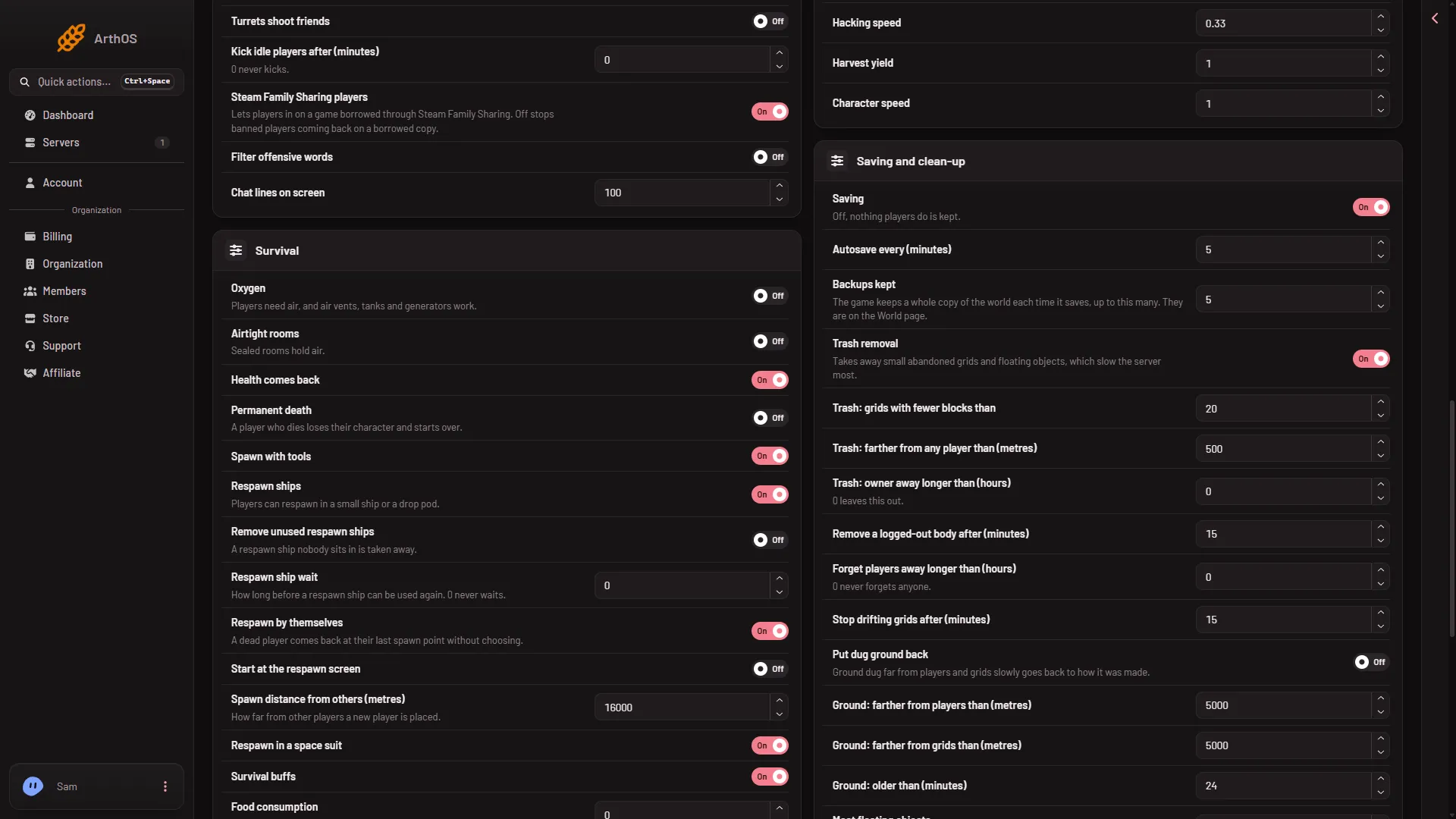
- Saving and clean-up
A new server shows only Passwords and Server settings until it has started twice: the first start makes the world, the next start names it as the world that loads. Start it again (or restart it), then stop it to change world settings.
Keep a copy of your own
The game’s backups live inside the world’s folder. For a copy that you control, use the panel’s backups: on Settings, Backups, press Create, then Create Backup. Stop the server first, or press Save now on the Players page (it needs the panel tools) and wait a few seconds, so the copy has what was just built. A panel backup restore stops the server and overwrites files, so it is a bigger step than Put back.
If it does not work
- There are no backups. The list says “No backups yet. The game makes one when it saves.” Autosave needs time. The game’s wiki says a Backups kept of 0 deletes the existing backups.
- The world was deleted. A world deleted from the World page, and its backups, is kept in the server’s trash for 3 days. Restore it from Files.
Sources: spaceengineers.wiki.gg: Setting up a Space Engineers Dedicated Server, spaceengineers.wiki.gg: SessionSettings