

















When a player cannot join, it is almost always one of eight things: the server is asleep or still starting, Experimental mode is off in their game, their game version differs from the server, the join password is wrong, the server is full, they are banned, or the server is limited to a Steam group. Work down the list. Each cause says where to check it.
First, make sure the server is running. A server in standby is stopped and shows nowhere in the list (see below). Then make sure the player has the right address. Open the Players page. The Join box shows the address and port, with a Copy button (1). In the game, the player chooses Join Game, then finds the server by name on the Servers tab, or presses Direct Connect and pastes the address. Not checked with a player on 1.210 as of 15 November 2026: how Direct Connect takes the port.
A new server is called Hosted By Loafhosts.com in the list until its owner changes Server name on Startup.
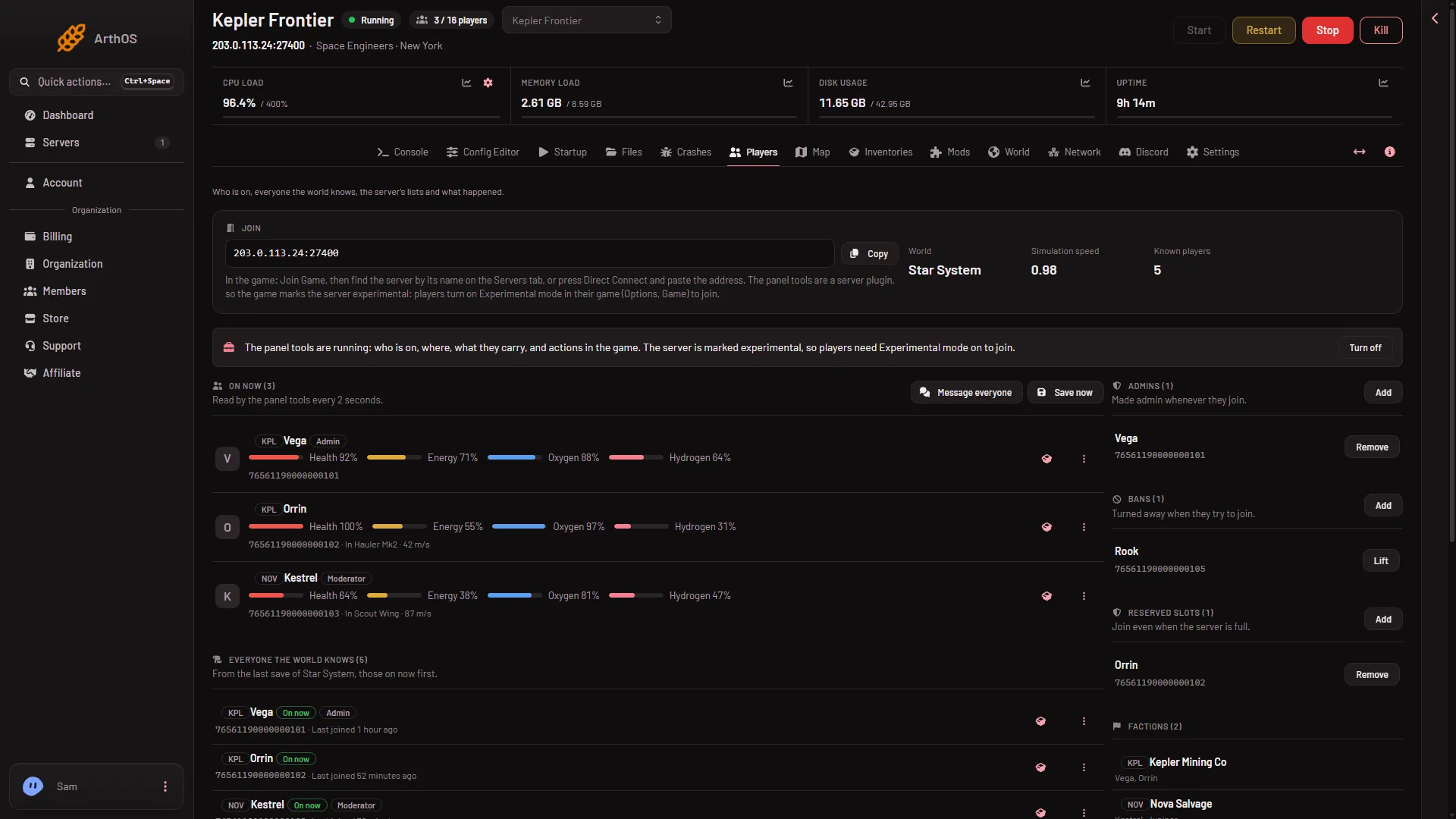
- Copy the address
- Bans
- Reserved slots
1. The server is asleep or still starting
Standby stops an empty server after 10 days by default. If it is stopped, start it, or use its Wake link (see standby).
A player cannot join until the server is ready. The Console shows Game ready when it is. The first start makes the world; for about 11 minutes after it, the server builds .NET files (the game’s runtime) in the background, so it works harder and may run slower. A later start of a small world took about half a minute on a Loafhosts server (measured: 31 seconds, Star System with three mods).
2. Experimental mode is off in their game
Experimental mode is a game setting for features Keen Software House, the game’s makers, mark as unstable. The game’s wiki says: “If the hosted game uses experimental mode, you must also enable experimental mode to be able to join.”
A new server already needs it, with the panel tools on or off. The world a new server makes has Programmable block scripts on and Block limits set to None, and the game counts both as experimental on their own. The panel tools, a plugin (an add-on the server loads), add one more reason.
To settle it, open the Console and find the line Experimental mode: after Loading session. The reason line under it names why. If it says Yes, every player needs the option on.
The player turns it on in the game:
- Leave any world and go to the main screen. The option is greyed out inside a world.
- Choose Options, then Game, then General.
- Tick Experimental Mode.
It applies to all their games. Not checked with a player on 1.210 as of 15 November 2026: what a player in safe mode sees when they try. A server stops being experimental only when every reason is gone, which is more than turning the tools off: see Experimental mode.
3. Their game version differs from the server
Players who have updated cannot join an older server. Update on start on the Startup page checks Steam for a newer server build at each start. Keep it on and restart after a game update (see update the server). Ask the player to let Steam finish updating. The game’s own filter, Show only servers with compatible version, hides a server on a different version.
4. The join password is wrong
If you set a join password, the server shows a lock symbol in the game’s list. Open the Config Editor, then Passwords. The field is Join password. Use the eye button to show it and the copy button to copy it. The panel says: “Players need it to join. Empty for none.”
A password uses letters, digits, dashes and underscores, 1 to 64 characters, no spaces. A new password applies at the next start. A new server has none. Not checked with a player on 1.210 as of 15 November 2026: the exact join prompt and what it says for a wrong password.
5. The server is full
The Players value on the Startup page is how many people can be on at once. Your plan sets the size. To let chosen people in when it is full, use Reserved slots (N) (3) on the Players page: see reserved slots. It applies at the next start.
6. They are banned
The Bans (N) list (2) turns people away. See lift a ban. A ban is by SteamID64 and covers every world on this server.
A player on a game borrowed through Steam Family Sharing is a separate case: see Steam Family Sharing. Not checked: which account’s ban the game looks at.
7. The server is limited to a Steam group
In the Config Editor, Server settings, the row Steam group only (GroupID) takes a Steam group’s number. The panel says: “A Steam group’s number: only its members see and join the server. 0 is everyone.” A friend outside the group will not see the server. Set it to 0 to let everyone in. Edits to Server settings apply at the next start. More in Steam group only.
If it does not work
- Console players cannot join. A Loafhosts server runs on Steam networking with console compatibility off. Xbox and PlayStation players cannot join. PC players on Steam can.
- It is the wrong game. Space Engineers 2 is a different game and has no dedicated server yet. Players need Space Engineers.
- The server is not running. Look at the Console and the Crashes page. See the server is not in the list.
More about the game: Space Engineers servers.
Sources: spaceengineers.wiki.gg: Multiplayer, spaceengineers.wiki.gg: Experimental mode, spaceengineers.wiki.gg: Setting up a Space Engineers Dedicated Server